Security features
167
13
c You can now access the machine using HTTPS.
We recommend secure management (SNMPv3) be used along with the HTTPS protocol. If you use the
SNMPv3 protocol, follow the steps below.
d Click Network Configuration.
e Enter a user name and a password. The default User Name is “admin” and the default Password is
“access”.
f Click Configure Protocol.
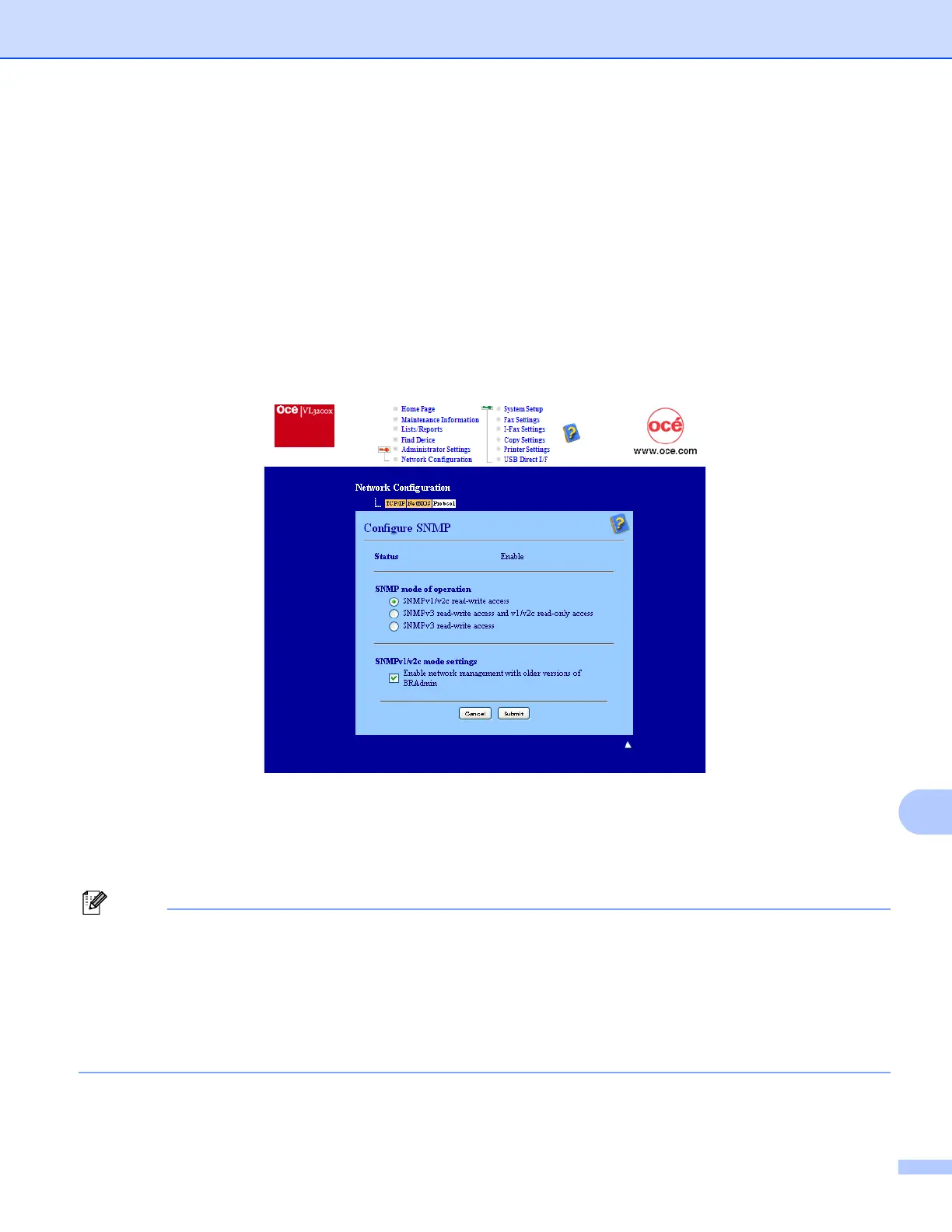
g Make sure that the SNMP setting is enabled, and then click Advanced Setting of SNMP.
h You can configure the SNMP settings from the screen below.
We have three SNMP connection modes of operation.
SNMPv3 read-write access
With this mode the print server uses version 3 of SNMP protocol. If you want to manage the print server
securely, use this mode.
Note
When you use the SNMPv3 read-write access mode, please note the following.
• You can manage the print server by using Web Based Management (web browser) only.
• We recommend secure SSL communication (HTTPS) be used.
• All applications that use SNMPv1/v2c will be restricted. To allow the use of SNMPv1/v2c applications,
use SNMPv3 read-write access and v1/v2c read-only access or SNMPv1/v2c read-write access
mode.







 To Next Page