51
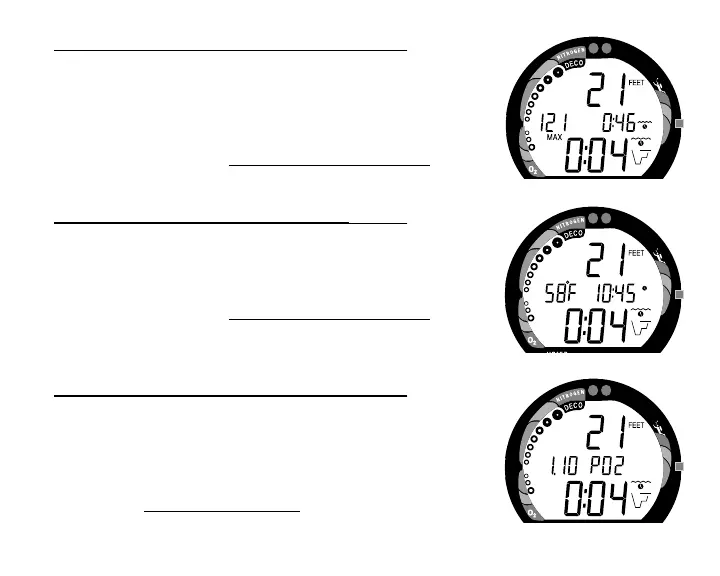
Decompression Dive Mode - Display #2 (Fig. 52)
Information includes - Current Depth, Maximum Depth for that
dive (and icon), Elapsed Dive Time (and icon), Total Ascent
Time (and Mode icon), both Arrows and the Deco Bar, and the
applicable bar graphs.
• Press and release the Advance (Front) button again to view
Display #3.
Decompression Dive Mode - Display #3 (Fig. 53)
Information includes - Current Depth, Temperature, Time of
Day (and icon), Total Ascent Time, both Arrows and the Deco
Bar, and the applicable bar graphs.
• Press and release the Advance (Front) button again to view
- Display #4 (only if FO2 is set for a numerical value -
Nitrox), or revert to Display #1 (if FO2 is set for Air).
Decompression Dive Mode - Display #4 (Fig. 54)
Information includes - Current Depth, the current value of PO2
(if a nitrox dive) and PO2 graphic, Total Ascent Time, Mode
icon, both Arrows and the Deco Bar, and applicable bar
graphs.
• Press the Advance (Front) button to view Display #1.
Fig. 54 - Deco #4
Fig. 53 - Deco #3
Fig. 52 - Deco #2



 To Next Page