65
To access the Time to Fly Countdown (while in Surface Mode)
• Press the Advance (Front) button 2 times.
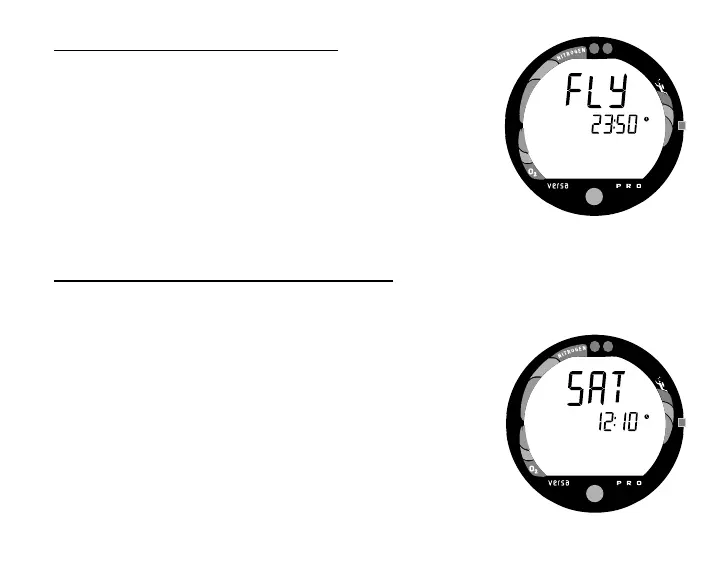
• The Time to Fly counter (Fig. 70) begins counting down 10
minutes after surfacing from a dive (after the Transition
Period) displaying the word 'FLY' and a countdown that
begins at 23:50 (hr:min) and counts down to 0:00 (hr:min).
• If a violation occurred during the dive a single dash ( - ) will
appear instead of the letters FLY.
• The unit will revert to Surface Mode after 2 minutes, unless
the Advance (Front) button is pressed to access the Desat
Time Countdown.
To access the Time to Desaturate Countdown
(while in Surface Mode)
• Press the Advance (Front) button 3 times.
• The unit will revert to Surface Mode after 2 minutes, unless
the Advance (Front) button is pressed to access the Log
Mode.
• If a violation occurred during the dive, Desaturation Time will
not be displayed.
The Time to Desaturate counter (Fig. 71) provides calculated time
for tissue desaturation at sea level. The countdown starts 10
minutes after surfacing at 23:50 (hr:min) maximum and counts
down to 0:00 (hr:min).
Fig. 70 - Time to Fly
Fig. 71 - Time to Desaturate



 To Next Page