5.12.6 Data Maintenance
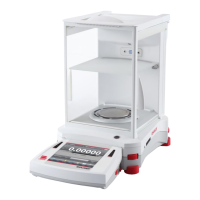
To check Software Upgrade, Balance Info and System Log.
All the changes made on balance setting will keep records in system log file. e.g. every
printed data, date/time change, balance setting changes, perform calibration action, user
log in/log out, user account create/edit/delete and etc.
These system log files can be reviewed and exported as a PDF to a USB flash drive.
When exporting the system log files, the two touchless sensor's LEDs will blink.
Maximum 5000 records can be stored in balance memories. When the memories are full,
a message will pop up for exporting the log files to a USB flash diver. Then the pop-up
message will show the log file has deleted.
In addition, calibration logs can be viewed separately
in System Log. To do this:
Activate System Log selection in the Date
Maintenance menu.
The System Log Review menu appears. Touch it.
Touch View Calibration to view calibration logs.



 To Next Page