Operating modes 59
• Information
The information panel lists detailed information about firmware and software versions as well as
battery status.
Just tap a category or use the multi-function control knob to select a category and push the control knob
to activate it. Now you can adjust specific settings that are described in the following sections.
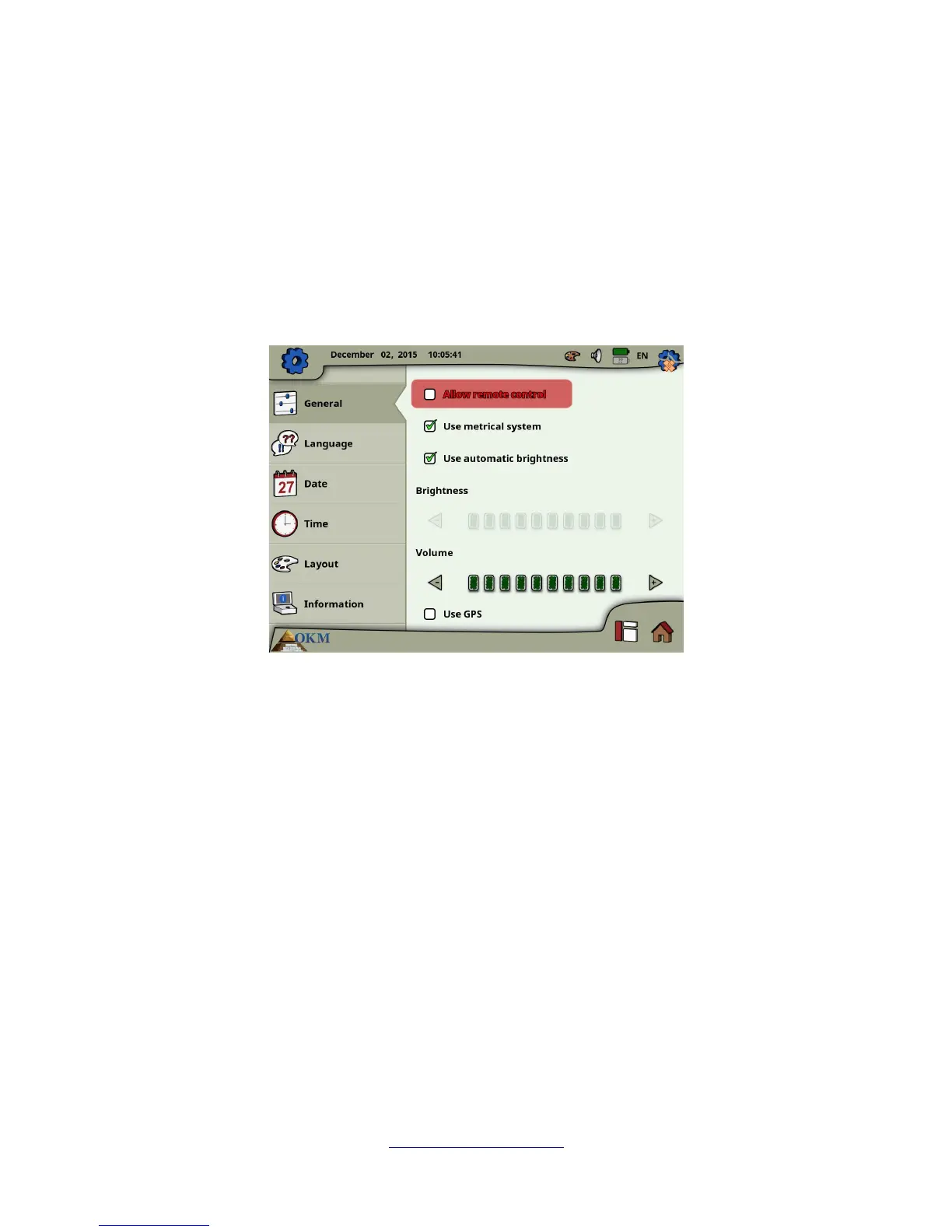
6.7.1 General
This is the place where you are configuring GPS, measure units, display brightness and volume settings.
• Allow remote control
You can allow remote control to connected Android devices like Tablet PC's and video eye
glasses. If this option is enabled you can control your eXp 6000 control unit by using an external
Android device.
• Use metrical system
At certain times you have to select length or width of scan areas. This can be done in meters
(metrical system) or feet (imperial system). You have the choice which of the two measure
systems you want to use:
◦ If the checkmark is set, the metrical system (meter) is enabled.
◦ If the checkmark is not set, the imperial system (feet) is enabled.
• Automatic brightness
If this checkmark is set, the brightness of the display will be regulated automatically according
to the environment lighting. The display's brightness will increase the brighter the surrounding
light is and vice versa.
OKM GmbH
www.okmmetaldetectors.com



 To Next Page