Operating modes 49
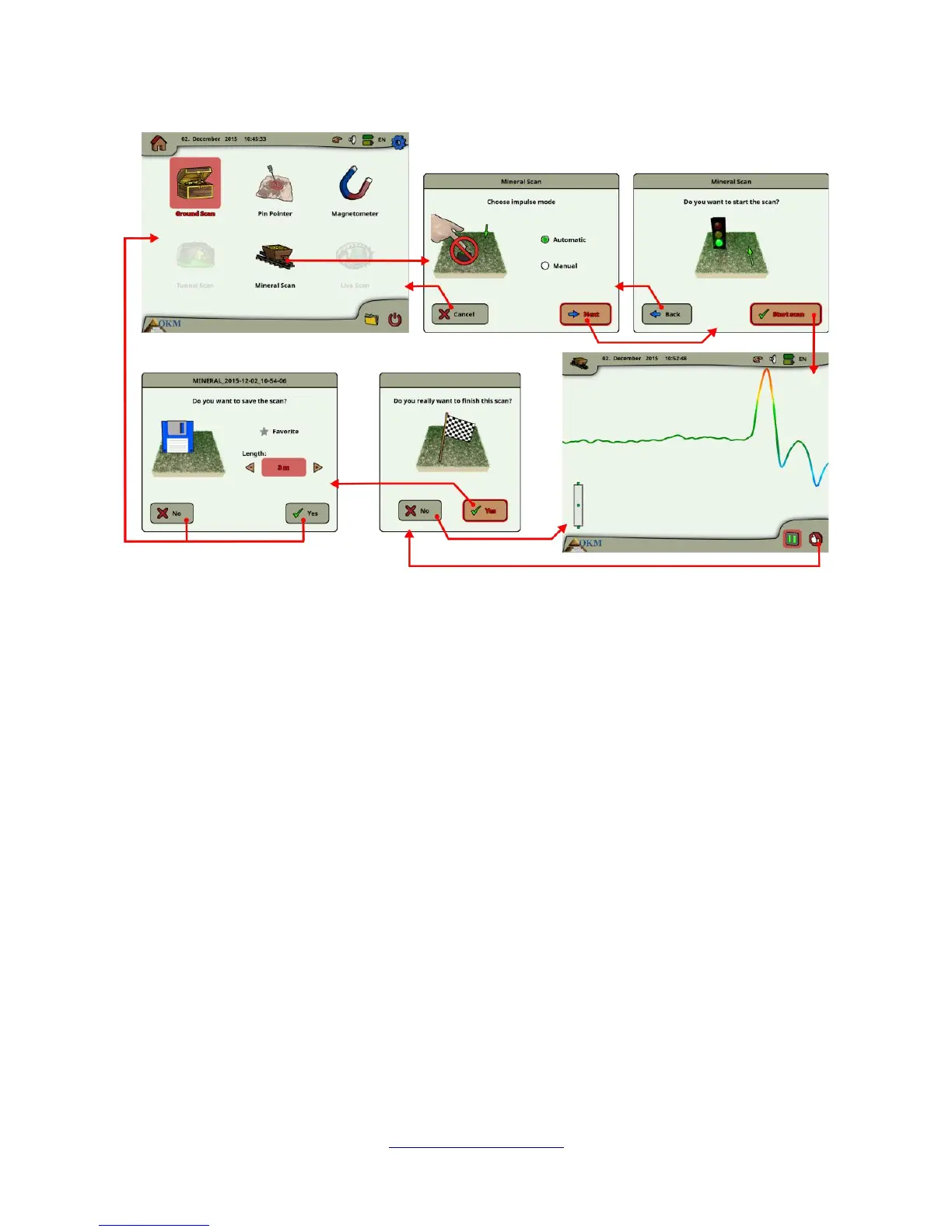
The operating mode “Mineral Scan” can only be used with the Super Sensor to be able to see also finer
or smaller mineral deposits.
After activating this operating mode you have the possibility to adjust the impulse mode setting. In
figure 6.12 you can see the corresponding sub-menu.
Please refer to section 7.3.3 (“Manual or automatic impulse mode?”) on page 80 for further explanations
concerning the impulse mode setting.
Then go to your start position and select the option “Start Scan” to start the measurement. A message
will appear and ask if you are ready to start your measurement. Rotate the multi-function control knob
and select “Yes”. As soon as you depress the knob, it is important to begin walking immediately for the
eXp 6000 is now recording data.
6.5.1 Scan Technique
The following technique applies only to the Mineral Scan mode with the Super Sensor
(1) Ensure that all batteries and power packs have enough of a charge to complete the scan entirely.
(2) Per the area to be prospected, ensure that you can travel the desired path without any
interruptions, pauses or large obstacles (see explanation below).
The scan needs to be conducted in the following manner. Create a path where a single line can be
traversed. This path needs to be a longer path, usually greater than 20 meters in length. The normal
OKM GmbH
www.okmmetaldetectors.com



 To Next Page