56 Operating modes
6.6 Live Scan
To work in the operating mode "Live Scan" you have to connect the LiveStream Sensor to your eXp
6000. In this operating mode you do not have to keep a defined scan direction. You can walk forwards or
backwards over your measured area. On the screen you will see immediately what is currently situated
right under the measuring probe. The graphical representation is very similar to the operating mode of
Ground Scan but much more data will be processed at once.
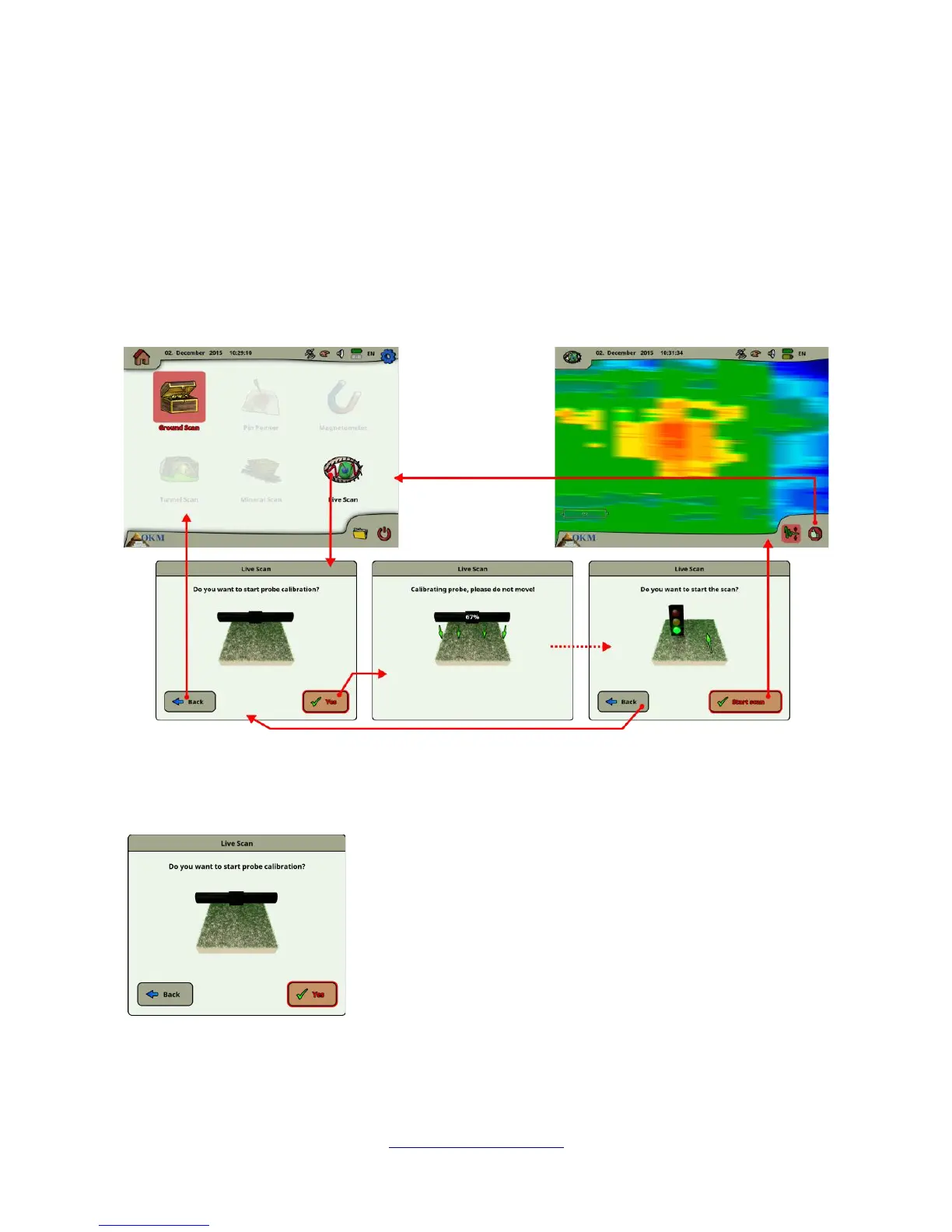
In figure 6.21 the workflow of a live scan is illustrated.
Right after selecting “Live Scan” from the main menu you have to calibrate the measuring probe. This
procedure is processed as follows:
As soon as you see this dialog you have to hold your LiveStream
Sensor right over neutral ground, which means normal underground
without any potential objects. Hold the measuring probe approx. 5 to
15 cm above the ground and push the "Yes" button.
Alternatively you can also push the start/stop button on the telescopic
rod assembly or the multi-function control knob on the control unit.
OKM GmbH
www.okmmetaldetectors.com



 To Next Page