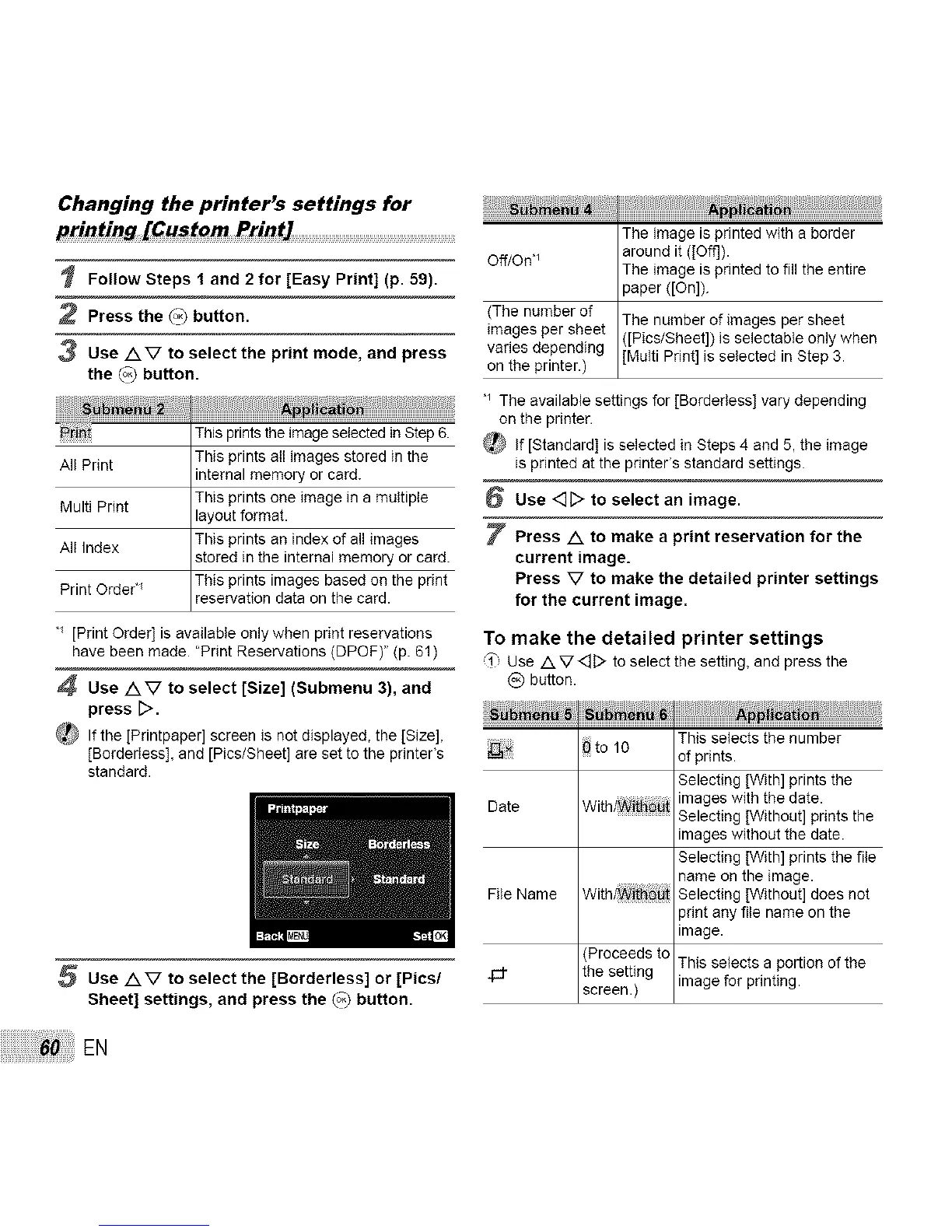
Changing the printer's settings for
printing [Custom Print] ...............................................................................
Follow Steps 1 and 2 for [Easy Print] (p. 59).
2 Press the (°3 button.
3 Use AV to select the print mode, and press
the (°3 button.
_!_! This prints the image selected inStep 6.
All Print This prints all images stored in the
internal memory or card.
Multi Print This prints one image in a multiple
layout format.
All Index This prints an index of all images
stored in the internal memory or card.
Print Orde¢ This prints images based on the print
reservation data on the card.
" [Print Order] is available only when print reservations
have been made. "Print Reservations (DPOF)" (p. 61)
4 Use AV to select [Size] (Submenu 3), and
press D.
_,_ If the [Printpaper] screen is not displayed, the [Size],
[BorderIess], and [Pics/Sheet] are set to the printer's
standard.
5 Use AV to select the [Borderless] or [Pics/
Sheet] settings, and press the (°3 button.
EN
The image is printed with a border
Off/On, _ around it ([Oft]).
The image is printed to fill the entire
paper ([On]).
(The number of The number of images per sheet
images per sheet ([Pics/Sheet]) is selectable only when
varies depending [Multi Print] is selected in Step 3.
on the printer.)
'_ The available settings for [Borderless] vary depending
on the printer.
_ If [Standard] is selected in Steps 4 and 5, the image
is printed at the printer's standard settings.
6 Use <][> to select an image.
7 Press A to make a print reservation for the
current image.
Press V to make the detailed printer settings
for the current image.
To make the detailed printer settings
'_', UseAV<::]D toselectthe setting,and pressthe
@ button.
s
tot0
Date With/Wii_
File Name With_i_ _
(Proceeds to
the setting
screen.)
This selects the number
of prints.
Selecting [With] prints the
images with the date.
Selecting [Without] prints the
images without the date.
Selecting [With] prints the file
name on the image.
Selecting [Without] does not
print any file name on the
image.
This selects a portion of the
image for printing.



 To Next Page