Trailer Management System Overview Trailer Management System Installation
14-2 80-JB400-1 Rev. D
MAY CONTAIN U.S. AND INTERNATIONAL EXPORT CONTROLLED INFORMATION
Trailer Management
System Overview
• Monitors trailer connects and disconnects and passes the information on to dispatch via
the wireless communication network with the date, time, and location.
• Monitors the refrigeration unit of a trailer.
Hardware Requirements
• The MCP110 accessory cable must be installed (see Chapter 5) on the mobile application
server 110 (MAS110).
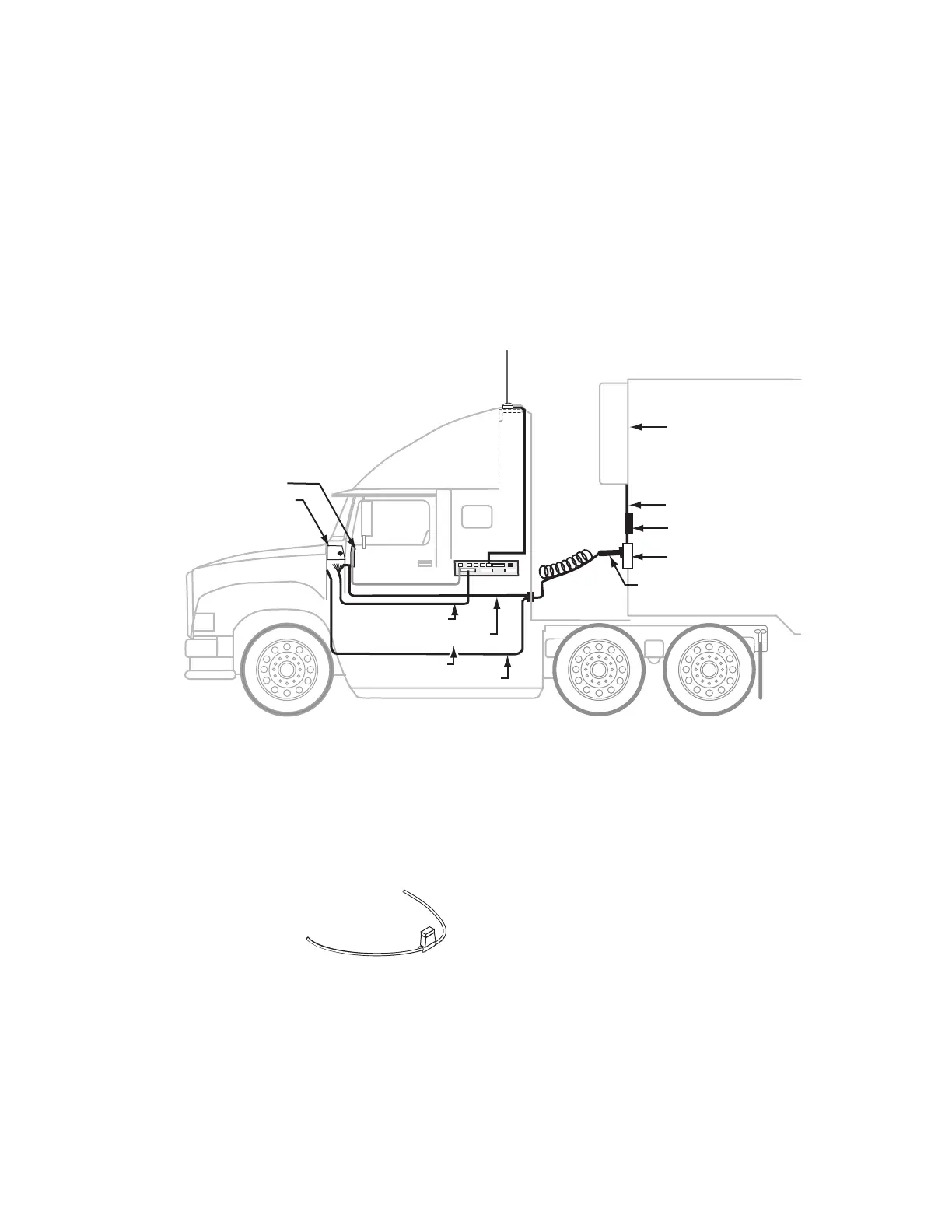
Trailer Management System Wiring for the Truck
Fuse Kit Installation
Fuse kits are needed for all Trailer Management system installations.
1. Locate the blue AUX wire in the 7-way trailer harness. With ignition turned ON,
determine if +12/24 VDC is present on this wire.
• If +12/24 VDC is present, proceed to step 2.
Refrigeration
Unit
Trailer Tracks Transmitter
+12 VDC
Fuse Panel
Trailer Pigtail Connector
Trailer Tracks
Refrigeration
Unit Interface Cable
7-way Receptacle
Trailer Aux Wire
TTracs Input Wire
MAS110
Accessory Cable
Wirless Interface Box
(WIB)
Display Interface Unit
(DIU110)
09AAA_038
To Accessory Cable
Trailer Tracks Input
Blue
(TTRACS)
5 Amp Fuse


 To Next Page