80-JB400-1 Rev. D 5-7
MAY CONTAIN U.S. AND INTERNATIONAL EXPORT CONTROLLED INFORMATION
Mobile Application Server 110 (MAS110) Installation Installing the Accessory Cable
Installing the Accessory Cable
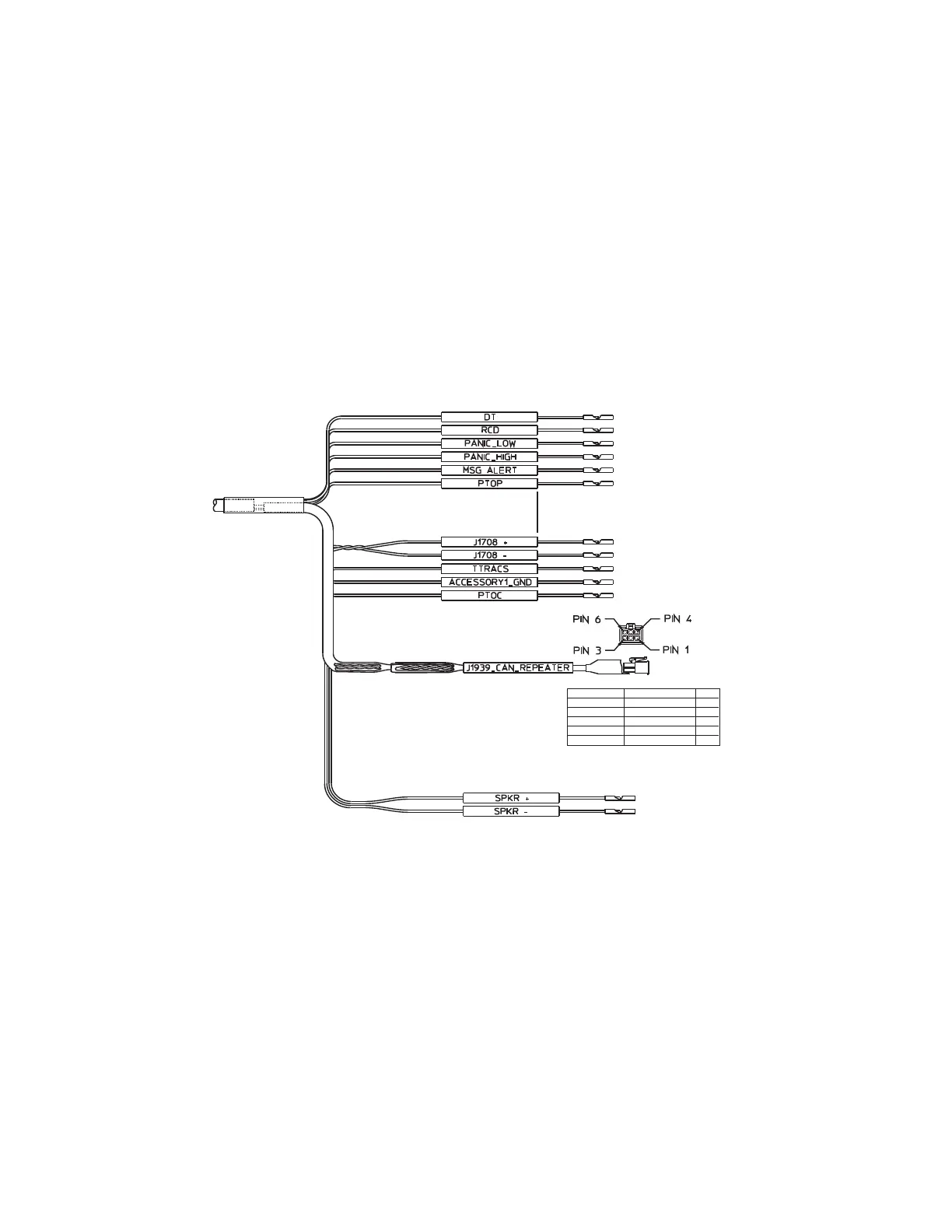
• Connects the MCP110 to the truck’s audio for text-to-speech, the J1708/1587 and J1939
data links, and other vehicle inputs and optional system devices.
• Typically, the accessory cable is routed to the vehicle’s dash area where accessory
connections are made.
• Provides necessary wiring for optional system features, such as Performance Monitoring
system, Trailer Management system, panic button, and other security devices.
• Standard length of accessory cable is 20 feet
• See Appendix A for detailed wiring diagrams.
MCP110 Accessory Cable.
GRN 22GRN 22
RED 22RED 22
BRN 22BRN 22
BLU/BLK 22BLU/BLK 22
BLU/RED 22BLU/RED 22
BLU 22BLU 22
VIO/ORN 22VIO/ORN 22
VIO/RED 22VIO/RED 22
BLU/GRN 22BLU/GRN 22
VIO 22VIO 22
BLU/YEL 22BLU/YEL 22
BLU/VIO 22BLU/VIO 22
BLU/GRA 22BLU/GRA 22
09AAA_027
WHT/BLU 20WHT/BLU 20
BRN/WHT 22BRN/WHT 22
WHT/BRN 22WHT/BRN 22
(CAN1_HI)(CAN1_HI)
1
(CAN1_LO)(CAN1_LO)
2
PIN
SIGNAL
COLOR
(CAN_GND)(CAN_GND)
(SHIELD)(SHIELD)
4
5
(CAN_PWR)(CAN_PWR)
3
BLU/WHT 20BLU/WHT 20


 To Next Page