80-JB400-1 Rev. D 8-3
MAY CONTAIN U.S. AND INTERNATIONAL EXPORT CONTROLLED INFORMATION
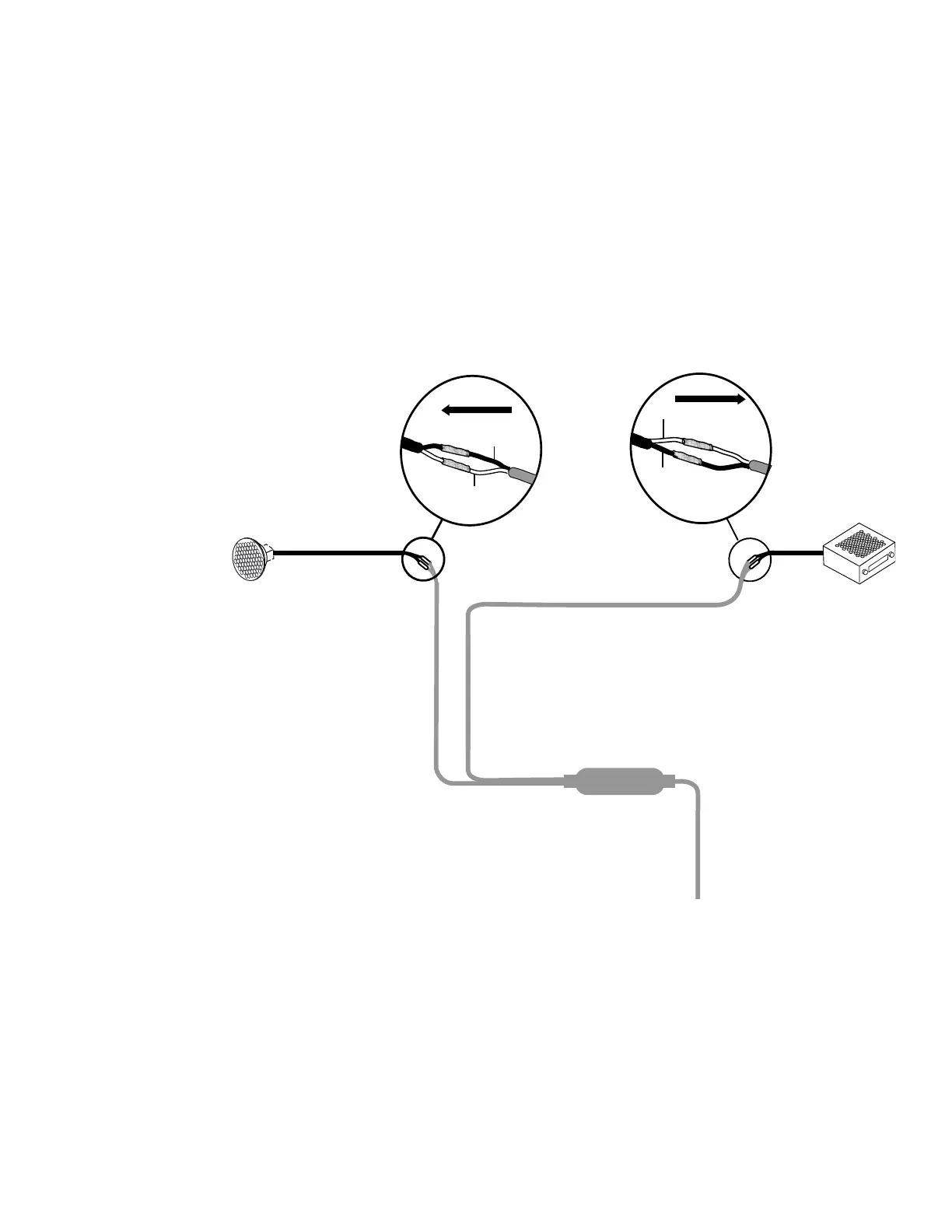
Text-to-Speech (TTS) Installation Option 1—Connecting to an Existing or Shared Speaker
Option 1—Connecting to an Existing or Shared Speaker
1. Test the audio system prior to installation.
2. Remove audio/radio.
3. Locate the speaker wires to be used for message playback. Refer to Radio Connector
Pin Callouts on page A-11.
4. Find a good location on the speaker wires where they can be cut and where there will
be enough room to work on either side of the cut.
5. Cut the speaker wires.
8-ohm
Door Speaker
SPKR OUT +
(Yellow)
SPKR OUT -
(Black)
To Speaker
VEH AUDIO IN +
(Orange)
VEH AUDIO IN -
(Black)
To Audio
Radio
To Accessory Cable
06AAA_180


 To Next Page