Upgrading the MAS OS and MAS Software Upgrading the MCP110 Using USB Memory Sticks
D-6 80-JB400-1 Rev. D
MAY CONTAIN U.S. AND INTERNATIONAL EXPORT CONTROLLED INFORMATION
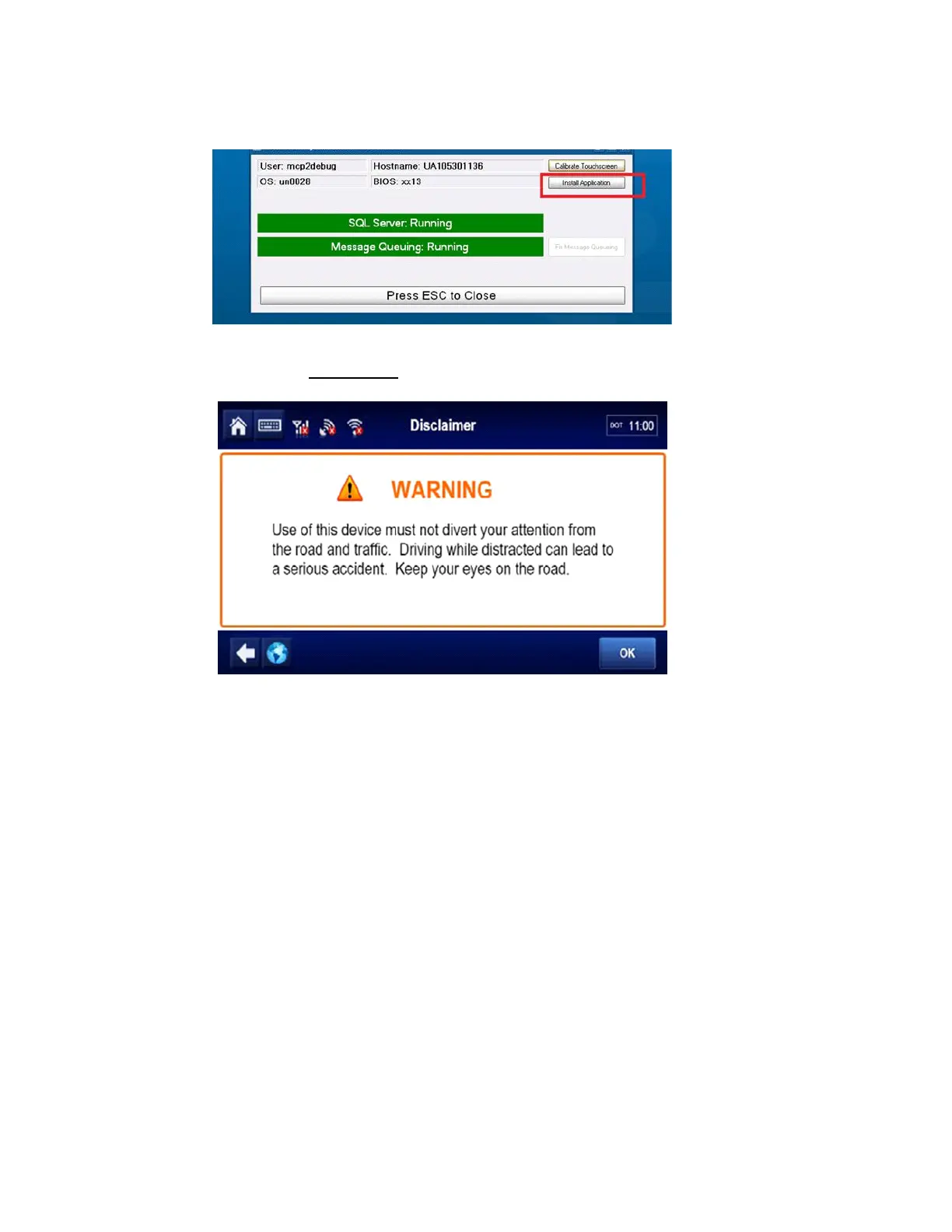
At the System Check screen, press the Install Application button. This will start the
application load.
When the application software load is complete, the screen will show a Driver Warning
(takes about 15 minutes
).
6. Run a complete system verification (e.g. System/Diag - Run All, verify tests show
appropriate green check marks, successfully send test message, successfully receive
test message, verify volume for text-to-speech). Once this is done, the OS and
application software upgrade is complete.
NOTE
The logs of the OS installation will be stored in a folder on the unit. In the event of a problem,
this log file can be viewed at C:\OsUpdate\Osupdate.txt.


 To Next Page