77
Preparing and Mounting Flat Connectors Section 4-3
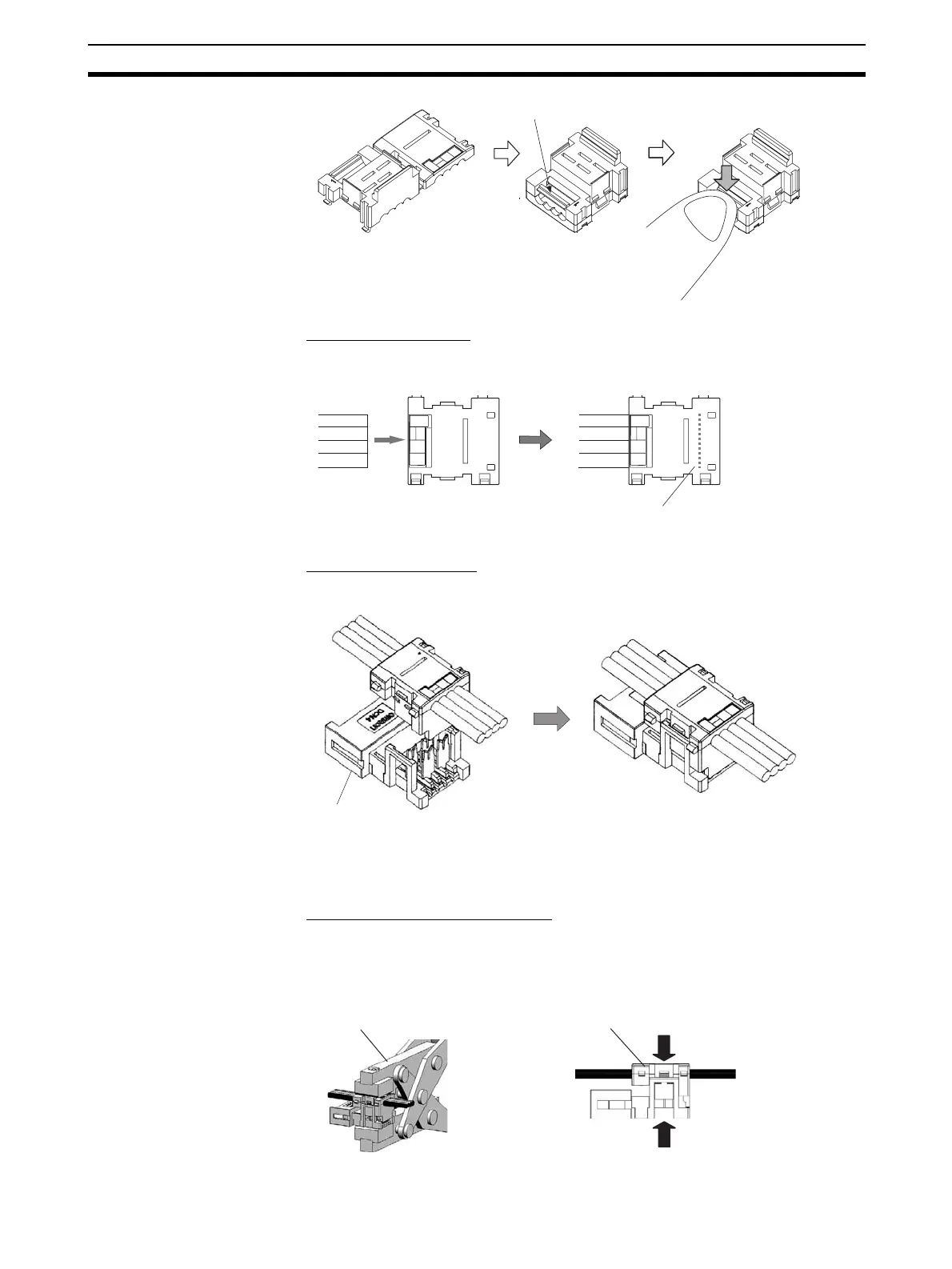
■ Connecting the Cable
Confirm that the cable colors match the cable labels and then insert the
unsheathed cable tip all the way into the cable stopper in the cover.
■ Attaching the Housing
Confirm the colors again, and temporarily secure the housing to the cover.
Note Once it is attached, the housing cannot be removed from the cover.
If you attempt to separate the housing and the cover forcefully, you
may damage the connector.
■ Pressure-welding the Connector
Use the DWT-A01 Pliers to pressure-weld the connector.
1,2,3... 1. Align the center (see arrows) of the connector cover with the center of the
pressure-welding block on the DWT-A01 Pliers.
Cable stopper
Location of
cable stopper
Housing
Special tool (DWT-A01 Pliers)
Connector cover












 To Next Page