3 - 7
3 Part Names and Basic Procedures
E5@C Digital Temperature Controllers User’s Manual (H174)
3-3 Part Names, Part Functions, and Setting Levels
3
3-3-1 Part Names and Functions
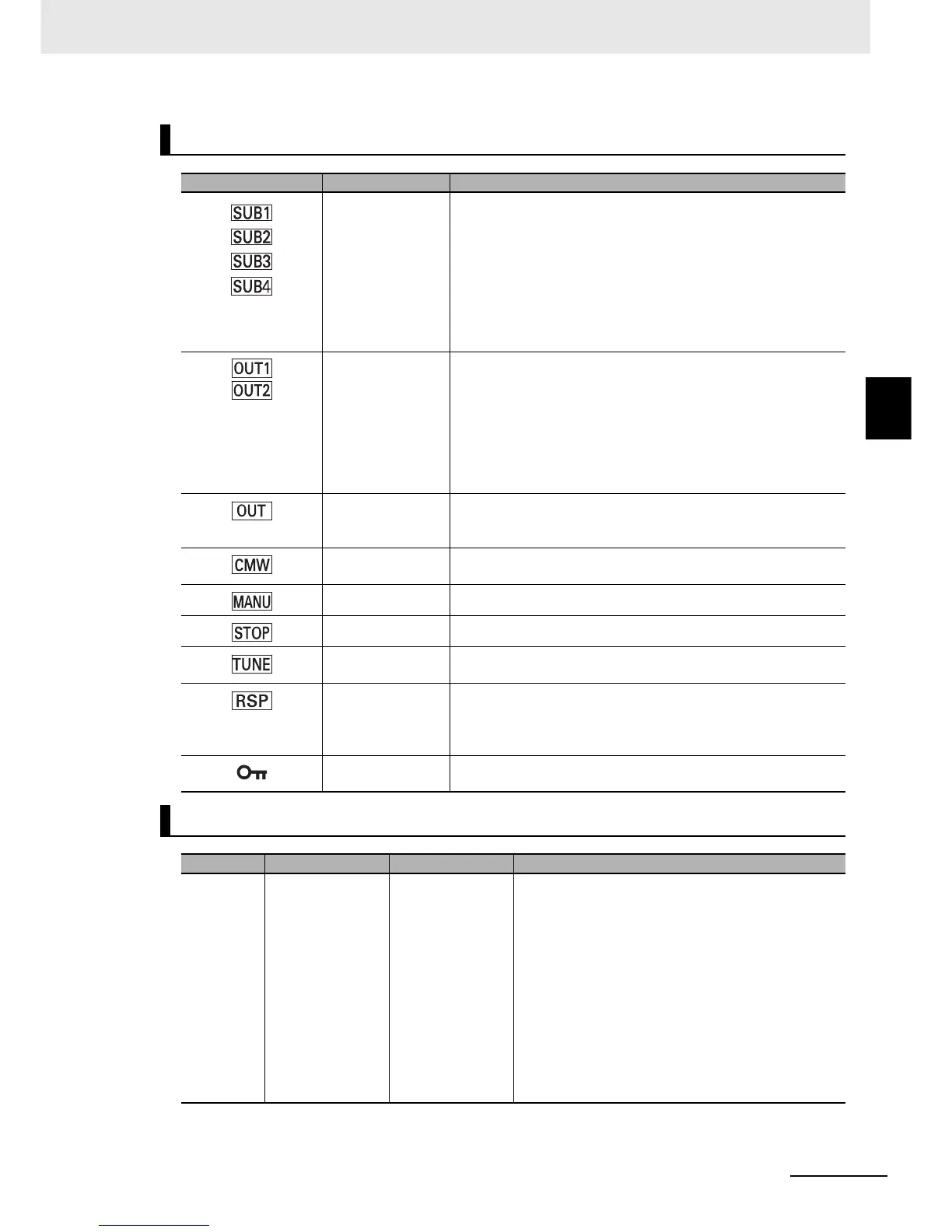
Indicators
Operation indicators Name Description
Auxiliary outputs 1
to 4 (Only the
E5CC, E5EC, or
E5AC supports
auxiliary output 3.)
(Only the
E5EC/E5AC
support auxiliary
output 4.)
Each indicator lights when the function that is assigned to
corresponding auxiliary output (1 to 4) is ON.
Control outputs 1
and 2 (Control
output 1: E5CC,
E5CC-U, E5EC, or
E5AC only)
(Control output 2:
E5CC, E5EC, or
E5AC only)
Each indicator lights when the function that is assigned to
corresponding control output (1 or 2) is ON. (For a linear current
output, the indicator is not lit for values below 0%.)
For a Position-proportional Model, OUT1 lights when the open
output is ON and OUT2 lights when the close output is ON.
Control output
(E5DC/E5GC only)
Each indicator lights when the function that is assigned to
corresponding control output is ON. (For a linear current output,
the indicator is not lit for values below 0%.)
Communications
writing
This indicator lights when wiring with communications is enabled.
Manual This indicator is lit in Manual Mode.
Stop This indicator is lit while operation is stopped.
AT/ST in progress This indicator is lit during autotuning.
This indicator flashes during self-tuning.
Remote SP
(E5CC/E5EC/E5AC
only)
This indicator is lit while the SP Mode parameter is set to Remote
SP Mode.
This indicator flashes when there is an RSP input error in Remote
SP Mode.
Setting change
protection
This indicator is lit while setting change protection is ON.
Keys
Key Name Overview Description
O
Level Key Selects the setting
level.
The next setting
level depends on
how long the key is
pressed.
• In Operation Level
• Press once for less than 1 second to go to
Adjustment Level.
• Press for at least 3 seconds to go to Initial Setting
Level.
• In Adjustment Level
• Press once for less than 1 second to go to
Operation Level.
• Press for at least 3 seconds to go to Initial Setting
Level.
• In Initial Setting Level
• Press for at least 1 second to go to Operation
Level.


 To Next Page