U
U
s
s
e
e
r
r
m
m
a
a
n
n
u
u
a
a
l
l
7
5. Remote control
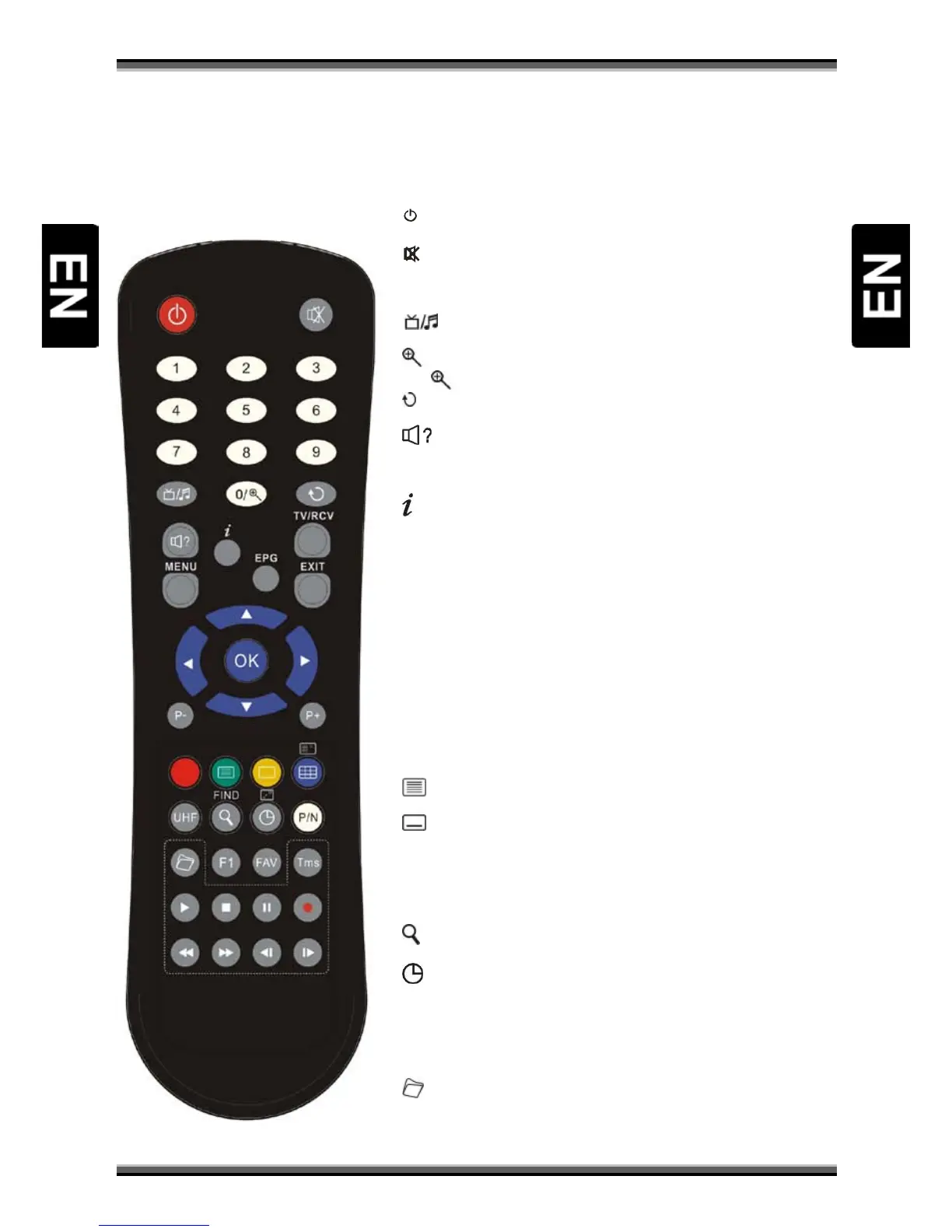
You can power on/off the receiver, operate on screen menu, and use a variety of hot key function.
Depending on configuration, one of two remote controllers may be attached to receivers set:
POWER
To switch your receiver on from standby or standby to on.
MUTE
Used to enable or disable the audio
NUMERIC KEYS 0 - 9
Used to select channels or enter programming parameters
(TV / RADIO)
Receiver switches between TV and Radio mode.
(ZOOM)
Press key select zoom times, from X1 to X16.
(PREVIOUS)
Return to the previous menu or status.
(AUDIO)
Audio channels setup, to select audio mode; Left, Right , Stereo.
TV/RCV
Receiver switches between TV and receive mode.
(INFORMATION)
To display channel status or various program information of current service.
EPG (Electronic Program Guide)
Display the Programs guide on screen when available.
MENU
Displays the Main Menu on the screen, or return to the previous menu or status
EXIT
Cancel the user selection and return to the viewing mode from a menu.
OK
To select menu option, or to updated on entry.
←,→ KEYS
To adjust volume level, or to move cursor left or right in the menu
↑,↓ KEYS
To change channels, or to move cursor up or down in the menu
P+/P-
To move up the cursor to the next or previous page in the menu or channel list
(RED KEY)
Has different functions per menu.
(GREEN KEY)
Shows teletext information of the current channel supports.
(YELLOW KEY)
Subtitle Display.
(BLUE KEY)
Has different functions per menu.
UHF
In case your TV is connected through RF Modulator (UHF), select output channel
number between CH21 and CH69 with up and down key. (optional)
(FIND)
Use to prompt find channels sort by character.
(SLEEP)
Press sleep key to switch between Sleep Timer Off /10/30/60/90/120 minutes.
P/N (WHITE KEY)
Press P/N button to switch the display mode among "AUTO", "PAL", "PAL-M" , "PAL -
N", "NTSC", "HDMI 576i50", "HDMI 480i60", "HDMI 576p50" and "HDMI 480p60".
FAV(FAVORITE)
To set receiver to the favorite list mode, display actual favorite channel list.
ARCHIVE
Press this button to enter the File Manager / File list menu directly.
TMS(Time Shift)
Press this button to display Time Shift info bar.



 To Next Page