PULSAR
2
ESP
Installation and Operating Manual
OPTIKON 2000
Cod. 111007EN Rev.E
7-7
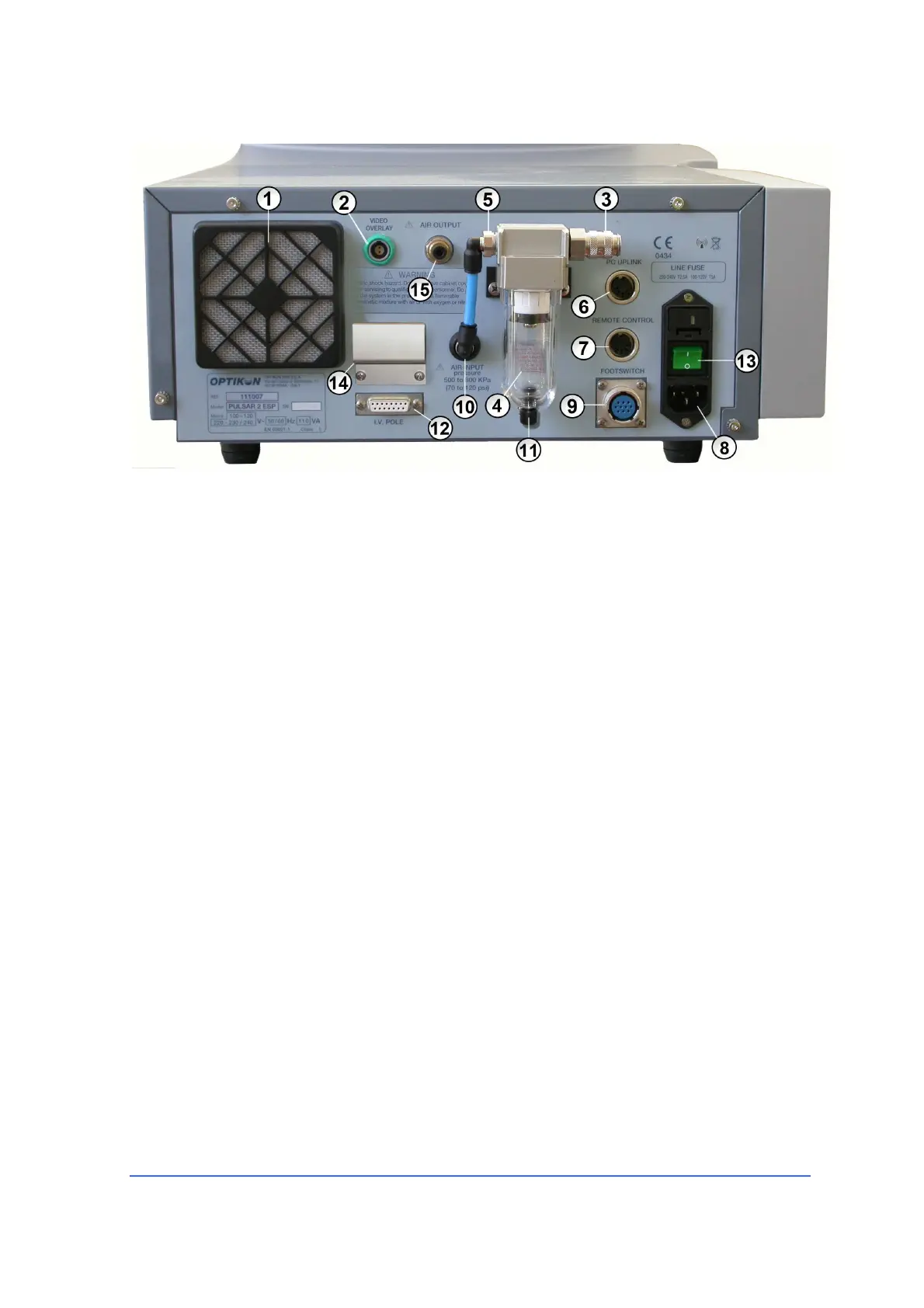
Rear panel (fig. 3)
1) COOLING FAN
Removes hot air from the unit.
2) CONNECTOR FOR VIDEO OVERLAY
This connector makes it possible the connection to the "Eclipse" Video Overlay
device, which allows you to superimpose the main parameters on the video shot
during surgery.
3) GAS INLET
Compressed air supply at a pressure of 500-800 KPa
(72 to 116 PSI)
must be
connected to this input. This air is used by the PULSAR
2
to operate Venturi
pump and vitrectomy cutter.
4) GAS FILTER
This filter removes humidity and particles from the compressed air supplied to
the PULSAR
2
unit. Depress the pin of the pin valve (Fig.3 No.11) at the lower
section of the filter to evacuate the water that condenses in the glass
container.
5) FILTER OUTLET
The filtered air leaves from this outlet. Connect the tube supplied with the unit
to the "AIR INPUT" (Fig.3 No.10).
6) PC UPLINK
This is the PULSAR
2
-PC interface for data download/upload and software
upgrade.



 To Next Page