Control central and
paging desk
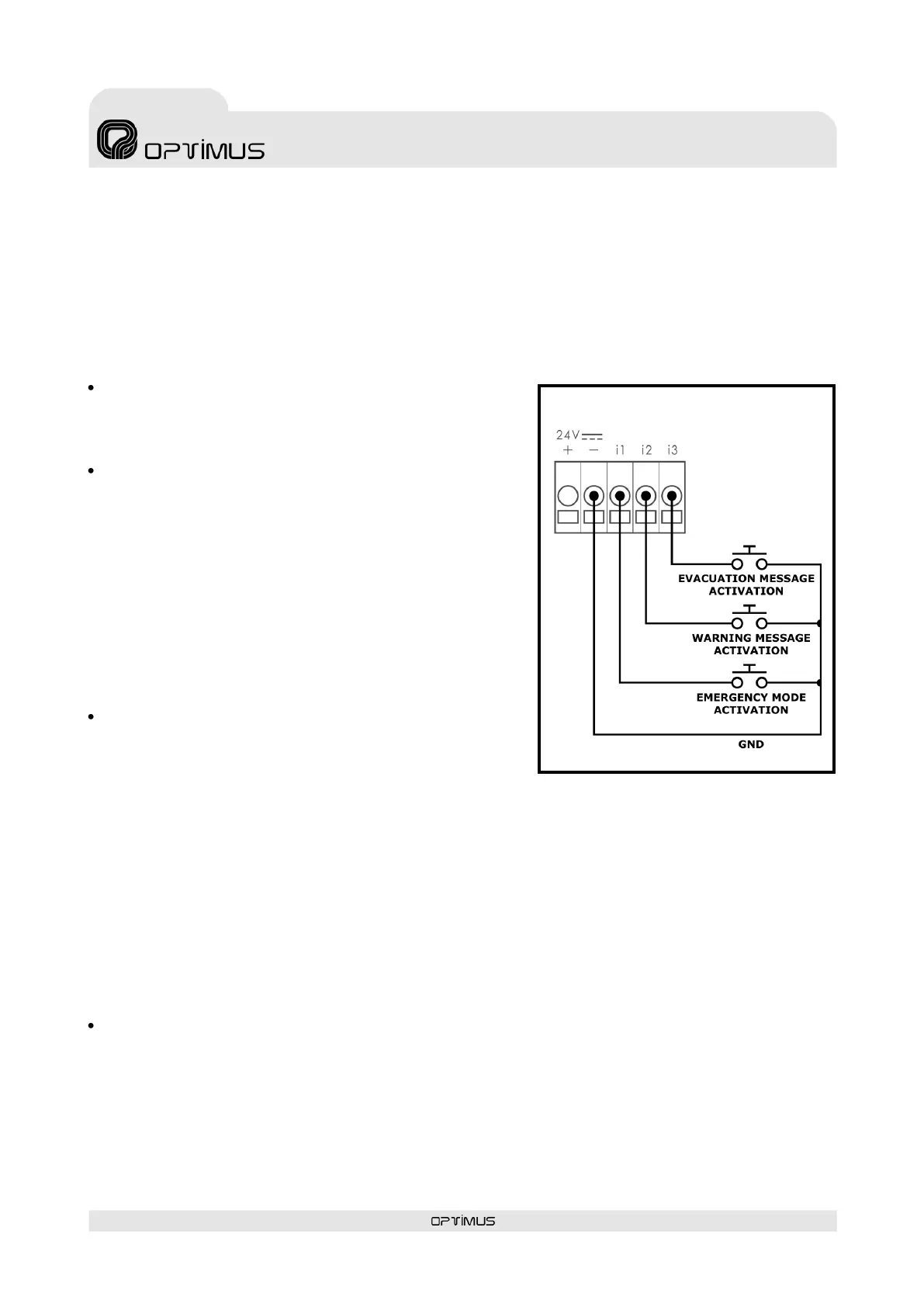
4.4. Connection of the input contacts
The input contacts of the DC-600ETH have two different modes of operation: Emergency System Mode
and Announcement System Mode. To define the mode of operation of the contacts, see section 7.2.2,
number (10).
In both cases, the connections are the same, although the functionality of the contacts varies.
4.4.1. Connection of the input contacts in Emergency System Mode
Input CONTACT "I1":
If this is connected to the ground contact, the desk goes into
emergency mode and remains in this mode as long as the
contact is activated.
Input CONTACT "I2":
By connecting it to the ground contact, it is used to activate
the warning message.
If the desk is in selection by zones mode, it is necessary to
select the zone or zones for which the message is intended
by means of the numeric keypad on the desk and then to
activate this contact. The warning message is repeated while
the contact is activated.
If the desk is in emergency mode, when this contact is
activated, the warning message will be sent to the
emergency group (by default to all the zones). The message
is repeated while the contact is activated or until the
emergency mode is cancelled.
Input CONTACT "I3":
By connecting it to the ground contact, it is used to activate
the evacuation message.
If the desk is in selection by zones mode, it is necessary to
select the zone or zones for which the message is intended by means of the numeric keypad on the desk
and then to activate this contact. The evacuation message is repeated while the contact is activated.
If the desk is in emergency mode, when this contact is activated, the evacuation message will be sent to
the emergency group (by default to all the zones). The message is repeated while the contact is activated
or until the emergency mode is cancelled.
4.4.2. Connection of the input contacts in Announcement System Mode
In this mode, the rear contacts function as if they were the GONG+TALK, TALK and REPEAT keys on the
desk.
Ideal for remote control of the desks when integrators are used.
Input CONTACT "I1":
If this is connected to the ground contact, the REPEAT function is activated, in the same way as when the
REP key on the desk is pressed.
This functionality is activated by pressing for at least 500 ms.



 To Next Page