Control central and
paging desk
NB: The IP address can also be set by software (see
section 8) or by the keypad (see section 11.4.10). If this
action is taken, the desk IP ADDRESS DIP switches cease to
be operative.
5. SETTINGS AND CONFIGURATION
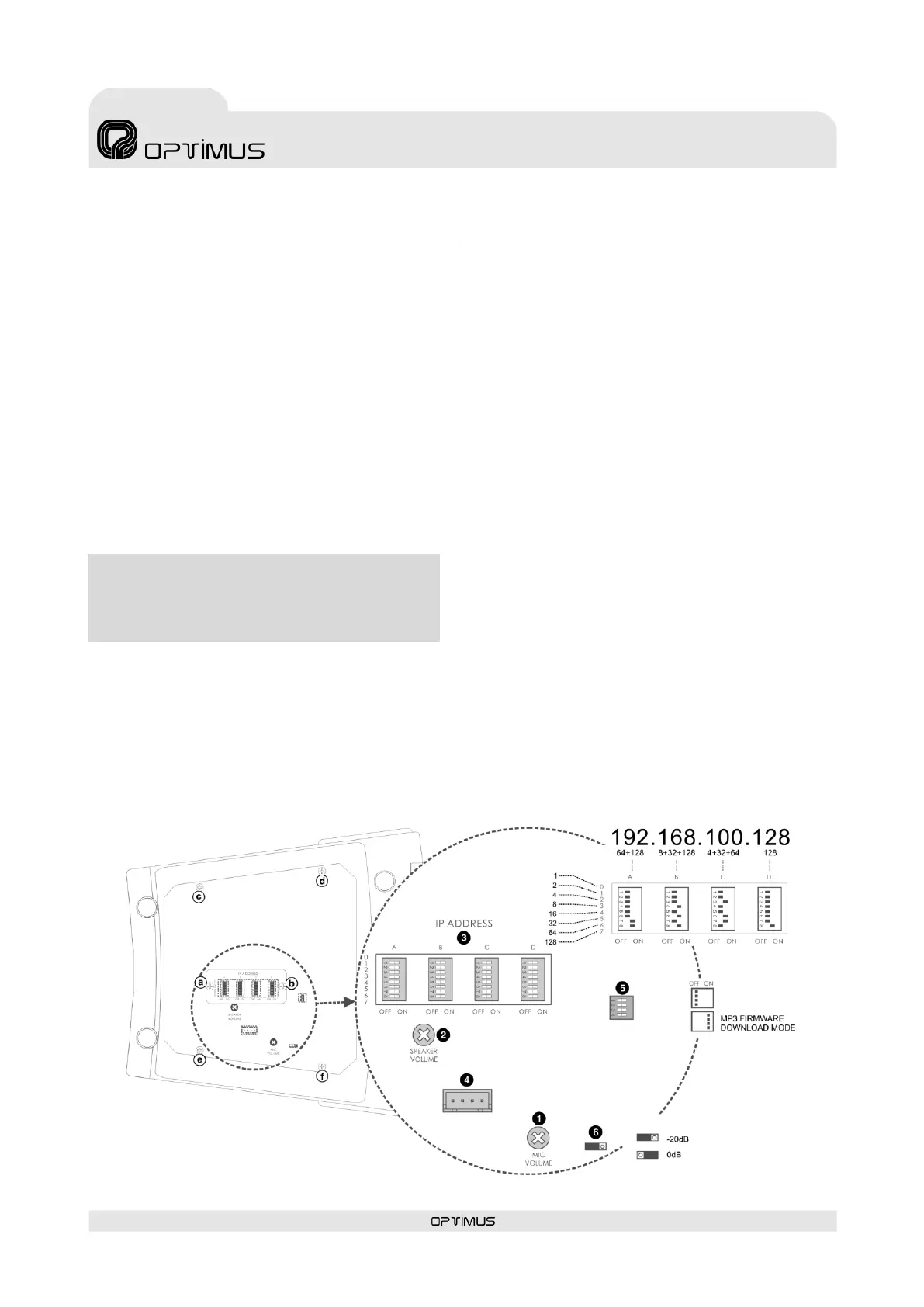
Situated on the underside of the desk, these
controls can be used to configure the IP address,
the microphone volume, the volume of the
monitor and the sensitivity of the analog input
(rear RCA connectors).
(1) MIC. VOLUME
Adjustment of the microphone gain.
(2) SPEAKER VOLUME
Volume of the monitor loudspeaker.
(3) IP ADDRESS
DIP switches to configure the IP address of the
desk. This address identifies the equipment unit
in the network, so each unit must have a unique
IP address.
An IP address is represented by means of a 32-
bit binary number. The IP addresses are
expressed as decimal notation numbers: the 32
bits of the address are divided into four octets
(an octet is a group of 8 bits). In the desk, each
octet is represented by A0 to A7 for the first
octet, B0 to B7 for the second octet, C0 to C7 for
the third octet, and D0 to D7 for the fourth octet.
In an octet, each bit can have the value 0 (DIP
switch OFF) or 1 (DIP switch ON). In order to
obtain the decimal value of the octet, the decimal
values of each bit that is in the ON position must
be added up (1, 2, 4, 8, 16, 32, 64 and 128).
Remove screws a and b indicated in Figure 9 to
gain access to the DIP switches. This figure
shows an example in which the IP address
192.168.100.128 is configured.
On the next page, Table I shows all the DIP
switch combinations from 0 to 255.
(4) MP3 FIRMWARE UPDATE
Firmware download connector for the MP3 circuit.
Contact Optimus technical staff for its use.
Remove screws c, d, e and f indicated in Figure 9
to gain access to the connector.
(5) MODE CONFIG.
Configuration DIP switch to enable the MP3
firmware download. Contact Optimus technical
staff for its use. Remove screws c, d, e and f
indicated in Figure 9 to gain access to the DIP
switch.
(6) ANALOG INPUT SENSITIVITY
Internal jumper for configuration of the analog
audio input sensitivity to either 0 dB or -20 dB.
Remove screws c, d, e and f indicated in Figure 9
to gain access to the jumper.



 To Next Page