Control central and
paging desk
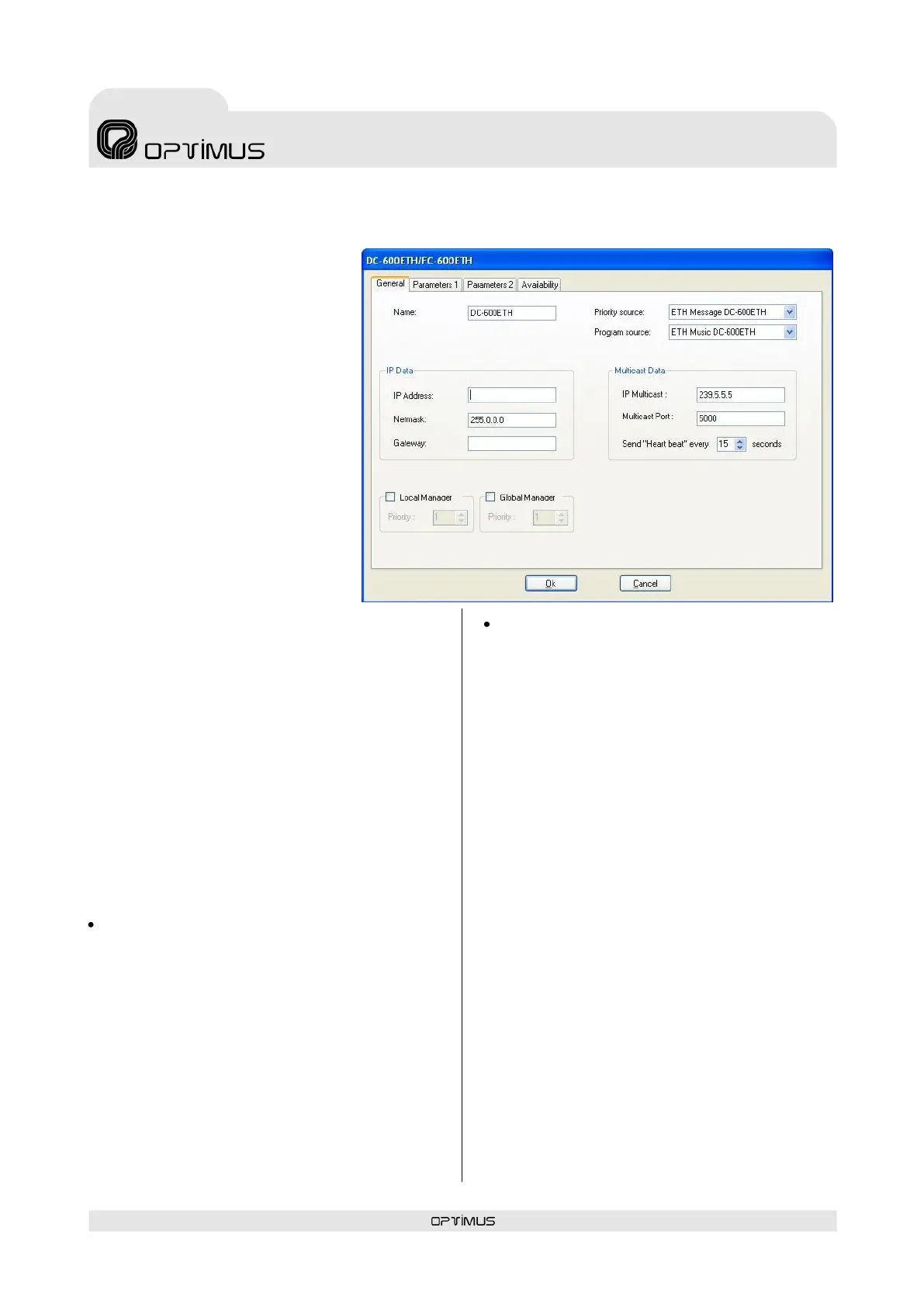
7.2. Desk configuration parameters
7.2.1. General tab
(1) Name
Enter a name to identify the
equipment unit. Maximum of 50
characters.
(2) Priority source
Click on the drop-down menu and
assign one of the Priority type
sound sources available to the
desk. These sound sources are
defined during the configuration of
Modes and sound sources.
Each sound source has a Mode or
priority level assigned to it, and so
the source selected will determine
the priority of the desk with respect
to the other audio signals in the
installation when an announcement
is sent (for more information, see
the Optimax Installations
Configuration Manual).
(3) Program source
Configure this option if you have a music source
connected to the desk (through the RCA
connectors on the rear panel).
Click on the drop-down menu and assign one of
the Program type sound sources available to the
desk. These sound sources are defined during the
configuration of Modes and sound sources.
Each sound source has a Mode or priority level
assigned to it, and so the source selected will
determine the priority with which the desk is to
send the music with respect to the other audio
signals in the installation (for more information,
see the Optimax Installations Configuration
Manual).
IP DATA
(4) IP Address
Enter the IP address of the unit. This IP must be
unique to the installation and it must coincide
with the configuration of the DIP switches on the
underside of the unit, or with the address
configured through the Web connection (see
section 8), or with the address configured
through the keypad (see section 11.4.10). It
must be a fixed IP address.
(5) Netmask and
(6) Gateway
In installations that require this. Consult the
network administrator of the installation.
MULTICAST DATA (see also page 19)
(7) IP Multicast
Default setting 239.5.5.5. Do not modify this field
unless the installation topology makes it
necessary. All the units with an IP connection in
the installation must have the same IP multicast
address.
(8) Multicast port
Default setting 5000. Do not modify this field
unless the installation topology makes it
necessary. All the units with an IP connection in
the installation must have the same multicast
port.
(9) Send “Heart beat” every n seconds
Frequency with which the unit sends a heart beat
signal to the multicast group. This signal informs
the other units with an IP connection in the
installation that the desk is operating perfectly.
(10) Local Manager and (11) Global
Manager
Defines whether the desk is to function as a
priority manager of the Optimax system, either
locally at PA Area level or globally for the
installation, and establishes the priority of this
management with respect to other equipment
units (1 = maximum priority). It is not advisable
to activate this management on the DC-600ETH
desk (see Notes on Local and Global Co-
ordinators on page 20).



 To Next Page