Control central and
paging desk
(14) Associated Group
Through this option, a group can be assigned to
the Emergency Mode, so that this group will be
the destination of the messages when the desk
goes into Emergency Mode. To assign a group,
the group must first have been created by means
of the Groups menu on the P.A. Manager
software installations screen.
If this parameter is left without configuration (-
None-), the emergency messages are sent to all
the zones.
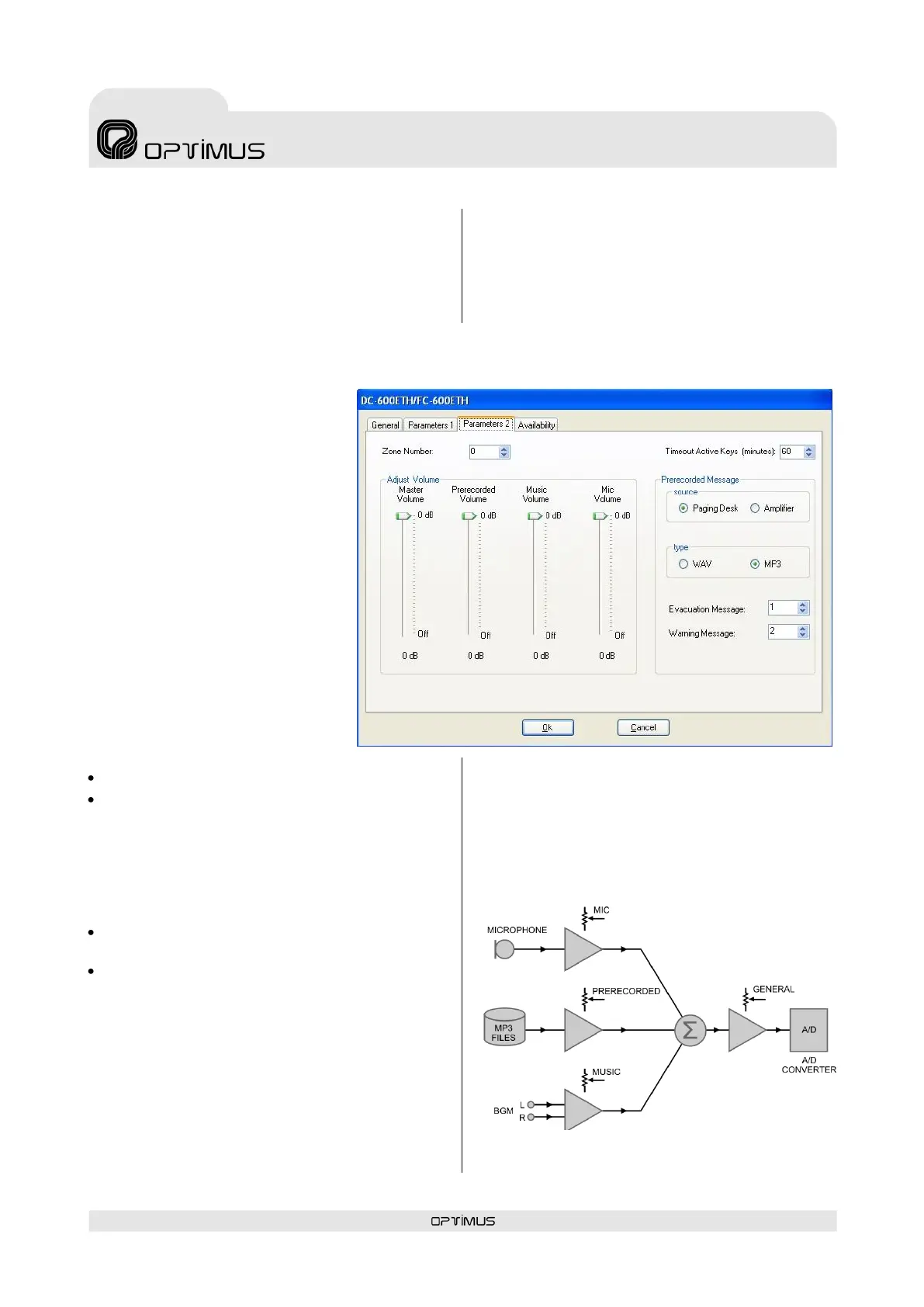
7.2.3. Parameters 2 tab
(1) Zone number
Not used.
(2) Mater Volume
General volume of the desk audio.
(3) Prerecorded Volume
Volume of the pre-recorded
messages of the desk.
(4) Music Volume
Audio volume of the music source
connected to the desk.
(5) Mic. Volume
Audio volume of the desk
microphone.
(6) Prerecorded message -
Source
Configures the origin of pre-
recorded messages activated by
the WARNING and EVACUATION
buttons on the desk.
Paging Desk: Messages resident in the desk.
Amplifier: Messages resident in the amplifier.
It is only possible to select Amplifier if the
installation has UP-ETH amplifiers.
(7) Prerecorded message - Type
Select the type of pre-recorded messages to be
activated by the WARNING and EVACUATION
buttons on the desk.
WAV: Pre-recorded WAV messages resident
in the Coldfire flash memory of the unit.
MP3: Pre-recorded MP3 messages resident in
the MP3 circuit of the unit.
(8) Evacuation Message
Enter the number of the message that will be
used as the EVACUATION message (EVACUATION
button).
(9) Warning Message
Enter the number of the message that will be
used as the pre-evacuation message (WARNING
button).
(10) Timeout Active Keys (minutes)
Time length during which the last zones and/or
messages selection is available on the
microphone desk display. Values between 1 and
254 minutes. Typewrite 255 to show it
indefinitely.
Logic diagram of the volume controls



 To Next Page