Control central and
paging desk
NB: To view the page, it is
necessary to deactivate the
proxy in the configuration of the
web page browser.
8. CHANGE OF THE IP ADDRESS OF THE UNIT BY SOFTWARE
It is possible to change the IP address of the unit by means of the DIP switches situated on the underside
of the unit, by means of the desk configuration menus and by software.
The software option allows
the change to be made
remotely, without the need
for access to the desk.
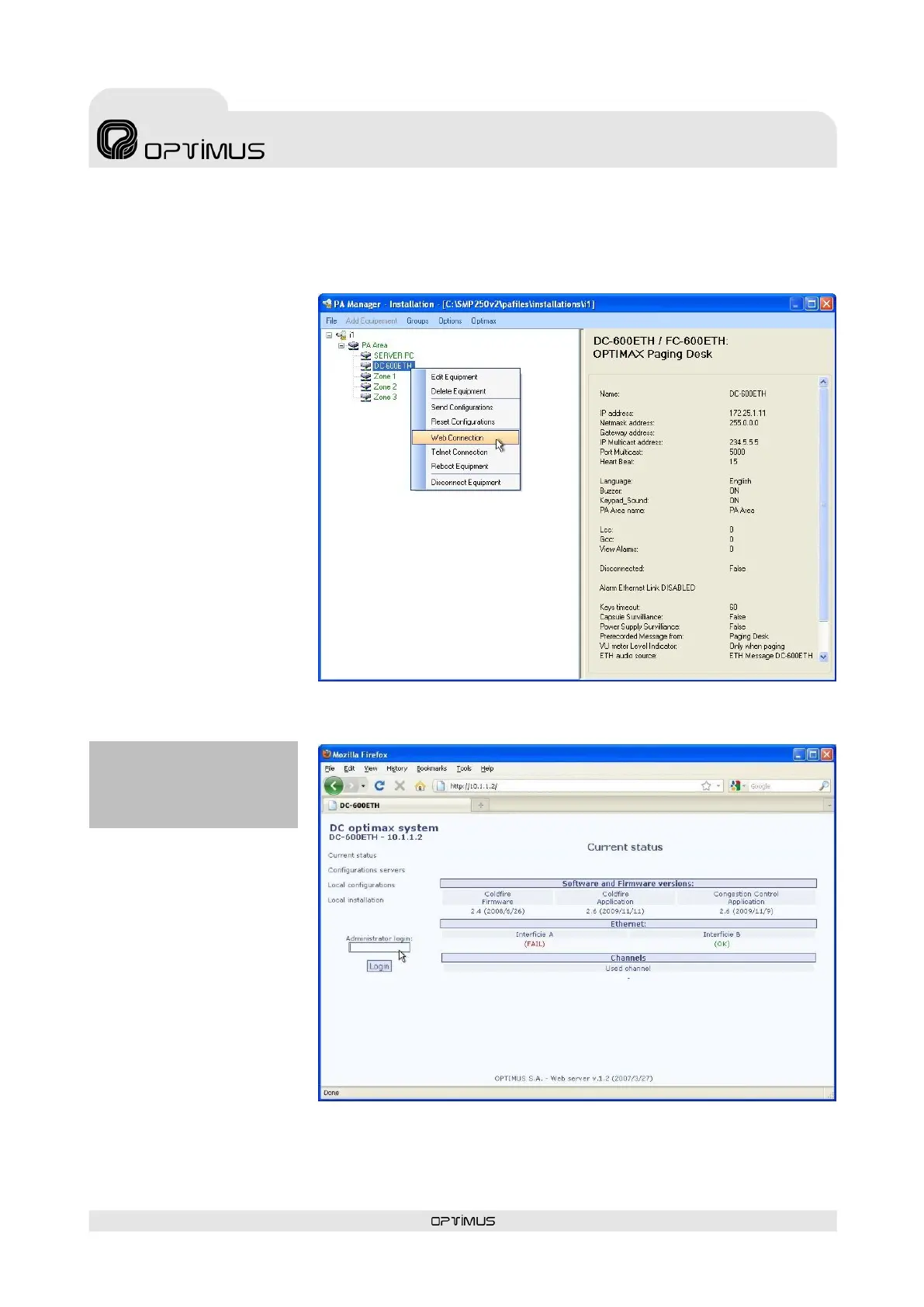
To make the change by
software, from the installation
screen of the P.A. Manager
software right click with the
mouse on the name of the
unit and select the option
Web Connection (1).
If the PC is remote with
respect to the installation,
open the Internet browser
and enter the IP of the unit in
the address bar (for example:
http://10.1.1.2).
This IP address is the address
configured by means of the IP
ADDRESS DIP switches
situated on the underside of
the desk or the address
configured from the menus of
the desk.
In both cases, a web page belonging to the unit will load.
Proceed as follows:
1. Enter the password in the
Administrator Login
section (2) (contact
technical staff at Optimus
and they will provide you
with this) and click on the
button Login.



 To Next Page