Control central and
paging desk
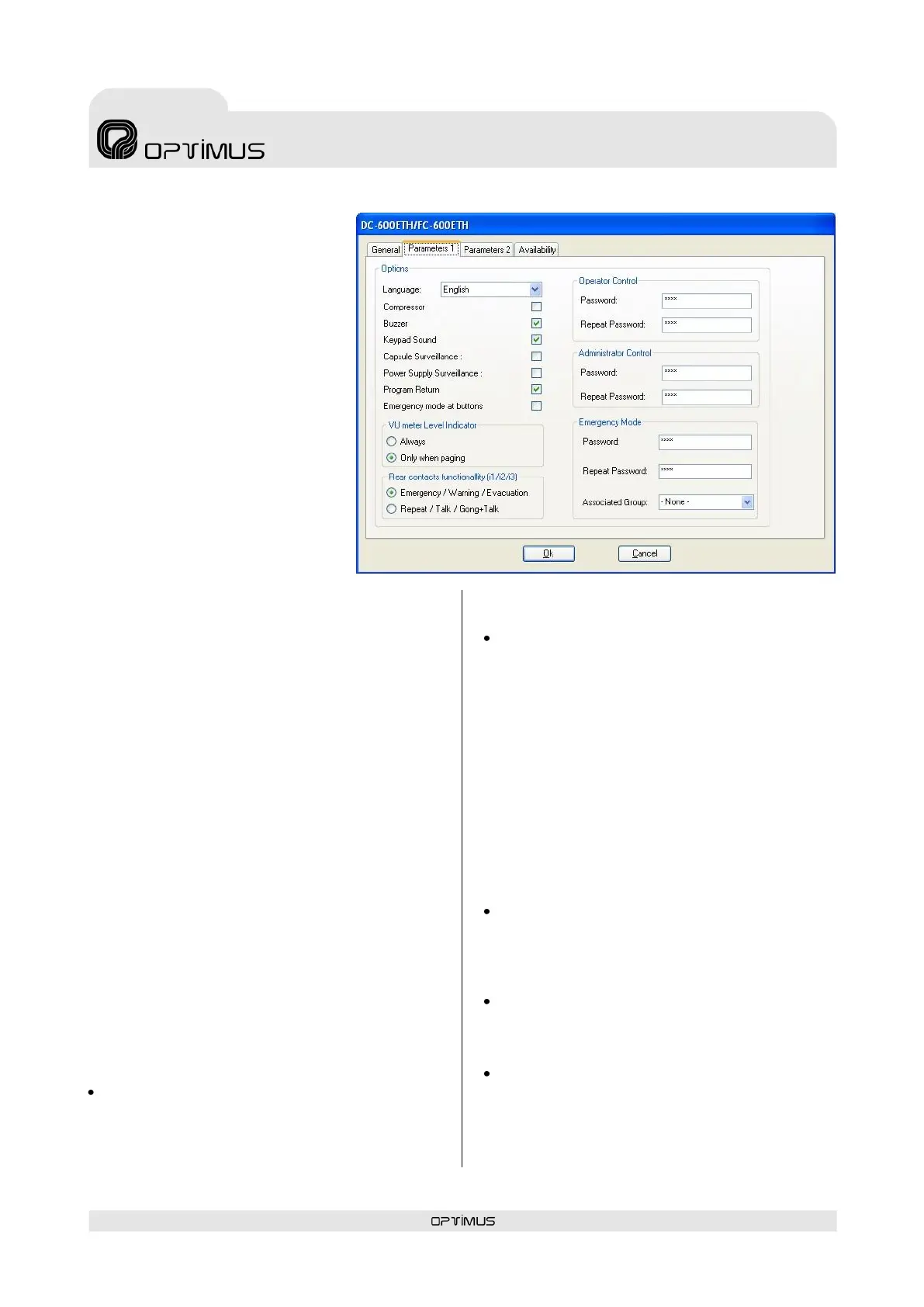
7.2.2. Parameters 1 tab
(1) Language
Configures the language in which
the messages appear on the LCD
screen of the DC-600ETH.
(2) Compressor
Activates or deactivates the
compressor of the microphone
desk.
(3) Buzzer
The desk has a buzzer which is
activated when an alarm is
received. This control activates or
deactivates the buzzer.
(4) Keypad Sound
Activates or deactivates the sound
of the keys (PLAY, REP, TALK and
GONG+TALK make no sound).
(5) Capsule Surveillance
Activates or deactivates
surveillance of the microphone capsule. If this
option is activated, the system will generate an
alarm when a fault is detected in the capsule.
(6) Power Supply Surveillance
Activates or deactivates surveillance of the power
supply to the junction box of the desk. If this
option is activated, the system detects when
either of the two power supply inputs to the
junction box fails, and generates an alarm.
(7) Program Return
Activates or deactivates the return of the
program signal to some zones after an
announcement has been sent from the desk to
these zones.
(8) Emergency mode at buttons
If this option is enabled, the desk will go into
emergency mode whenever the WARNING or
EVACUATION button is pressed.
(9) VU meter Level Indicator
The volume bar can show the audio signal level
when a message is sent (Only during the
announcement) or at all times.
(10) Rear contacts functionality
Configures the functionality of input contacts I1,
I2 and I3 of the desk.
Emergency / Warning / Evacuation. If
this option is selected, when I1 is activated,
the desk goes into Emergency System
Mode; activating I2 launches the Warning
message; and activating I3 launches the
Evacuation message.
Repeat/Talk/Gong+Talk. Activates the
Announcement System Mode functionality.
Through this option the functions REP
(repetition), TALK and GONG+TALK can be
activated from contacts I1, I2 and I3
(I1=REP, I2=TALK, I3=GONG+TALK).
(11) Operator Control and (12)
Administrator Control
In order to restrict access to certain functions of
the DC-600ETH from the controls on the front, 3
user levels have been established: Basic,
Operator and Administrator.
Through these parameters, the Administrator
password and the Operator password can be
established.
Basic: Default level when the unit is switched
on. Without password. Allows basic
operations such as sending pre-recorded
messages and viewing the status of the
volume.
Operator: With password (by default 1234).
In addition to all the operations available to
the basic user, the zone volume can be
modified.
Administrator: With password (by default
1234). Without any restriction.
(13) Emergency Mode
Password for access to emergency mode.
Default value 1234.



 To Next Page