16
Name and function of your projector
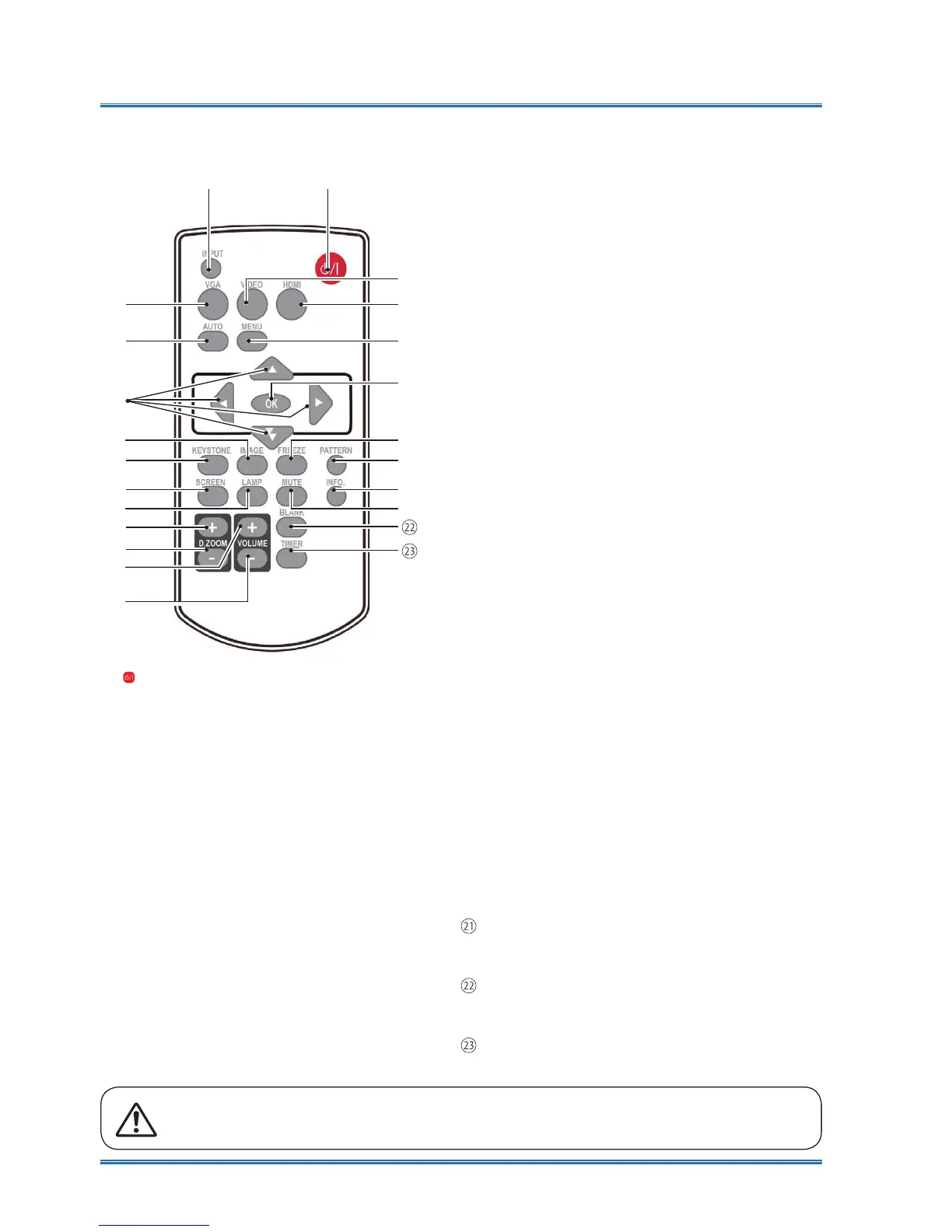
Remote controller
⋇⋈
⋉
⋊
⋐⋔
⋕
⋖
⋓⋗
⋑
⋘
⋙
⋒
⋌
⋋
⋍
⋏
⋎
⋚
ⓟ
①
POWER
Power on or off your projector .
②
INPUT
Open or close the INPUT menu .
③
VGA
Select VGA input source .
④
AUTO
Enter auto adjustment mode .
⑤
VIDEO
Select VIDEO input source .
⑥
HDMI
Select HDMI 1/HDMI 2(MHL) input source.
⑦
MENU
Open or close the OSD menu .
⑧
Arrow
ٻٽ
ٻ
ٻ
–Select items or adjust data in the OSD menu .
–Select display area in digital zoom+
mode
.
⑨
OK
Enter the OSD menu or select options in it .
⑩
IMAGE
Select image mode .
⑪
KEYSTONE
Keystone calibration .
⑫
SCREEN
Enter the screen size adjustment menu.
⑬
LAMP
Select LAMP mode.
⑭
FREEZE
Freeze projected images.
⑮
PATTERN
Select built-in test pattern of your projector.
⑯
INFO.
Display current status info. of your projector .
⑰
MUTE
Turn off the sound Temporarily.
⑱
D.ZOOM +
Zoom in projected image .
⑲
D.ZOOM -
Zoom out projected image .
⑳
VOLUME +
Increase volume.
VOLUME -
Decrease volume .
BLANK
Dark out screen images temporarily.
TIMER
Enable the timer function .
PATTERN button on the remote controller is invalid when you choose USB display,
Memory viewer and Network as input signal.



 To Next Page