77
1) Press
WX
EXWWRQWRVHOHFWD¿OH
2) Press
button to select [Memory Viewer ] menu,then select [From Scratch] menu.
3) Press <OK > button.
·
Full screen display
·
Press <OK> button to return the thumbnail.
The Slide Show Mode in the Memory Viewer menu is set to a special setting ,all images in the
same folder can play automatically.
Play slide
1) Press
WX
EXWWRQWRVHOHFWD¿OH
2) Press <OK> button.
·
Full screen display
·
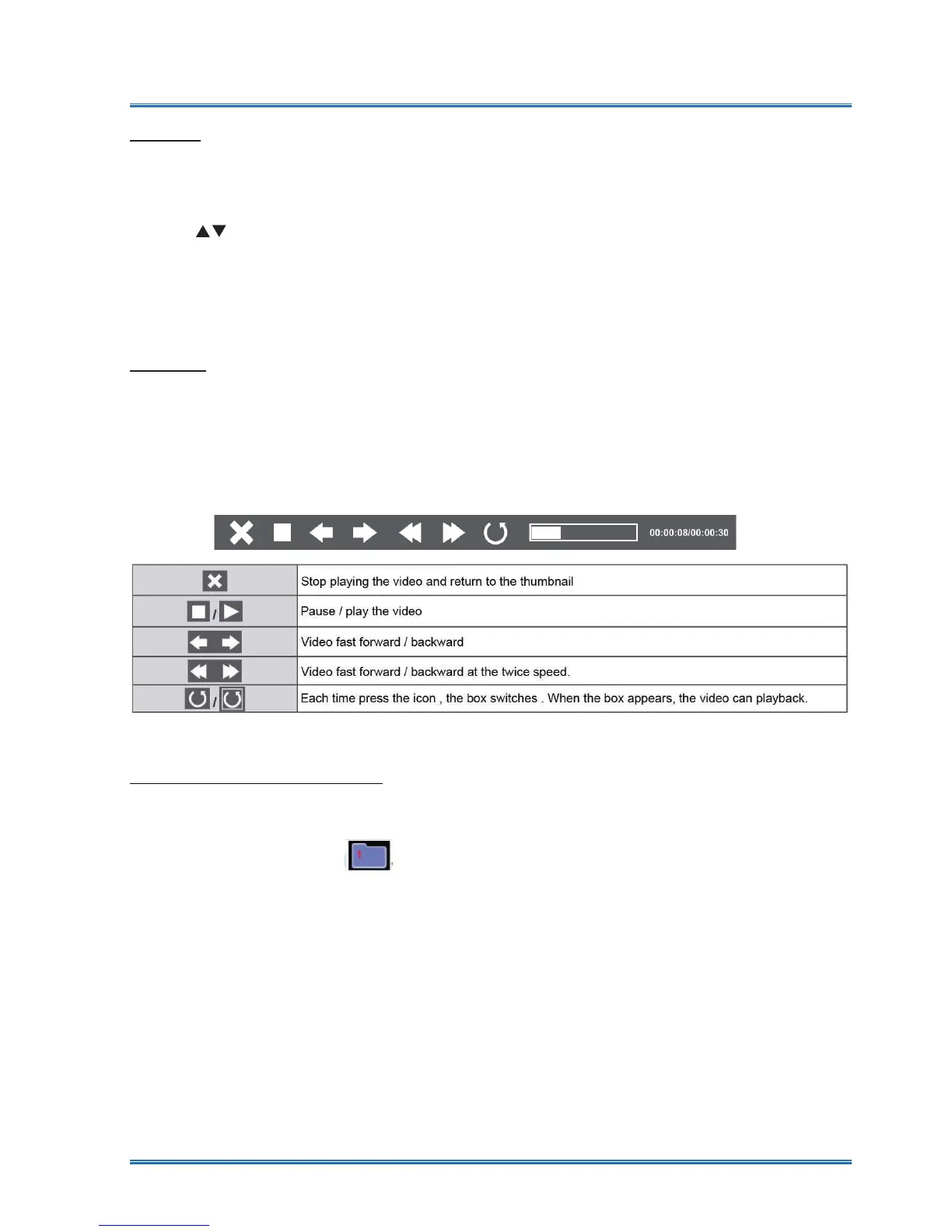
Use the remote control to operate the controller that appears at the bottom of the screen.
POD\YLGHR¿OHV
Play video
1) Press
WX
button to select ,displayed in the left corner of the screen.
2) Press <OK > button.
·
Please Press RC ENTER to display standby screen instanly.
3) Unplug the USB memory directly.
The Slide Show Mode in the Memory Viewer menu is set to a special setting ,all images in the
same folder can play automatically.
The termination of Memory Viewer
Useful function



 To Next Page