B-149-4N-E
10
7. HOW TO CHANGE FLOW DIRECTIONS
CAUTION: Do not fail to turn power OFF if the meter is of remote output type.
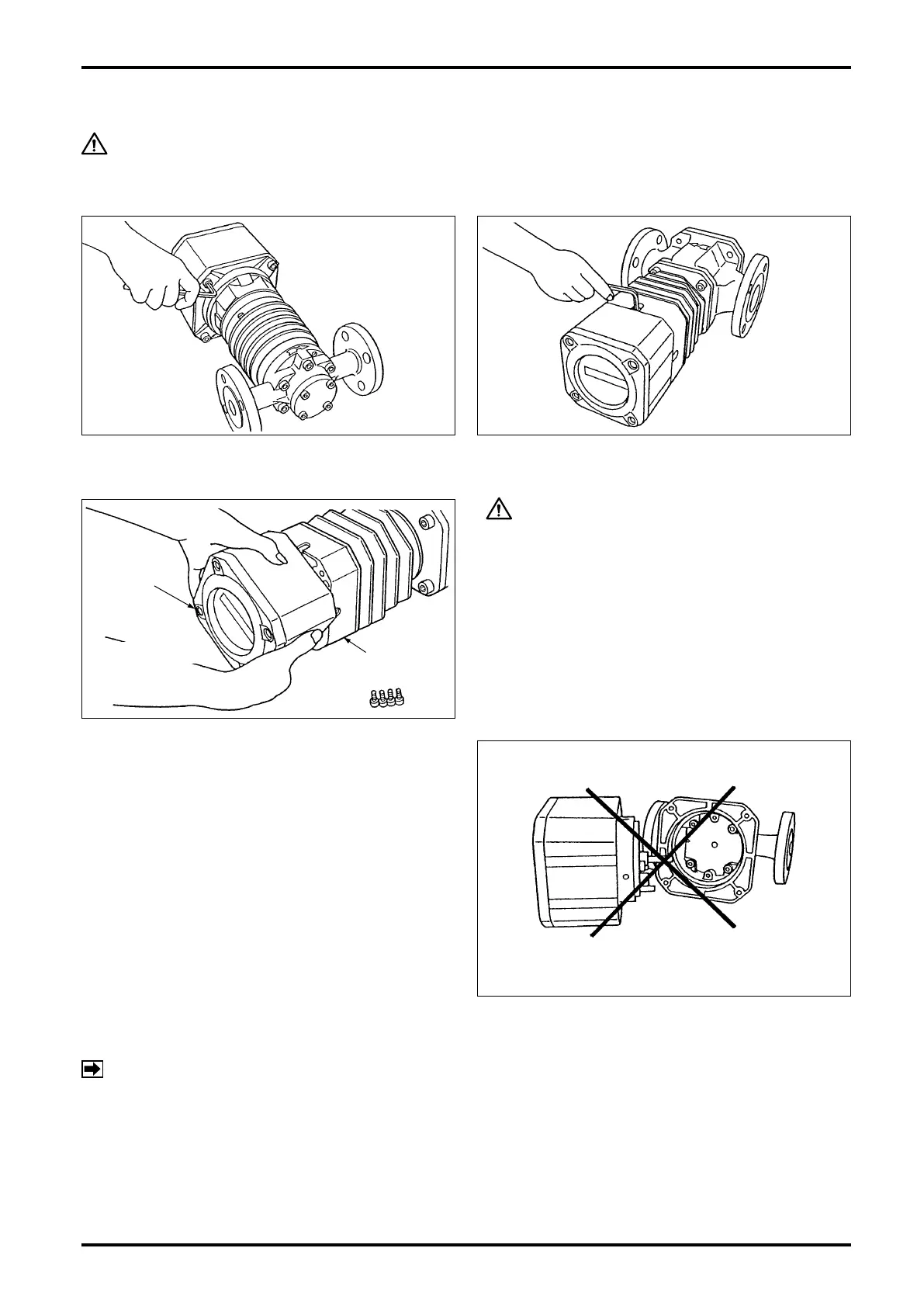
To reverse the ow direction, change the orientation of both the register and owmeter body to the new ow
direction.
(1) Take off four hex socket head screws (M6) with hex wrench.
CAUTION
1. Rotate the register assembly without separating
it from the skirt.
2. Do not attempt to rotate the register assembly
more than one complete revolution.
(2) Holding the register assembly in both hands,
carefully rotate it and then secure it with hex
socket head screws in line with the new direction
of ow.
REGETER
ASSEMBLY
CAREFULLY
ROTATE.
SKIRT
Do not attempt to change ow directions by
separating the register assembly like this.
NOTE: If you have separated the register assembly, first return it to the state before changing the flow
direction, then follow the correct procedure in step (2) (without separating the register assembly)
again to change ow directions.










 To Next Page