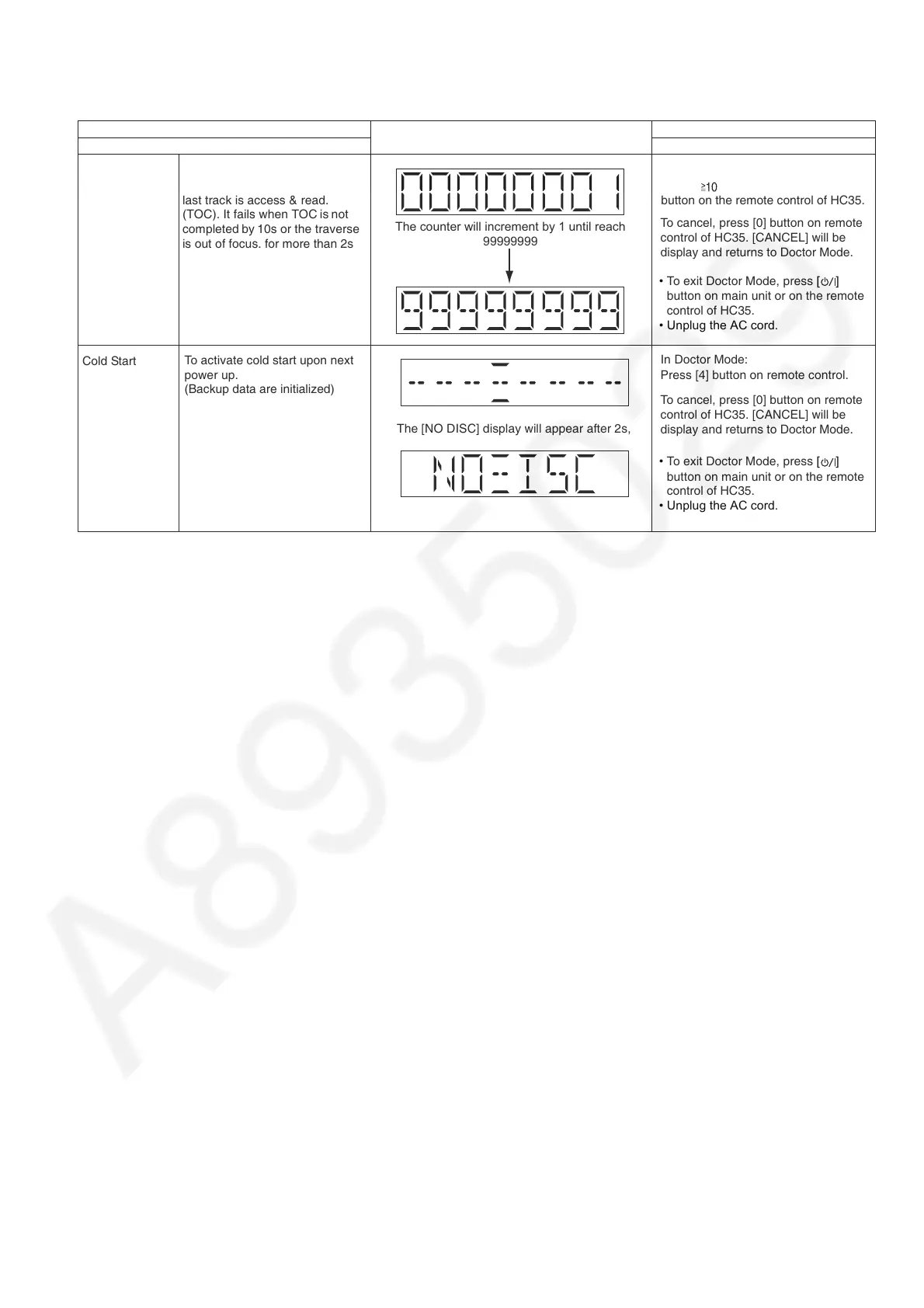
6.4. Doctor Mode Table 2
Item
FL Display
Key Operation
Mode Name Description
Front Key
CD Traverse Test
Mode
In Doctor Mode:
Press [ ] follow by [1] & then [2]
button on the remote control of HC35.
The counter will increment by 1 until reach
99999999
To check for the traverse unit
operation. In this mode, the first &
last track is access & read.
(TOC). It fails when TOC is not
completed by 10s or the traverse
is out of focus. for more than 2s
•
To exit Doctor Mode, press
[TA]
button on main unit or on the remote
control of HC35.
• Unplug the AC cord.
•
To exit Doctor Mode, press
[TA]
button on main unit or on the remote
control of HC35.
• Unplug the AC cord.
Cold Start
The [NO DISC] display will appear after 2s,
In Doctor Mode:
Press [4] button on remote control.
To activate cold start upon next
power up.
(Backup data are initialized)
To cancel, press [0] button on remote
control of HC35. [CANCEL] will be
display and returns to Doctor Mode.
To cancel, press [0] button on remote
control of HC35. [CANCEL] will be
display and returns to Doctor Mode.









 To Next Page