24
QR34642
Discs and Cards
The following table lists the storage media (discs and cards) that can be used on this DVD Palmcorder and
the functions which are available with them:
● : Functions available;
-
: Not available
*1: Can be played back on some DVD players.
*2: Must be finalized on this DVD Palmcorder before DVD-R disc can be played back on DVD player or DVD recorder (See
P. 76). May not be playable on some DVD players.
*3: Can be played back on some DVD-RAM recorders.
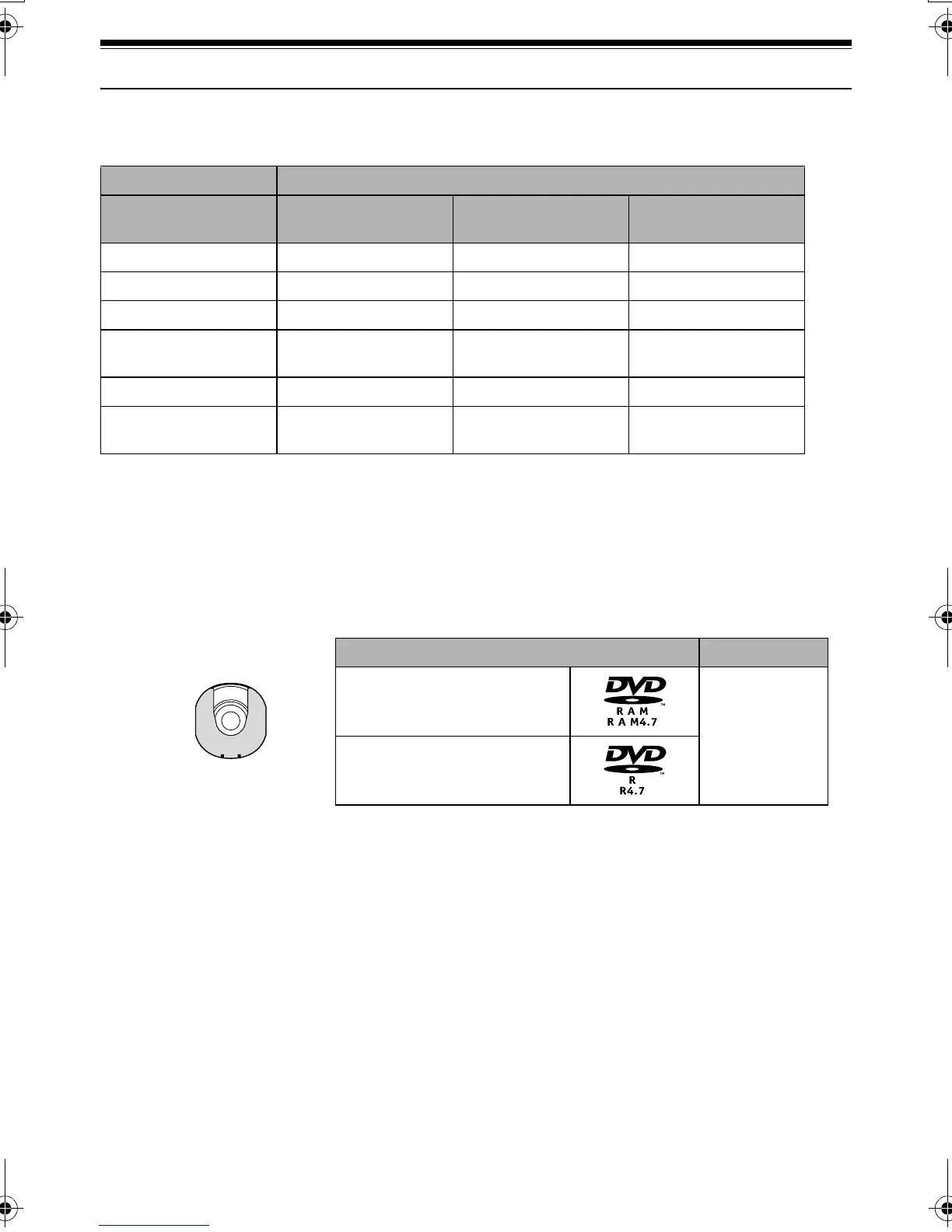
Available Discs
This DVD Palmcorder uses 8 cm DVD-RAM discs
and 8 cm DVD-R discs for camcorder use.
Discs removed from Round DVD Holder cannot be
used on this DVD Palmcorder: Use them only in the
holder.
Note:
• It is recommended that you use Panasonic discs, since
their compatibility with this DVD Palmcorder has been
confirmed. Using a disc other than those made by
Panasonic may not allow the DVD Palmcorder to deliver
optimum performance.
• It is necessary to initialize an unformatted disc. When an
unformatted disc is inserted into the DVD Palmcorder, a
message will appear: Initialize the disc following the
instructions on screen (P. 129).
• The Round DVD Holder cannot be used on the DVD
Palmcorders that use square type adapters.
• Image data edited on PC and certain types of image data
may not be visible on this DVD Palmcorder.
• The image data recorded on another device may not be
playable on this DVD Palmcorder.
Media
Function DVD-RAM disc DVD-R disc
SD Memory Card/
MultiMediaCard
Recording movie ●●
-
Recording still ●
-
●
Deleting recorded image ●
-
●
Editing on this DVD
Palmcorder
●
--
Playback on DVD player
-
*1
●
*2
-
Playback on DVD-RAM
recorder
●
-
*2
-
*3
Usable discs and logos Shape
DVD-RAM Ver. 2.1 (8 cm)
In Round DVD
Holder
DVD-R
[for General Ver. 2.0 (8 cm)]
VDR-M30PP_GB.book Page 24 Friday, March 14, 2003 8:53 PM













 To Next Page