64
QR34662
On-Screen Information
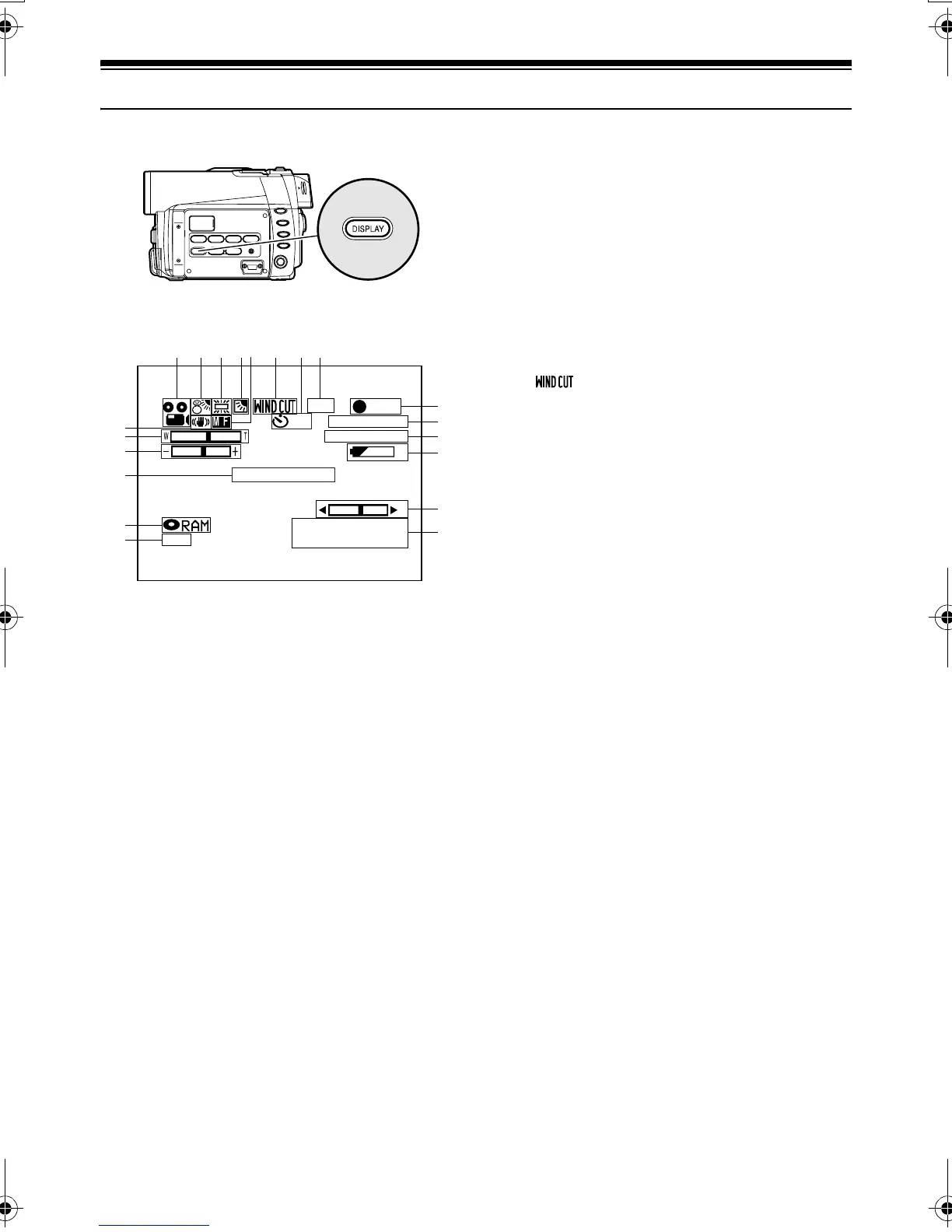
Various types of information will appear in the viewfinder or on the LCD screen during recording.
Information Display During Recording
1. Recording mode
:Movie
:Still
: External input still (field)
: External input still (frame)
2. Program AE (only in movie recording mode)
No display: Auto
- :Sports
. :Portrait
/ : Spotlight
0 :Surf & Snow
1 :Low Light
3. White balance
No display: Auto
3 :Set
4 : Outdoor
5 :Indoor1
6 :Indoor2
4. Backlight compensation
No display: Backlight compensation OFF
8 : Backlight compensation ON
5. Manual focus
No display: Autofocus
: : Manual focus
6. Wind Cut (only in movie recording mode)
No display: Microphone filter OFF
: Microphone filter ON
7. Self-timer (only in still recording mode)
No display: Self-timer OFF
< : Self-timer ON (count is from 10
seconds)
8. External Input
LIN :AV input
9. Recording status
/ :During recording
. : During recording pause
No display
*1
10.Electronic image stabilizer (EIS)
No display: EIS OFF
9 :EIS ON
11.Zoom
(Digital Zoom: Off)
(Digital Zoom: 40×)
(Digital Zoom: 240×, only in movie
recording mode)
12.Exposure correction
13.Warning message
14.Disc/Card type
:DVD-RAM
:DVD-R
: DVD-RAM (write-protected)
: DVD-R disc already finalized on this
DVD Palmcorder
: DVD-R disc finalized on a device
other than this DVD Palmcorder
: SD Memory Card or MultiMediaCard
:Locked SD Memory Card
No display
*2
10
8:00AM
SEP 30 2003
3 0 MIN
0:00:00
FINE
REC
DISC ACCESS
REM
LIN
The above screen is an example for explanation: It is
different from the actual display.
123456 7
10
11
12
13
14
15
9
16
17
18
19
20
8
VDR-M30PP_GB.book Page 64 Friday, March 14, 2003 8:53 PM













 To Next Page