34
QR34642
Setups
This section explains preparations for recording - setting up the DVD Palmcorder and battery pack.
Setting Up the DVD Palmcorder
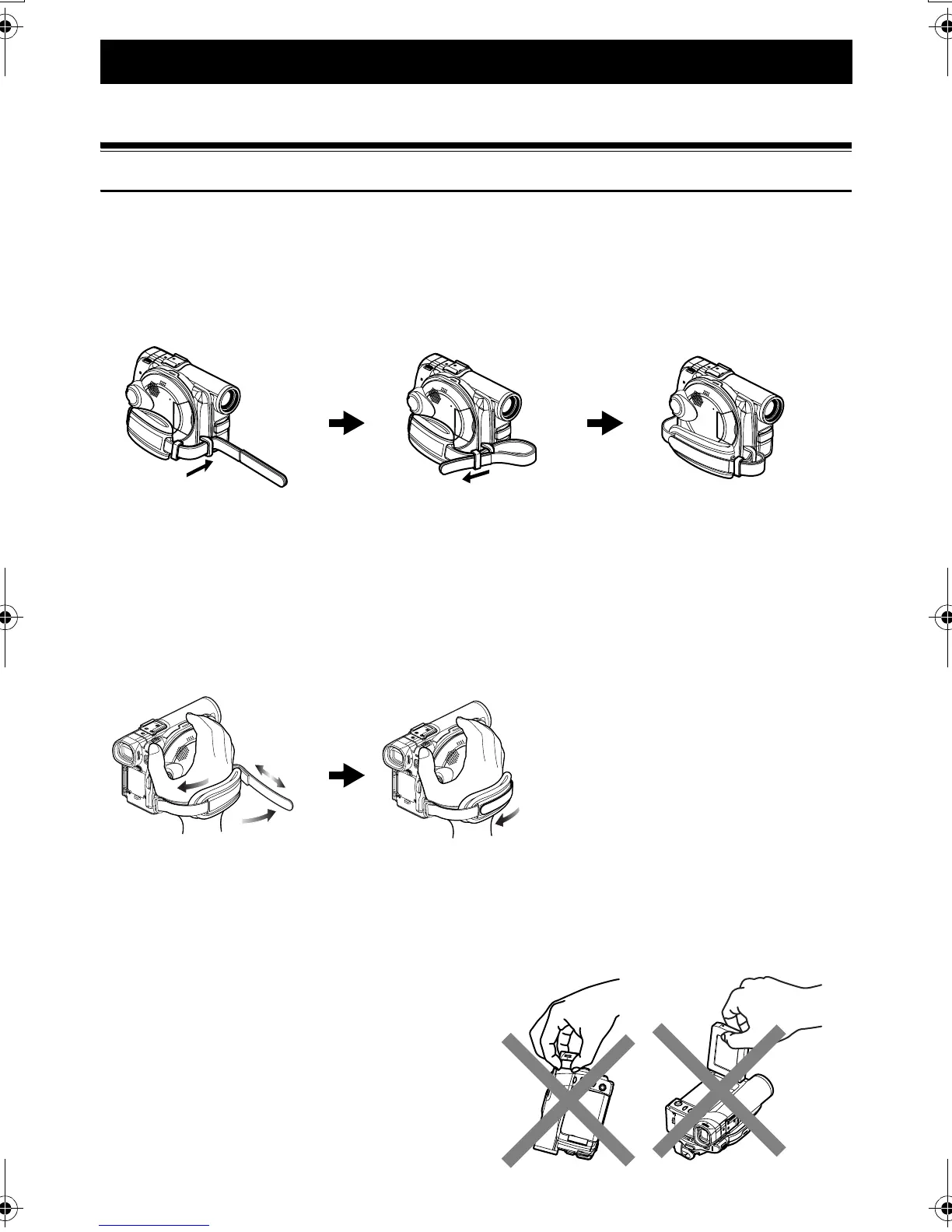
Attaching adjuster (securing tab)
1 Pass the belt through the attachment part of
DVD Palmcorder.
2 Pass the belt through the adjuster (securing tab).
3 Adjust the length of hand strap.
Holding DVD Palmcoder
To use as a Grip Belt
Insert your right hand from the bottom of DVD Palmcorder up to the base of your thumb.
Put your hand in a position where you can easily operate the REC button and the Zoom lever.
Adjust the length of grip belt so that the DVD Palmcorder is stable when you press the REC button with
your thumb.
Note:Note:
Do not adjust the grip belt while holding the DVD
Palmcorder: Doing this could cause the DVD Palmcorder
to fall and be damaged.
1
2
3
Caution:
Do not lift the DVD Palmcorder by holding the
viewfinder or LCD monitor: If the viewfinder or LCD
monitor comes off, the DVD Palmcorder will fall.
VDR-M30PP_GB.book Page 34 Friday, March 14, 2003 8:53 PM













 To Next Page