36
QR34642
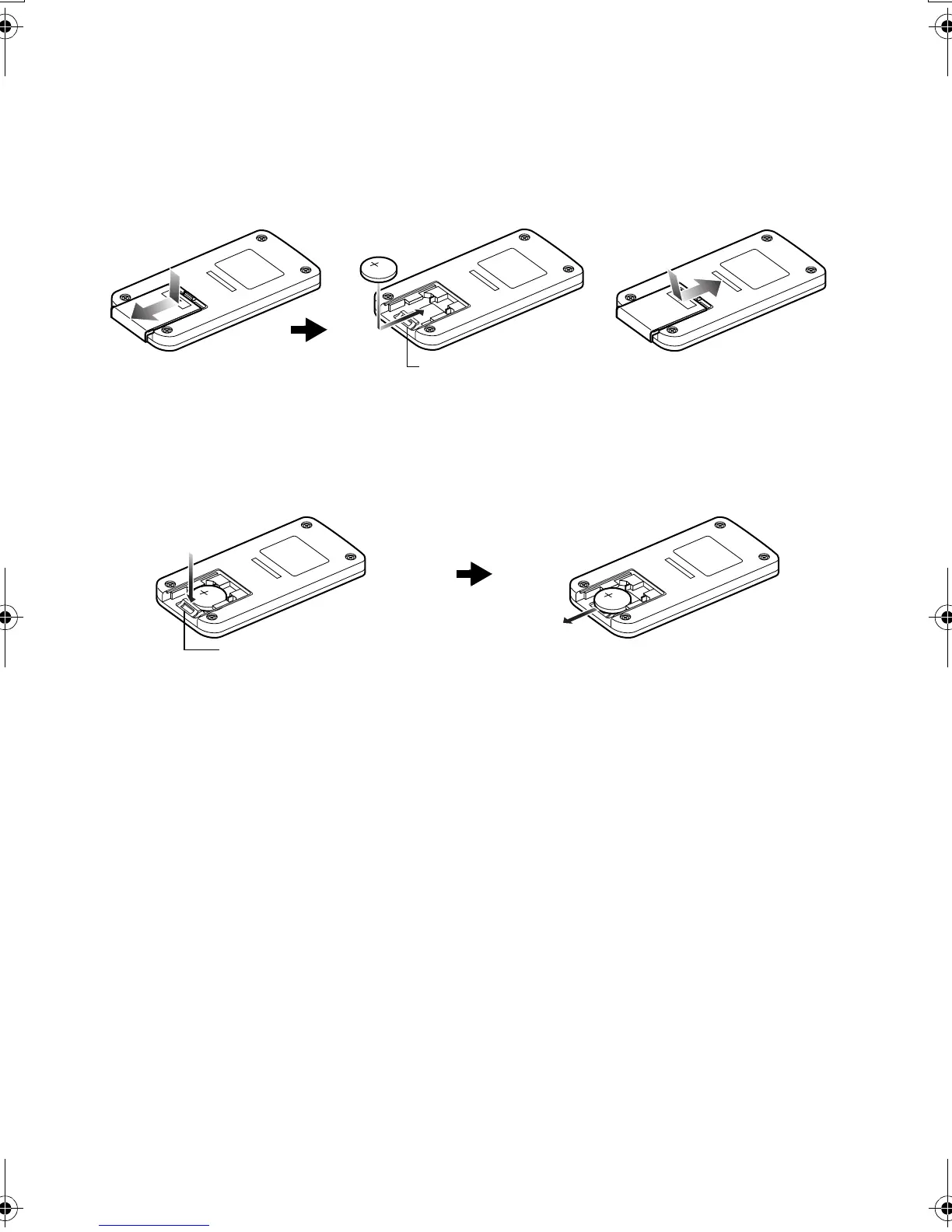
Inserting Battery into Remote Controller
Insert the provided button type battery into remote controller.
1 Slide the cover to remove it.
2 Insert the button type battery with the positive
terminal facing up.
3 Slide the cover to close it.
Note:Note:
The life of the button type battery is approximately one year.
If the battery is discharged, no operation is possible with
remote controller: Replace the battery.
Removing Battery from Remote Controller
1 While pushing the battery stopper, slide the
battery out.
Warning:
• KEEP THE BATTERY AWAY FROM CHILDREN AND
PETS.
• IF SWALLOWED CONSULT A PHYSICIAN
IMMEDIATELY FOR EMERGENCY TREATMENT.
• BATTERY MAY EXPLODE IF NOT HANDLED
PROPERLY. DO NOT RECHARGE, DISASSEMBLE OR
DISPOSE OF IN FIRE.
Note
:Note:
• Dispose of battery safely in accordance with local laws.
Do not dispose of in fire.
• Do not short circuit the battery.
• Do not hold the battery with metallic tweezers.
• Keep the battery in a dark, cool, dry place.
Battery stopper
Battery stopper
While pushing
battery stopper
VDR-M30PP_GB.book Page 36 Friday, March 14, 2003 8:53 PM













 To Next Page