19
QR34642
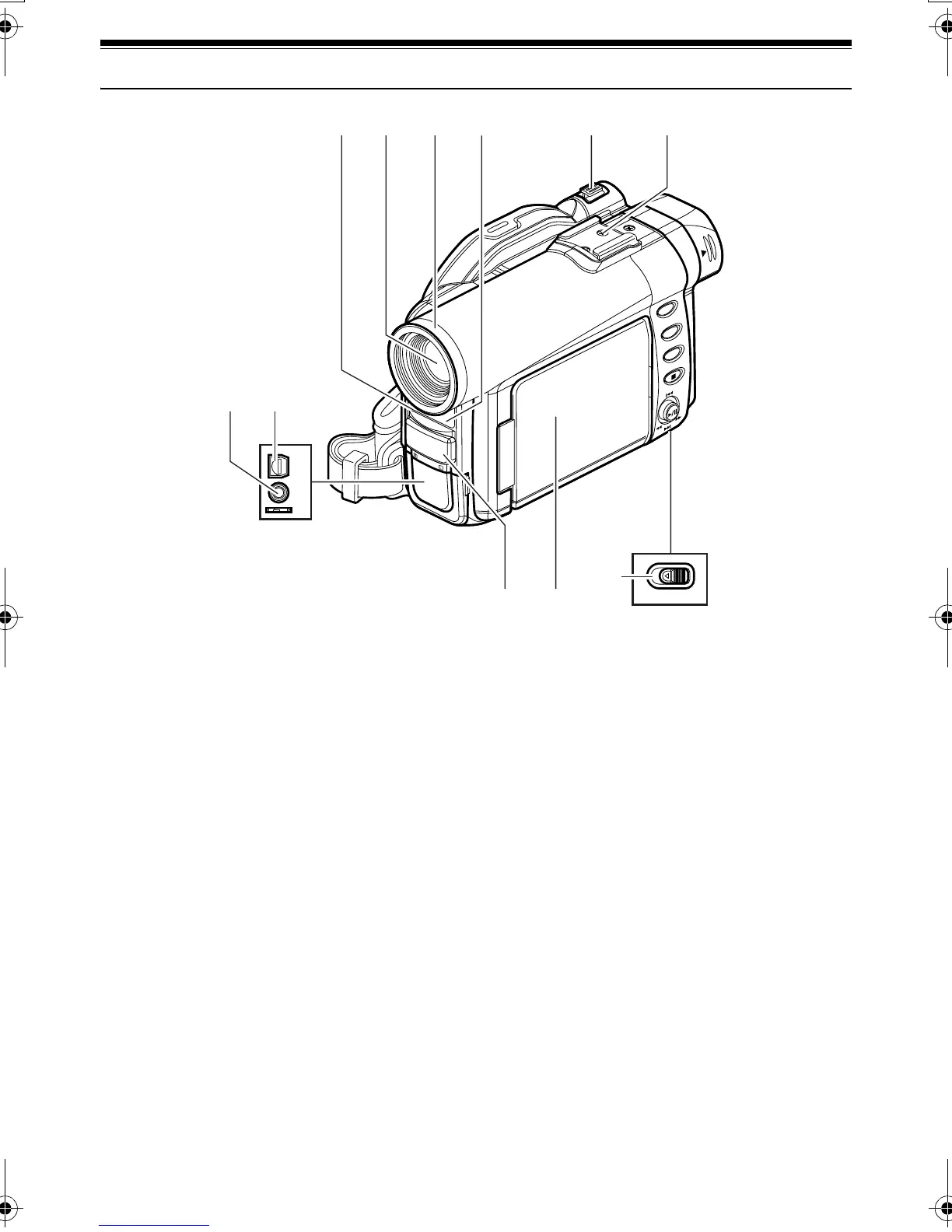
Names of Parts
1 Recording indicator (P. 95)
The red indicator will light during recording.
2 Optical 10× zoom lens (P. 57)
3 Lens hood (P. 58)
Always remove this lens hood when using
generally available tele-conversion or wide-
conversion lens.
4 Infrared receiver (P. 37)
When the remote controller is used to operate
the DVD Palmcorder, this receiver will receive
the infrared signal.
5 Zoom lever (P. 57)
Push the lever to the T side for telephoto, or to
the W side for wide-angle.
6 Accessory shoe
7 External microphone jack (P. 54)
8 AV input/output jack (P. 67, 74)
9 Stereo microphone (P. 54)
10 2.5” type Liquid Crystal Display (LCD)
(inside) (P. 48)
11 BATTERY EJECT switch (P. 39)
The BATTERY EJECT switch is located on the
bottom of this DVD Palmcorder: Slide it when
removing the battery pack.
A/V
MIC
BATTERY EJECT
7
8
11
910
1234 5 6
(Inside the cover)
(Bottom)
VDR-M30PP_GB.book Page 19 Friday, March 14, 2003 8:53 PM













 To Next Page