EasyManua.ls Logo

Pentax K20D - Playing Back Still Pictures; Playing Back Images

Pentax K20D
286 pages
Print Icon
To Next Page IconTo Next Page
To Previous Page IconTo Previous Page
Loading...
68
Basic Operations
3
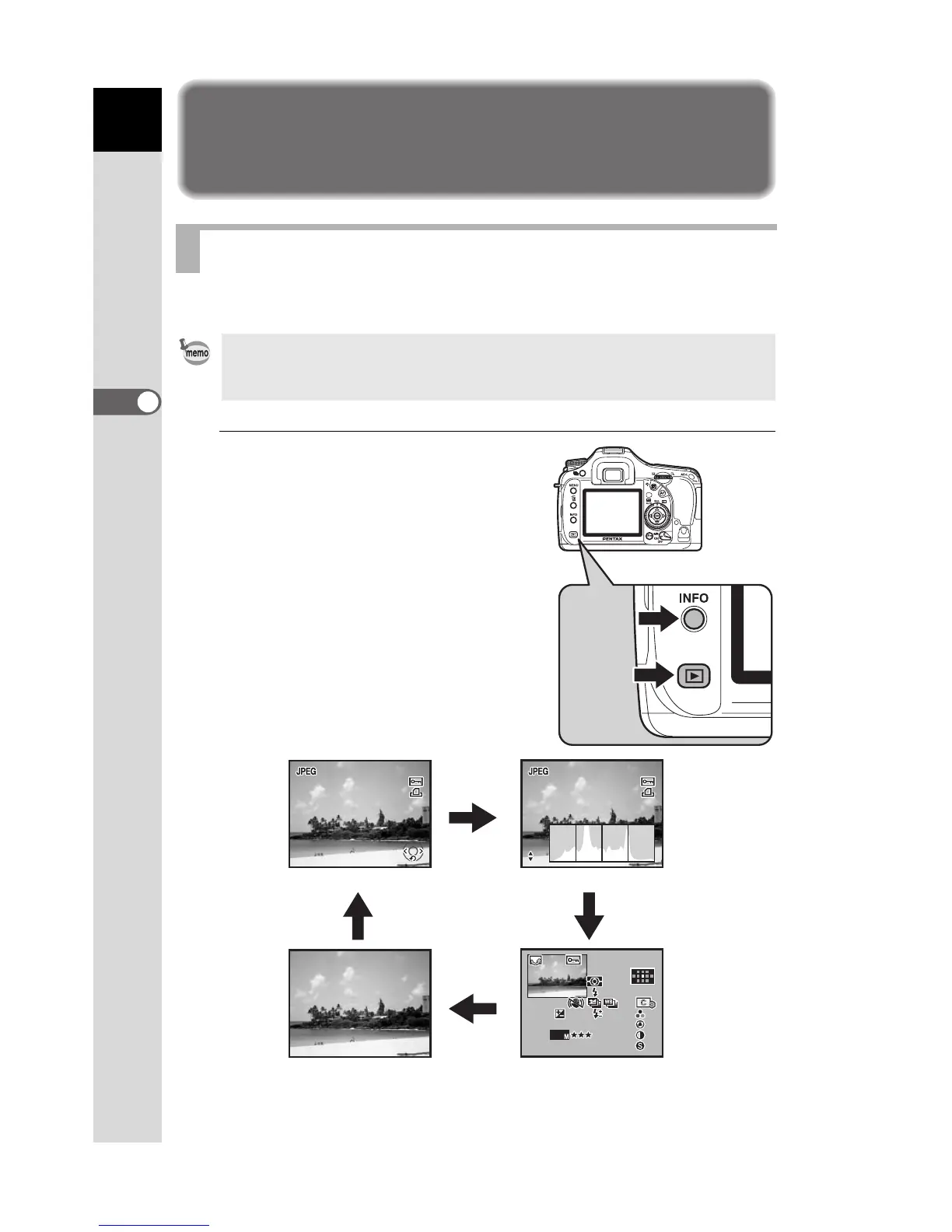
Playing Back Still Pictures
You can play back captured still pictures with the camera.
1
Press the Q button after
taking a picture.
The most recently captured image
(image with the largest file number) is
displayed on the monitor.
Press the
M
button during
playback to display information such as
the image data for the displayed image.
Refer to p.25 - p.26 for display
information details.
Playing Back Images
Use the included “PENTAX PHOTO Browser 3” software to play back using a
PC. Refer to the “PENTAX PHOTO Browser 3/PENTAX PHOTO Laboratory 3
Operating Manual” for details.
100-0001

100 - 000 1
100-0001
RGB
RGB
RGB
100-0001
100 - 000 1
100-0001
1/2000
1/2000
F2.8
F2.8
1/2000
F2.8
JPEG
JPEG
JPEG
ISO
ISO
10000K
10000K
G2
G2
A1
A1
AdobeRGB
AdobeRGB
AdobeRGB
200
200
200
AF.S
AF.S
AF.S
100-0001
1 0 0 - 0 0 0 1
100-0001
1/2000
1 / 2 0 0 0
1/2000
+1.5
+ 1 . 5
+1.5
F2.8
F 2 . 8
-
0.5
0 . 5
-
0.5
14.6
10
10
: 39
39
10 : 39
AM
AM
AM
24
2 4
24
mm
mm
ISO
10000K
G2
A1
± 0±0
± 0±0
± 0±0
± 0±0
F2.8
mm
gg
Av
Av
Av
/ 2008
2008
02
02
02
02
2008//02 02/
Standard display
M
M
M
M
Histogram displayHistogram display
No info. Display Detailed information display

Table of Contents

Other manuals for Pentax K20D

Related product manuals