174
Editing Images
7
Processing Images
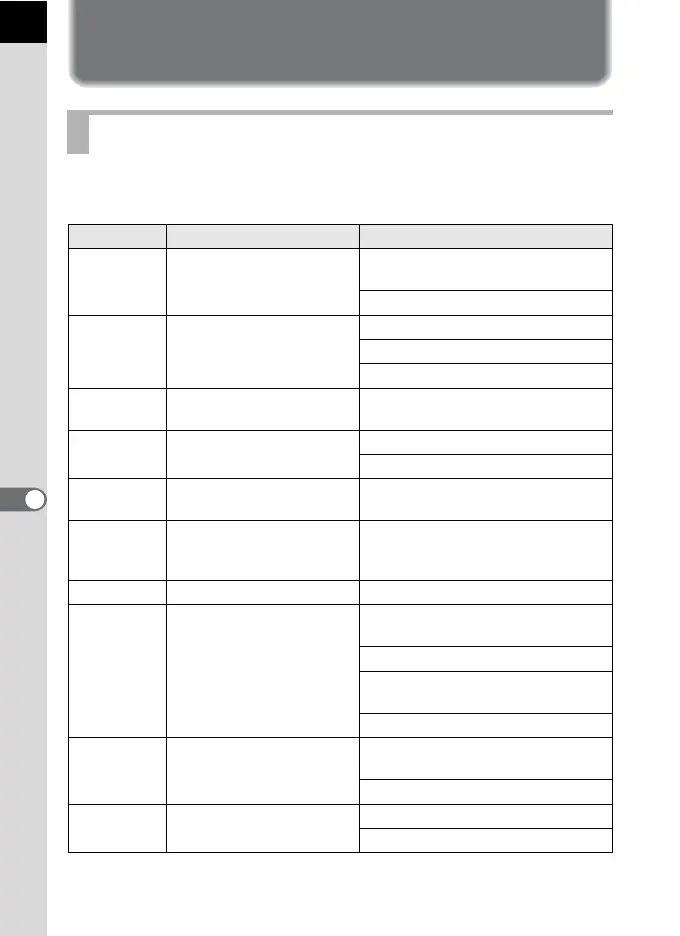
You can edit captured images using digital filters.
The following filters are available.
Processing Images with Digital Filters
Filter Name Effect Parameter
Monochrome
Creates a monochrome
image such as a black-and-
white photo.
Filter Effect: OFF/Red/Green/Blue/
Infrared Filter
Toning (B-A): 7 levels
Toy Camera
Creates an image that
looks as though it was shot
with a toy camera.
Shading Level: Low/Medium/High
Blur: Low/Medium/High
Tone Break: Red/Green/Blue/Yellow
High
Contrast
Enhances the contrast in
the image.
Intensity: 1 to 5
Shading
Creates an image with
darkened edges.
Shading Type: 6 types
Shading Level: -3 to +3
Slim
Changes the horizontal and
vertical ratio of images.
-8 to +8
HDR
Creates an image that
looks like a high dynamic
range image.
Low/Medium/High
Invert Color Inverts image colors. OFF/ON
Extract Color
Extracts two specific colors
and makes the rest of the
image black and white.
Extracted Color 1: Red/Magenta/
Blue/Cyan/Green/Yellow
Extractable Range of Color 1: 1 to 5
Extracted Color 2: OFF/Red/
Magenta/Blue/Cyan/Green/Yellow
Extractable Range of Color 2: 1 to 5
Color
Adds a color filter to the
image. Select from 18
filters (6 colors x 3 tones).
Color: Red/Magenta/Blue/Cyan/
Green/Yellow
Color Density: Light/Medium/Dark
Water Color
Creates an image that looks
as though it was painted.
Intensity: Low/Medium/High
Saturation: OFF/Low/Medium/High



 To Next Page