Alignments
GB 72 L01.1A8.
YD (Y-delay)
Always set to 8.
CL (cathode drive level)
Always set to 7.
AFA
Read only bit, for monitoring purpose only.
AFB
Read only bit, for monitoring purpose only.
8.3.3 White Tone
Figure 8-7
In the WHITE TONE sub menu, the values of the black cut off
level can be adjusted. Normally, no alignment is needed for
the WHITE TONE. You can use the given default values.
The colour temperature mode (NORMAL, COOL and
WARM) and the colour (R, G, and B) can be selected with the
UP/DOWN RIGHT/LEFT cursor keys. The value can be
changed with the LEFT/RIGHT cursor keys. First, select the
values for the NORMAL colour temperature. Then select the
values for the COOL and WARM mode. After alignment,
switch the set to standby, in order to store the alignments.
Default settings:
1. NORMAL (colour temperature = 11500 K):
– NORMAL R = 32
– NORMAL G = 35
– NORMAL B = 30
2. COOL (colour temperature = 14000 K):
– DELTA COOL R = 0
– DELTA COOL G = -5
–DELTA COOL B = 5
3. WARM (colour temperature = 8200 K):
– DELTA WARM R = 8
– DELTA WARM G = -3
– DELTA WARM B = 2
8.3.4 Geometry
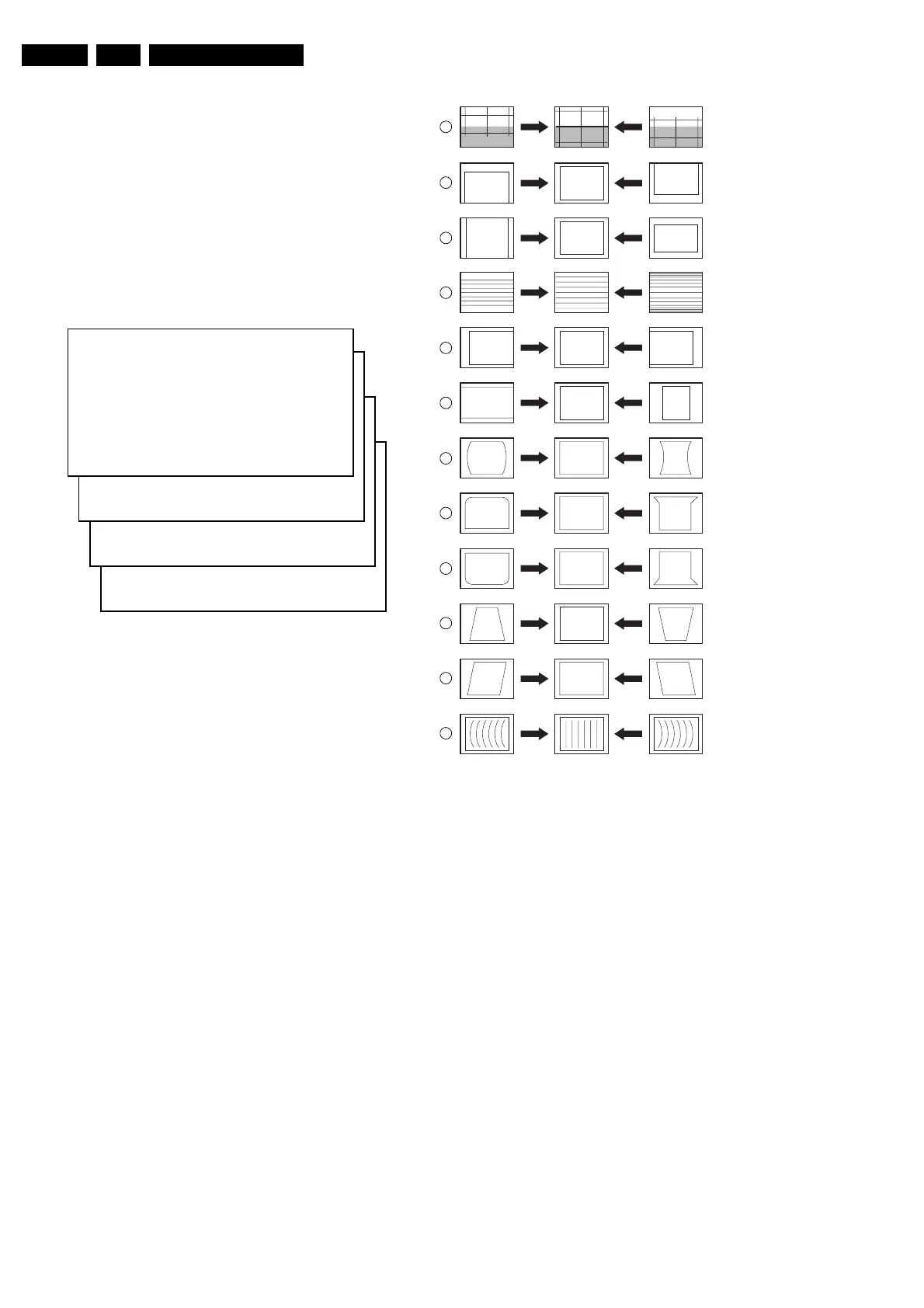
The geometry alignments menu contains several items to
align the set, in order to obtain correct picture geometry.
Figure 8-8
Connect an external video pattern generator to the aerial
input of the TV-set and input a crosshatch test pattern. Set
the generator amplitude to at least 1 mV and set frequency to
61.25 MHz (channel 3).
1. Set 'Smart Picture' to NATURAL (or MOVIES).
2. Activate the SAM menu (see chapter 5).
3. Go to the GEOMETRY sub menu.
4. Choose HORIZONTAL or VERTICAL alignment
Now you can perform the following alignments:
Horizontal:
• Horizontal Parallelogram (HP) Align straight vertical
lines in the top and the bottom; vertical rotation around
the centre.
• Horizontal Bow (HB) Align straight horizontal lines in
the top and the bottom; horizontal rotation around the
centre.
• Horizontal Shift (HSH) Align the horizontal centre of the
picture to the horizontal centre of the CRT.
• East West Width (EWW) Align the picture width until the
complete test pattern is visible.
• East West Parabola (EWP) Align straight vertical lines
at the sides of the screen.
• Upper Corner Parabola (UCP) Align straight vertical
lines in the upper corners of the screen.
S
M
NORM
L > (1)
COOL > (2)
W A R M > (3)
(1) N O R M A L R E D X X
NORMAL GREEN XX
NORMAL BL UE XX
(2) D C O O L R E D X X
DCOOLGREEN XX
DCOOLBLUE XX
(3) D W A R M R E D X X
DWARMGREEN XX
DWARMBLUE XX
CL 16532008_051.pdf
220501
CL 16532044_022.eps
140501
1
2
3
4
5
6
7
8
9
10
11
12
VERT. SLOPE
VERT. SHIFT
VERT. AMPLITUDE
V.S-CORRECTION
HOR. SHIFT
HOR. AMPLITUDE
E/W PARABOLE
UPPER E/W CORNER
LOWER E/W CORNER
E/W TRAPEZIUM
HOR. PARALLELOGRAM
HOR. BOW



 To Next Page