Directions for Use
GB 7L01.1A 3.
10
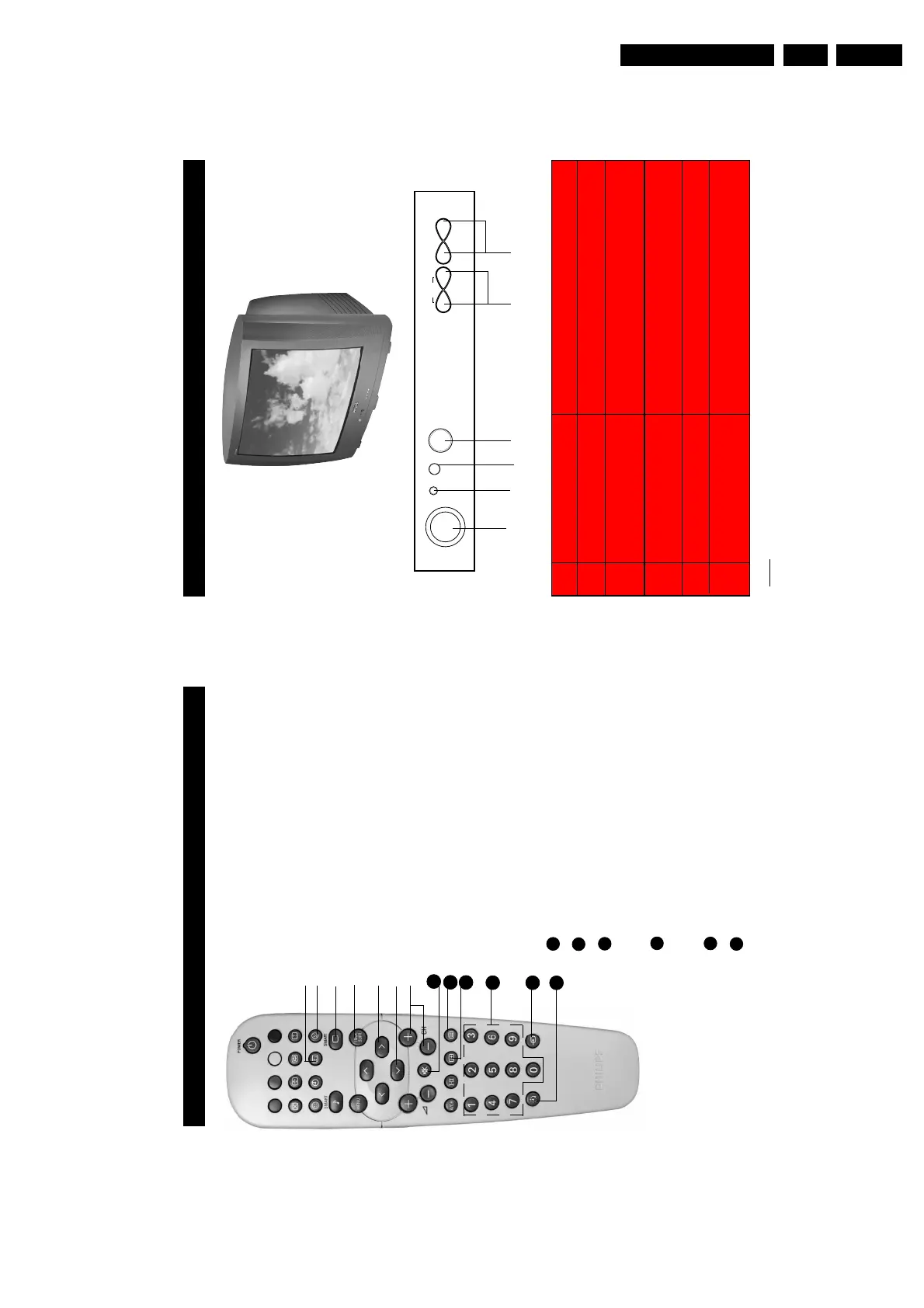
& Mains Power button Switch mains power on or off.
é Standby light indicator Indicate red light when standby mode is activated.
“ Remote Sensor Acts as a sensor for activating the controls of the
TV when remote control handset is aimed at it.
‘ Headphone socket Connect headphone jack to socket for personal
listening.
( Volume 8/9 buttons Adjust sound volume softer/louder.
§ Channel 7 / 6 buttons Select channel in descending/ascending order.
Note
• You can enter the main menu by pressing both the Volume 8 and 9 buttons at the
same time.
• Press the 7 or 6 button to select the next item on the menu.
• Press Volume 8 or 9 button to access sub-menu and adjust the settings.
é“ ‘ ( §
VOLUME
LK
˙
˝
˚
¸
CHANNEL
˚
¸
INSTALL /
MENU
FUNCTIONS
OF
TV
CONTROLS
➩
&
9
F
UNCTIONS OF
R
EMOTE
C
ONTROL
3 Main Index Button
In teletext mode, press button to return to the
main index page.
4 Frownie button
Allows to delete stored personal preference
channels in your Personal Preference list. For
detailed description of functions, refer to section on
“Personal Zapping ”.
5 Smart Picture Button
Press the Smart Picture button repeatedly to
access 5 different types of picture settings and
choose your desired setting.
61Incredible Surround Button
– Allows you to select Incredible Surround sound
when transmission is in stereo mode.
– Allows you to select Spatial Sound when
transmission is in mono mode.
71\Cursor Right Button
Allows you to access the sub-menus and adjust
the settings.
8 Cursor Down Button
Allows you to select the next item on the menu.
9 Channel + / – Buttons
Allows you to select channels in ascending or
descending order.
20 Mute Button
Mutes sound. To restore sound, press button again.
21 Teletext Button
Refer to section on “Using the Teletext”
22 OSD button
Allows you to display the current channel number.
It also allows to exit menu from the screen after
control adjustments.
23 Digit (0 -9) Buttons
Press to select a channel. For a 2-digit channel
number, press the first digit and followed
immediately by the second digit.
24 A/V Button
Allows you to select the AV channels.
25 Sleeptimer Button
Allows you to select a time period after which the
setwill switch to standby mode automatically.
3
4
5
6
7
8
9
21
20
22
23
24
25



 To Next Page