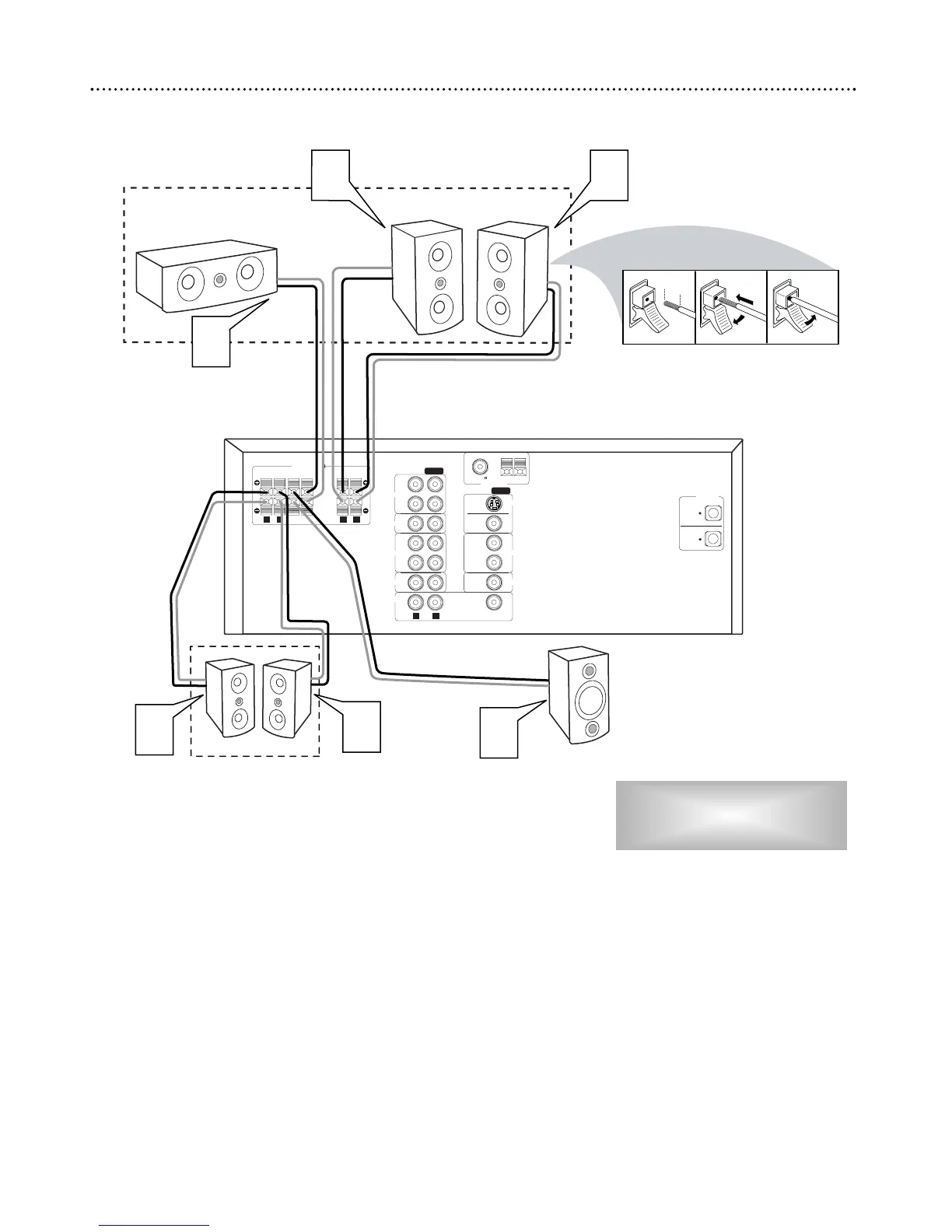
1
Connect the supplied Front Right speaker to the Red/Black
+/- FRONT R jacks on the rear of the DVD Receiver.
2
Connect the supplied Front Left speaker to the Red/Black +/-
FRONT L jacks on the rear of the DVD Receiver.
3
Connect the supplied Center speaker to the Blue/Black +/-
CENTER jacks on the rear of the DVD Receiver.
4
Connect the supplied Surround Right speaker to the
Gray/Black +/- SURROUND R jacks on the rear of the DVD
Receiver.
5
Connect the supplied Surround Left speaker to the
Gray/Black +/- SURROUND L jacks on the rear of the DVD
Receiver.
6
Connect the supplied Subwoofer to the Brown/Black +/- SUB-
WOOFER jacks on the DVD Receiver.
● To use a larger Subwoofer (not supplied), connect it to the SUB-
WOOFER PRE-OUT jack using a shielded audio cable.
10 Hookups - Speakers
Connecting the Speakers
Use the supplied speaker wires.
Match the color coded wiring. Connect
the +/- terminals on the Receiver (FR, FL,
etc.) to the correct +,- Speaker terminals.



 To Next Page