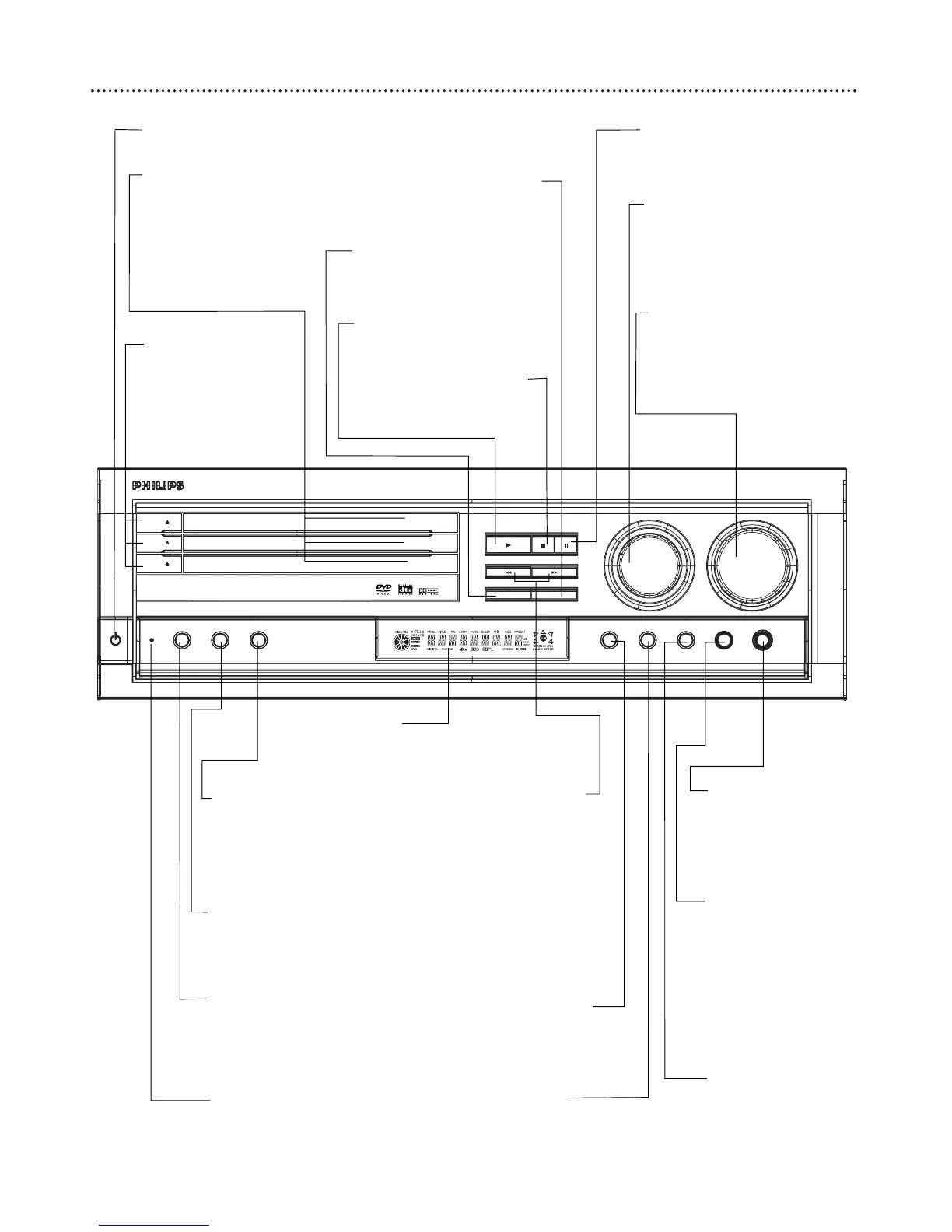
STANDBY-ON (power) y Button
Press to turn the DVD Receiver on or off (Standby).
Disc Tray
Insert a Disc here. Load the
Disc with the label facing up
(shiny side facing down). If
the Disc is two-sided, make
sure the label for the side
you want to play is facing up.
Standby LED indicator
Indicates that the system is
in standby mode
VOLUME
Use to adjust the volume and
Bass/Treble levels.
SOURCE
Use to select a sound source
(DVD/CD, TV/AV, TUNER,
VCR, SAT, AUX, or CDR).
PROGRAM Button
In DISC mode, use to program
Tracks.
In TUNER mode, use to pro-
gram preset radio stations.
DISC SKIP Button
Press to select another disc.
TUNING•PRESET Button
Press to switch between preset
or tuning mode.
DIM Button
Press to select different levels of
brightness for the DVD receiver’s
display panel.
REPEAT Button
Press to repeat playback of a
Chapter, Track or Disc.
Display panel
Information about the current activity
of the DVD Receiver appears here.
; (Headphones)
Connect headphones
(not supplied) here.
NIGHT Button
Press to reduce the
range of volume
between the loudest
and softest sounds
during DVD playback.
TONE Button
Use to select bass and
treble mode to make
adjustments.
VIRTUAL Button
Press to select the virtual
sound effect (Stadium,
Hall, or Theater).
SURROUND Button
Press to select a surround
sound mode.
STOP•CLEAR
77
Button
Press to stop Disc playback.
PLAY
3 Button
Press to play a Disc.
SEARCH•PREV
44
/
SEARCH•NEXT
¢¢
Button
In DISC mode, press to go
to previous or next Chapter
or Track. Press and hold for
two seconds to start a
reverse search during play-
back.
In TUNER mode, press to
tune to a radio station. .
PAUSE
8 Button
Press to pause playback of a Disc.
OPEN 0 Button
Press to open or close
the Disc Tray.



 To Next Page