EasyManua.ls Logo

Philips MX5000D - Favorite Track Selection; Favorite Track Programming, Night Mode

Philips MX5000D
40 pages
Print Icon
To Next Page IconTo Next Page
To Previous Page IconTo Previous Page
Loading...
22 Favorite Track Programming, Night Mode
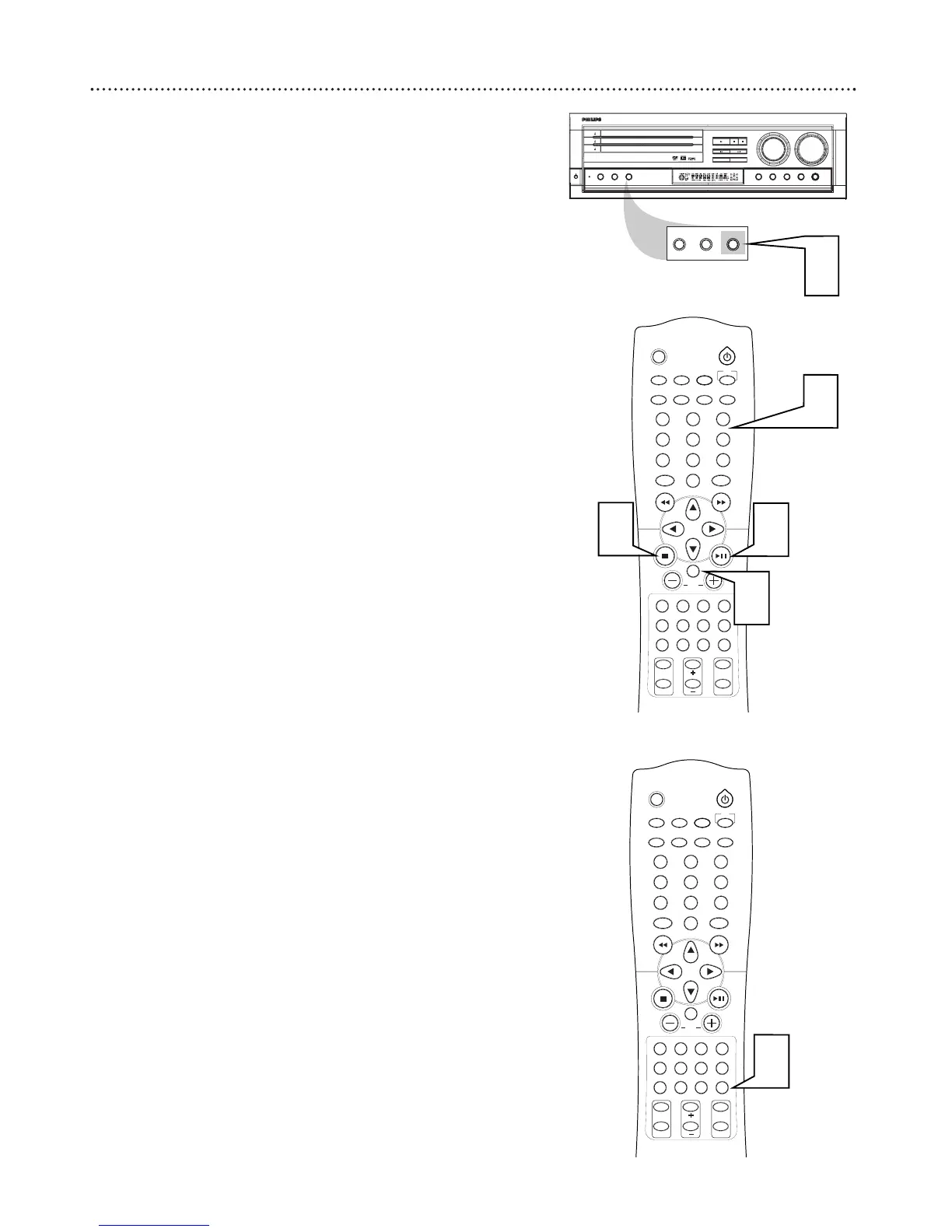
Favorite Track Selection
You can play Audio CD Tracks in an order you specify, with up to 32
tracks in a program.
1
While playback is stopped, press PROGRAM on the DVD
Receiver. PROG flashes on the DVD Receivers display panel.
2
Press the Number buttons (0-9) to enter the track number you
want to play. If you try to program more than 32 tracks, "P-FULL"
appears in the display panel.
3
Press OK to store the track.
4
Repeat steps two and three for every track you want to pro-
gram.
5
Press PLAY/PAUSE Bk to play the Program.
6
Press STOP C once to stop playback. Press STOP C again to can-
cel the Program.
You can review the program by pressing 5 and while playback
is stopped. Press 7 to exit the review mode.
SLEEP
MUTE
DVD/CD TV/AV TUNER
TV
CDRAUXSATVCR
MENUMENU
DISC
SYSTEM
OK
VOL
TITLE
ANGLE
ZOOM
LANGUAGE
NIGHT
PICTURE
RETURN
SPEAKER
SURROUND VIRTUAL TONE TEST TONE
G U I
REPEAT
SUBTITLE
PROGRAM
SLOW MOTION
AUDIO
123
456
78
0
9
II
OPEN
DISC 1
DISC 2
DISC 3
PLAY
DISC SKIP
STOP-CLEAR
SEARCH PREV
SEARCH NEXT
TUNING PRESET
PAUSE
SOURCE
SURROUND
ON/
OFF
VIRTUAL TONE NIGHT
PHONES
VOLUME
OPEN
OPEN
MX 5000D 3DVD VIDEO DIGITAL SURROUND SYSTEM
DIM
POWER
STANDBY
ON
REPEAT PROGRAM
DIM REPEAT PROGRAM
1
Night Mode
Set Night Mode to On to level the volume during Disc playback. This
reduces the highs and lows of the volume.
1
Press NIGHT to turn Night mode on or off.

SLEEP
MUTE
DVD/CD TV/AV TUNER
TV
CDRAUXSATVCR
MENUMENU
DISC
SYSTEM
OK
VOL
TITLE
ANGLE
ZOOM
LANGUAGE
NIGHT
PICTURE
RETURN
SPEAKER
SURROUND VIRTUAL TONE TEST TONE
G U I
REPEAT
SUBTITLE
PROGRAM
SLOW MOTION
AUDIO
123
456
78
0
9
II
1
2
3
5
6

Related product manuals