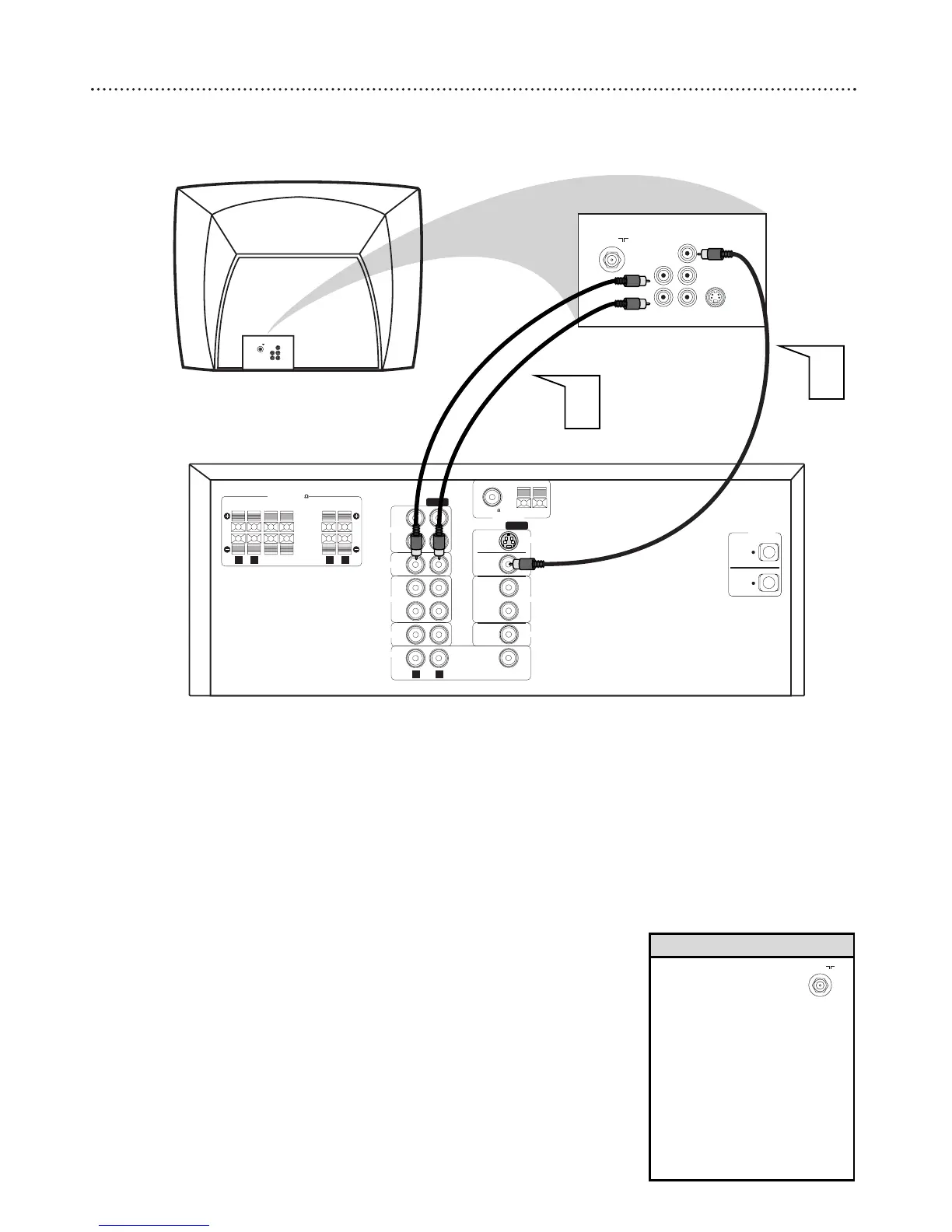
1
Connect the DVD Receiver’s yellow MONITOR OUT jack
to the VIDEO IN jack on your TV. Use the supplied composite
(yellow) RCA-style video cable.
2
To hear TV channels through the DVD Home Cinema System,
connect the supplied red and white audio cables to the
DVD Receiver’s red/white, right/left (AUDIO) TV IN jacks
and to the TV’S right/left AUDIO OUT jacks. Match the cable
colors to the jack colors.
3
Connect the power cords of the DVD Receiver and TV to a
power outlet.
4
Turn on the TV and set it to the correct Video In channel.
Go to the lowest TV channel and change channels down until you
find the Video In channel. (It is not channel 3 or 4 as it might be
when using a VCR.) See your TV owner’s manual for details.
5
Press STANDBY-ON
yy
on the front of the DVD Receiver to
turn on the DVD Receiver. The red Standby light will disappear.
• If your TV only has a
single Antenna In(put)
jack, you will need an
accessory RF Modulator to view
the DVD Playback on your TV.
The RF Modulator converts the
Video signal output from the
Receiver so that it can be
played through the TV’s
Antenna connector.
• See your electronics retailer or
contact Philips for details on RF
Modulator availability.
Helpful Hints



 To Next Page