8 Philips · HDP2510
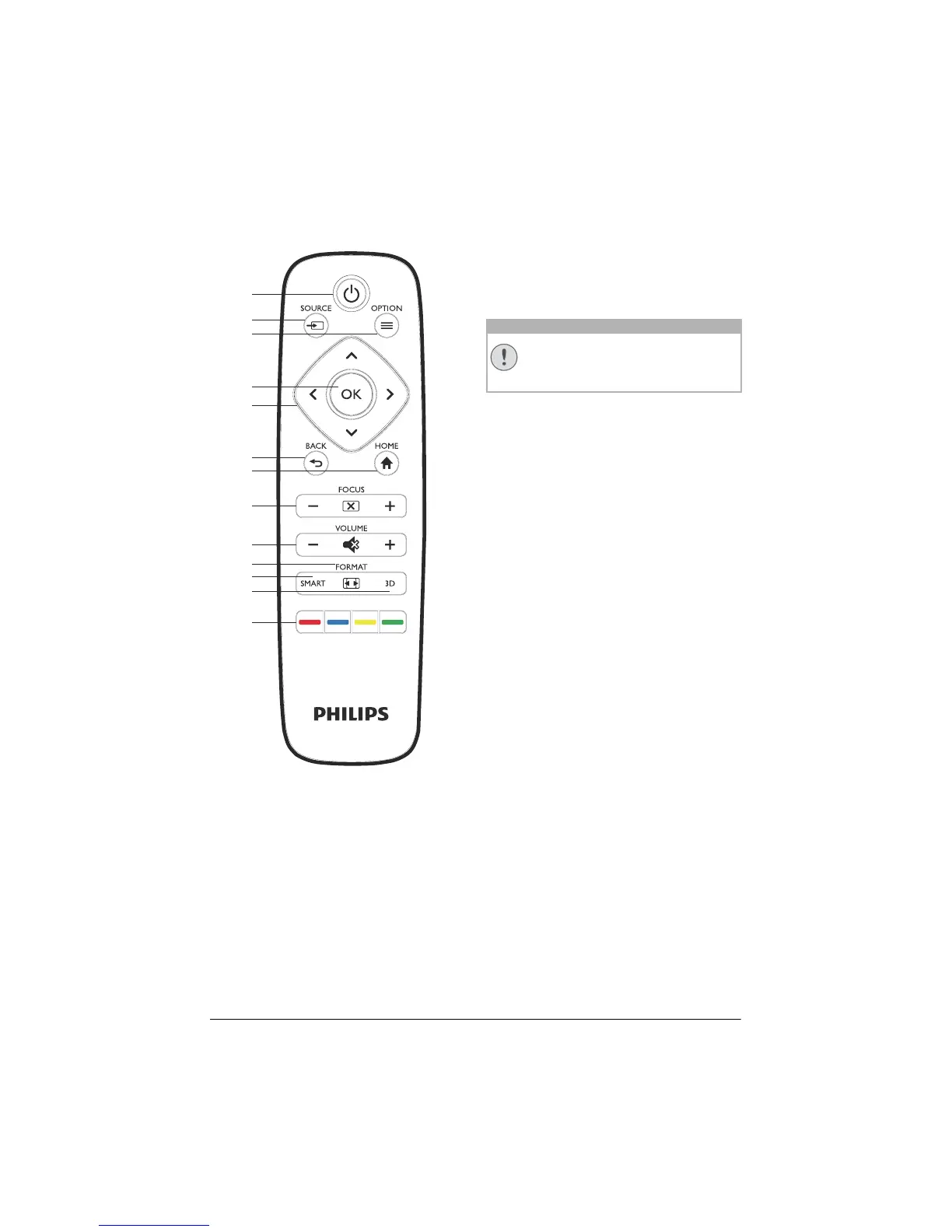
Remote control
a
d
c
g
h
i
j
÷
…
f
e
b
Fahren Sie das Gerät stets ordnungs-
gemäß herunter, um Schäden an der
UH
P-Lampe zu vermeiden.
1 B / POWER
Short press: Powers on the projector.
Double press: Powers off the projector.
Long press (three seconds): Starts Pairing
mode.
Long press (ten seconds): Resets the pro-
jector.
2 SOURCE
Opens the Source short cut menu.
3 OPTION / e
Opens the Option menu.
4 OK
Goes one level down in menu / confirms se-
lection.
5 Navigation keys – //À/Á
Navigate in menu / modify settings / con-
firms selection.
6 BACK / ¿
Goes one level back in menu / cancels a
function.
7 HOME
Opens the Option menu.
8 FOCUS
Adjusts the focus for image sharpness
.
9 VOLUME
Adjusts the volume level (decreases/increas-
es and mutes the sound).
FORMAT
Changes the aspect ratio.
SMART
Displays the Smart settings menu.
÷ 3D
Displays the 3D menu.
… Colour keys
Changes on-screen options.
CAUTION!















 To Next Page