English
21
•
Do not use the stove as a cooking appliance, except for the P 960 F.
• Ensure that the room in which the stove is installed is sufficiently well
ventilated (fresh air intake).
• Ensure that all joints in the flue are hermetically sealed using a
silicone- (not cement-) based sealant which is resistant to
temperatures of up to 250ºC and which shows no sign of
deterioration.
• Check (or have checked) regularly that the flue is clean.
• Under no circumstances use fuels other than pellets.
• Remove any deposits of unused pellets left by failed ignition before
restarting the stove.
Keep any inflammable object well away from the stove while
it is in use (MINIMUM 80 cm from the front panel).
While in use the door must remain closed and the glass must
be present and intact.
The removal of the protective grille inside the pellet hopper
is strictly prohibited.
If replenishing with pellets while the stove is lit, ensure that
the bag does not come into contact with any hot surfaces
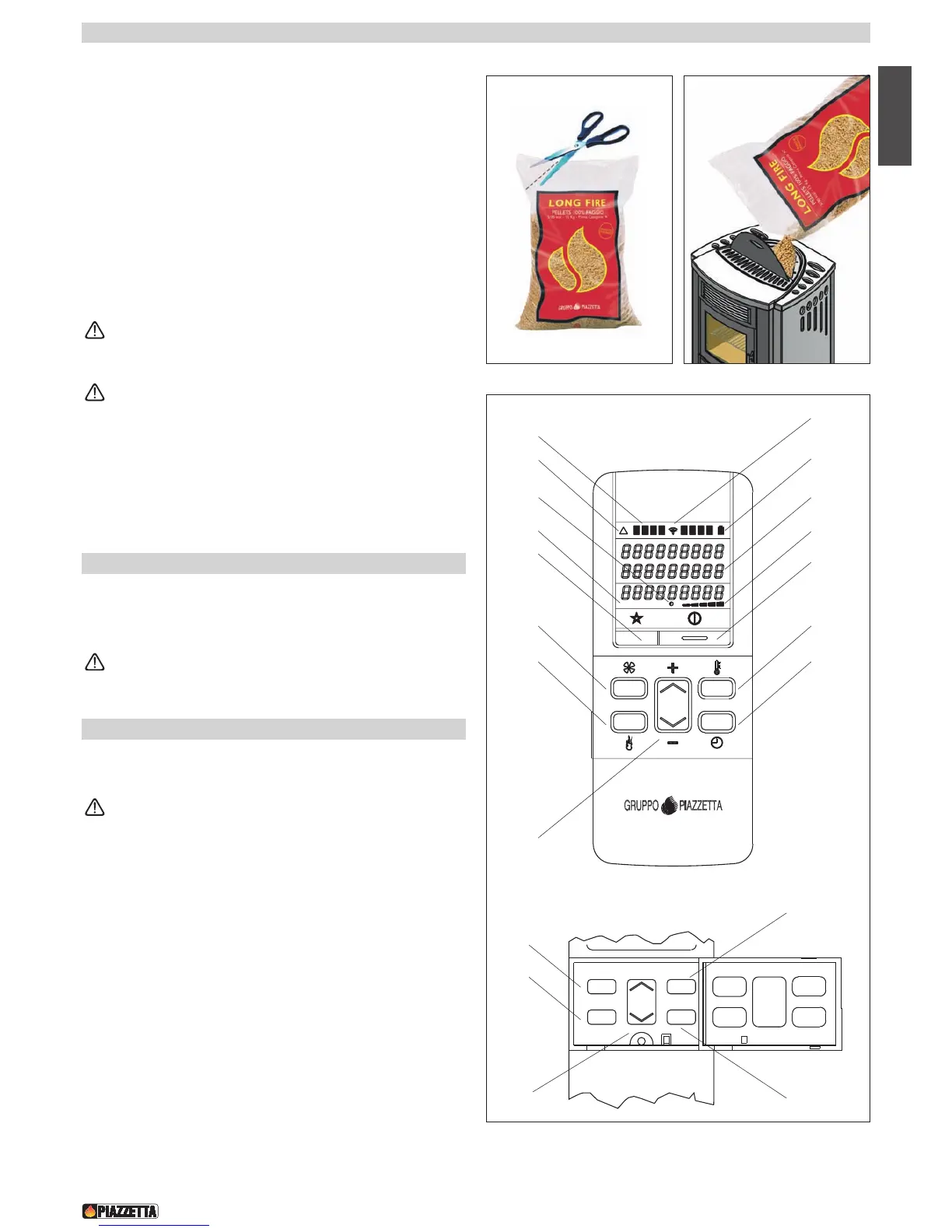
6.1 Loading the pellets - Fig. 51 - 52
• To load the pellets into the hopper it is advisable to tear off the edge
of the sack and empty the sack directly into the hopper. This makes
filling easier and avoids pouring pellets on top of the stove.
Do leave leftover pellets on top of the stove – they could
catch fire!
6.2 Remote control - Fig. 53
• The pellet stove comes equipped with an LCD-display remote control
and radio transmitter which allow you to operate its various functions.
The remote’s range can be affected by other devices which
operate on a continuous radio frequency of 433.92 MHz , for
example radio headphones, toys, wireless mouses etc.
The remote has a range of around seven metres in conditions
where there is no interference from other sources.
• When pressing the keys to select the various functions wait for a
signal from the stove that the selection has registered before
selecting further functions. Or if you are in an adjoining room wait for
confirmation on the remote’s display. If the stove is not receiving
signals from the remote try bringing the remote closer to the stove.
Below are listed the various functions of the remote control’s keys.
6
.0 USE
DT2010219-03
D
T2010035-01


 To Next Page