English
26
INTERRUPTION OF POWER SUPPLY
A
ction
F
unction
D
isplay
In the event of a brief interruption of the electrical current
while the stove is in operation, the stove will restart
automatically.
• The grate cleaning phase activates.
•
The fan operates at full speed to allow the stove to cool.
• The readout "PUL" appears in the STOVE STATUS mode.
See the section on programming.
• The automatic stove restart cycle begins (functions
detailed in ‘STARTUP’ activate automatically).
• Once the ignition cycle has been completed the stove
operates normally at power level 2.
• The stove will continue operating normally at power level 2.
DT2040061-01
CLEANING
12:00 22
1
.
c
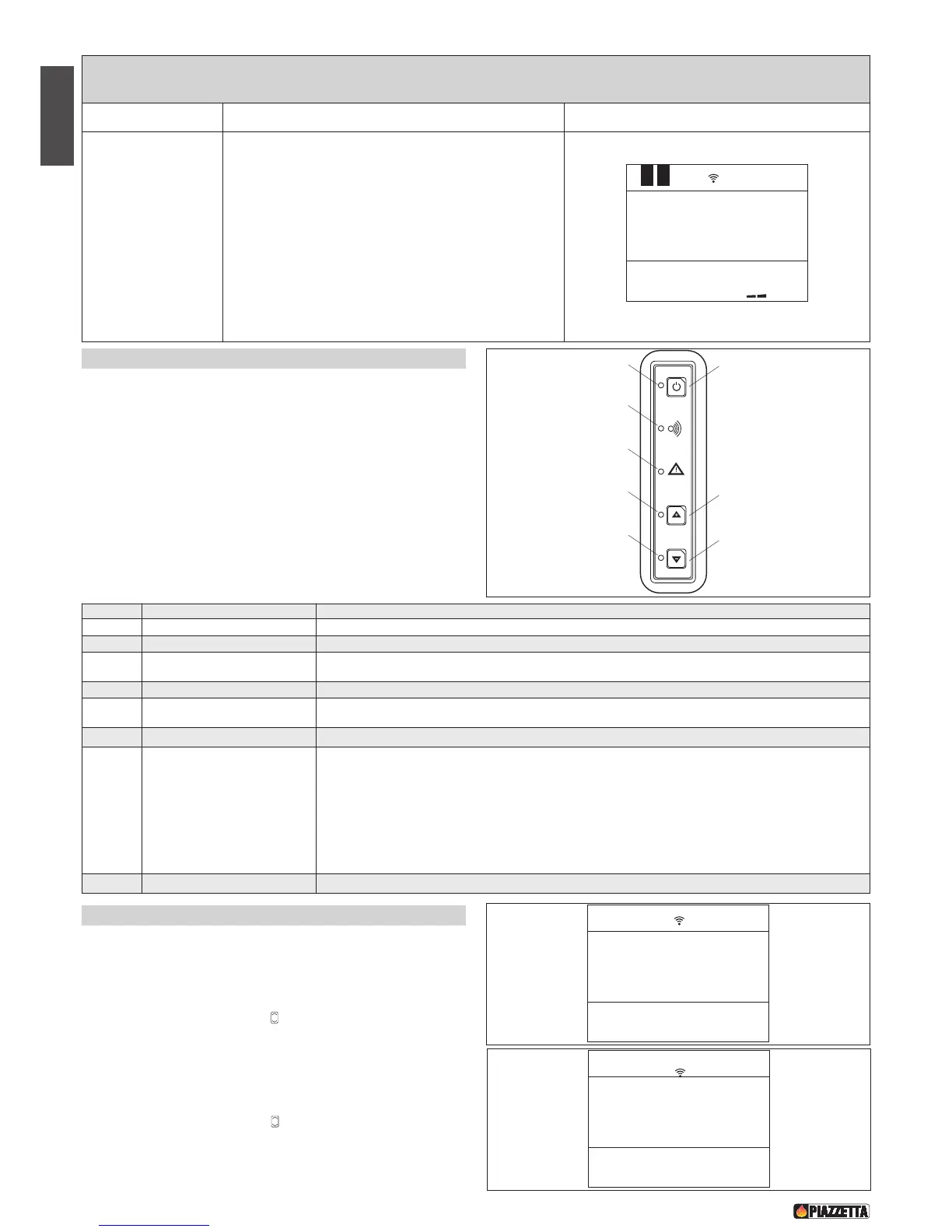
6.5 Control panel - Fig. 55
The stove is fitted with a digital control panel to operate stove functions
when the LCD remote control is unavailable. The various functions of
the control panel are listed below.
DT2030332-00
F
ig. 55
NUMBER KEY / DISPLAY DESCRIPTION
1 KEY 1 ON/OFF Allows you to start up or shut down the product manually.
2 LED 2 ON/OFF LED If the LED lights up, it indicates that the stove is lit.
3 KEY 3 INCREASE POWER
Allows you to increase the power setting. You can choose between the two available settings, P1-
P3. The Multifuoco fan has a default setting for each of the two power settings.
4 LED 4 INCREASE POWER LED
The LED lights up when the power-increase key is pressed and indicates that the power has been increased.
5 KEY 5 DECREASE POWER
Allows you to decrease the power setting. You can choose between the two available settings, P1-
P3. The Multifuoco fan has a default setting for each of the two power settings.
6 LED 4 DECREASE POWER LED
The LED lights up when the power-decrease key is pressed and indicates that the power has been decreased.
7 LED 7 SAFETY DEVICE
If the LED lights up, it indicates that a safety device has activated. After approx. 60 seconds the
alarm signal will sound (if activated). In the event of activation proceed as follows:
• turn off the stove by pressing the ON/OFF key for several seconds;
• the alarm signal will stop;
• wait until you are sure that combustion of any pellets left in the grate has ceased;
• wait for the stove to cool, then check for and remove whatever has activated the safety device.
Finally, after having cleaned the grate, restart the stove by pressing the ON/OFF key.
8 LED 8 RADIO SIGNAL EMISSION The led lights up when the stove receives data from the remote control.
6.6 Setting the language
1. open the flap on the remote control;
2. press the “MENU” key;
3. scroll with the SELECT key “ “ until “SELECT LANGUAGE” is
displayed;
4. press the “SET” key;
5. scroll with the SELECT key “ “ until the required language is
displayed, e.g. “ENGLISH”;


 To Next Page