EasyManua.ls Logo

Piazzetta P950 - SET THE CLOCK (current day;time)

Piazzetta P950
52 pages
Print Icon
To Next Page IconTo Next Page
To Previous Page IconTo Previous Page
Loading...
English
2828
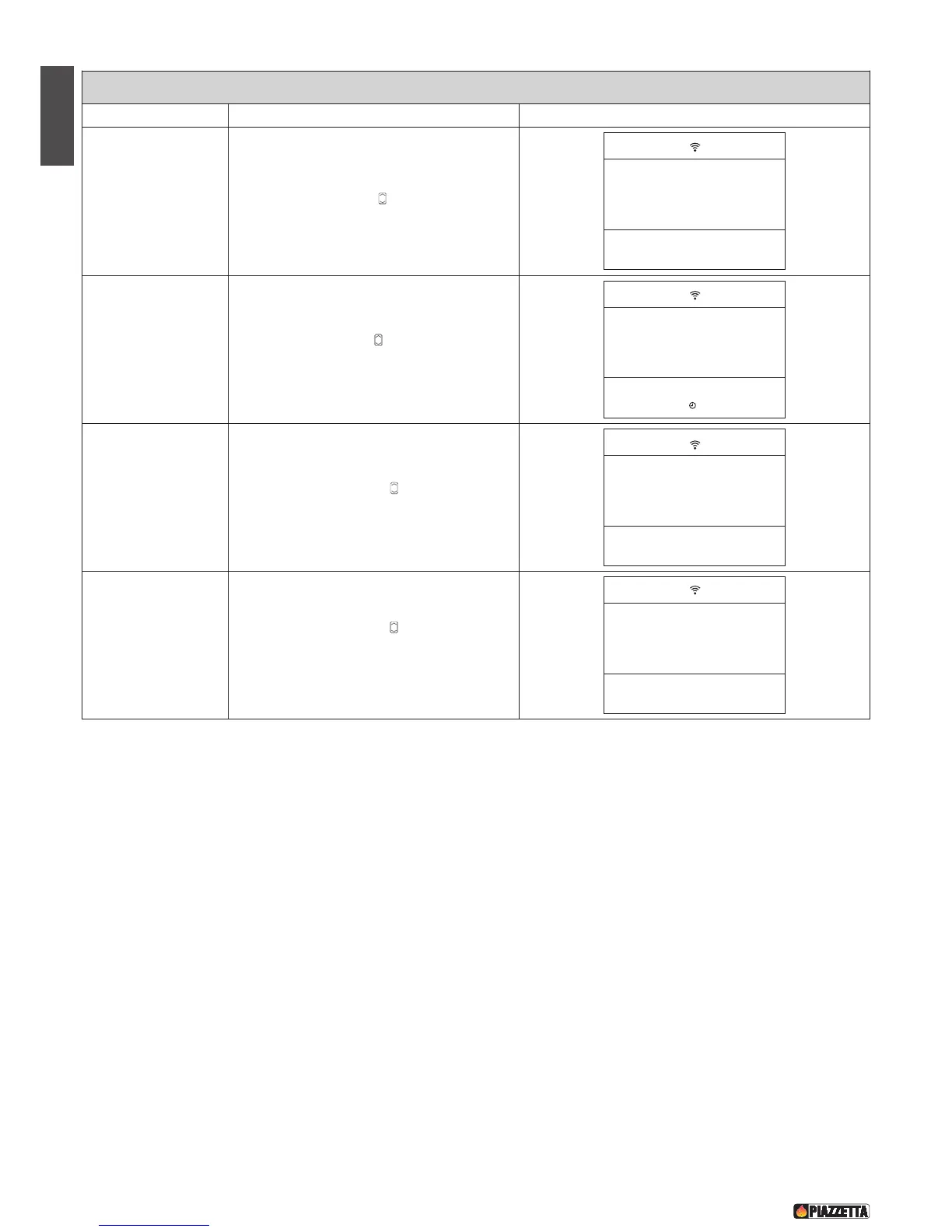
SET THE CLOCK (current day/time)
F
unction
A
ction
D
isplay
Set the day
Press the MENU key, select the SET CLOCK menu
using the SELECT MENU key, then confirm by
pressing the SET key.
MENU
S
ET
E
SC
OPT
Confirm setting and
move to next section.
Press the SELECT MENU key and set the “day”.
Confirm by pressing the SET key.
MENU
S
ET
ESC
OPT
Set the hour.
Press the SELECT MENU key and set the
current “hour”. Confirm by pressing the SET key.
MENU
SET
E
SC
O
PT
Set the minutes
Press the SELECT MENU key and set the
“minutes”. Confirm by pressing the SET key.
After confirmation the initial display will reappear.
MENU
SET
E
SC
OPT
SET
CLOCK
!
DAY
MONDAY
!
HOURS
CLOCK
12:
!
MINUTES
CLOCK
:01
!
DT2040064-01
1
!

Table of Contents

Related product manuals