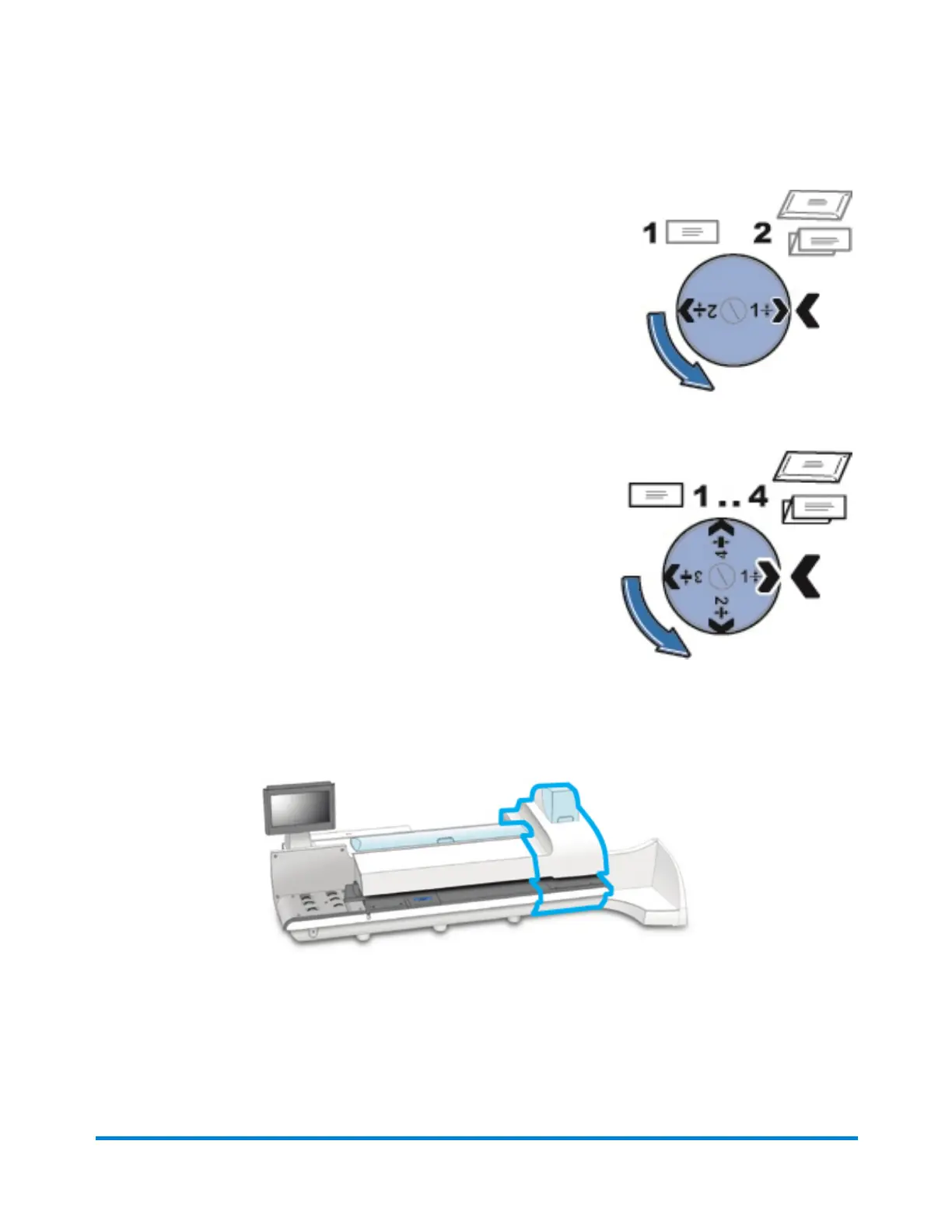
l Setting 1: Use this setting for postcards mail pieces that are 0.007
inches (0.18 mm) to 0.375 inches (9.52 mm) thick.
l Setting 2: Use this setting for mail pieces that are greater than
0.375 inches (9.52 mm) to the maximum of 0.625 inches (15.9 mm)
thick.
Connect+® 3000 / SendPro® P3000 Systems
l Setting 1: Use this setting for postcards and mail pieces that are
less than 0.25 inches (6.35 mm) thick.
l Setting 2: Use this setting for mail pieces that are greater than
or equal 0.25 inches (6.35 mm) thick, but less than 0.50 inches
(12.7 mm) thick.
l Setting 3: Use this setting for mail pieces that are greater than
or equal to 0.50 inches (12.7 mm) thick, but less than 0.625
inches (15.9 mm) thick.
l Setting 4: Use this setting for mail pieces that are greater than
or equal to 0.50 inches (12.7 mm) thick, but less than 0.625
inches (15.9 mm) thick.
Printer
The main components of the printer module are the ink cartridges, print heads and waste ink tray.
Ink Cartridges
Getting started
Pitney Bowes Operator Guide February,2018 Page 27 of 349











 To Next Page