User Manual of VDR-300NU
Disable DHCP Server: If the DHCP server is disable
d, you need to
manually set the start IP address, end IP address and the lease time
for the clients in the LAN.
DHCP Server
Enable DHCP Server: If you enable the DHCP sever, the clients will
automatically acquire the IP address from the DHCP server.
Edit DHCP
Option60
You can add, edit or delete the DHCP60 options.
Edit DHCP option
You can add, edit or delete the DHCP options, and these options will
be sent to the DHCP client.
DHCP Advance
setup
You can enable or disable DHCP for every LAN interface.
Add Entries
Enter the MAC address of the LAN host and the static IP address that
is reserved for the host
Remove Entries
Remove the entries you set.
Configuring the
Second IP
Address and
Subnet Mask for a
LAN Interface
After enabling Configure the second IP Address and Subnet Mask for
LAN interface, enter an IP address and a subnet mask for the LAN
interface.
IPv6 Auto-configuration
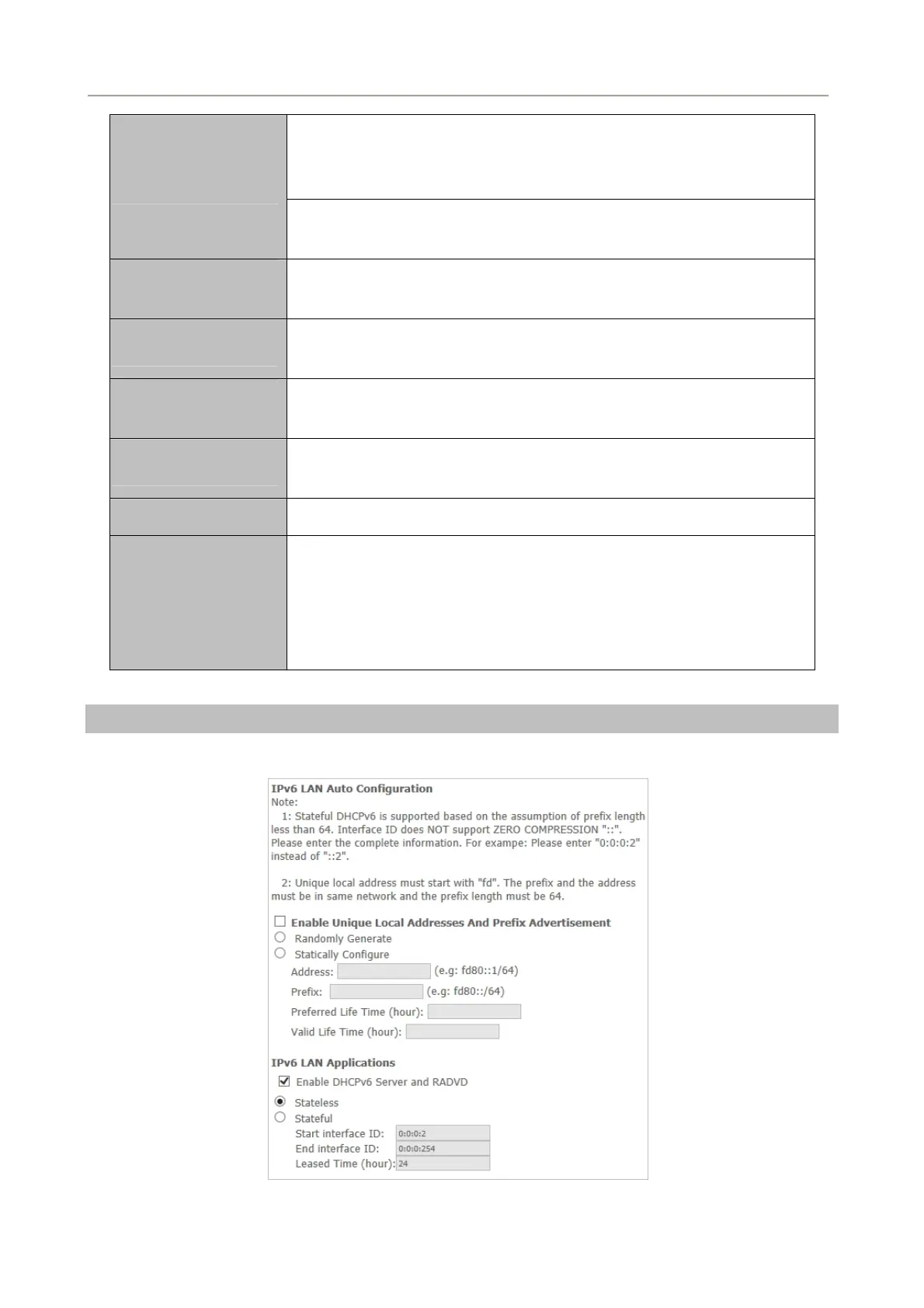
Click Advanced Setup > LAN >IPv6 Autoconfig and the following page appears.
Figure 5-2-42
61



 To Next Page