User Manual of VDR-300NU
5.2.4 LAN Configuration
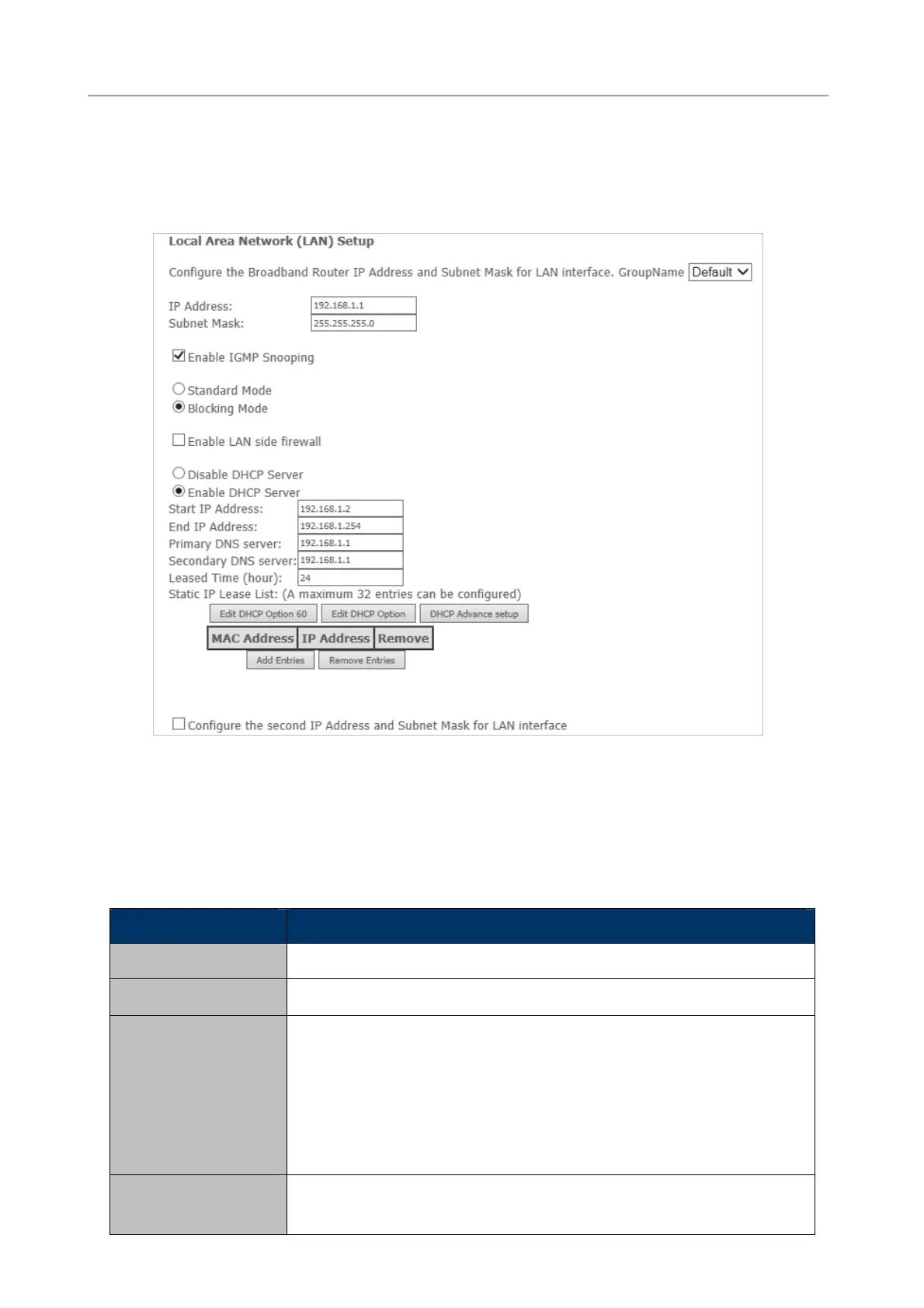
Choose Advanced Setup > LAN and the following page appears.
Figure 5-2-41
On this page, you can configure an IP address for the DSL router, enable IGMP snooping, enable or
disable the DHCP server, edit the DHCP option, configure the DHCP advanced setup and set the binding
between a MAC address and an IP address.
Configuring the Private IP Address for the DSL Router
Object Description
IP Address
The default IP address is 192.168.1.1.
Subnet Mask
The default Subnet Mask is 255.255.255.0.
Enable IGMP
Snooping
IGMP snooping enables the router to forward multicast traffic
intelligently, instead of flooding all ports in the VLAN. With IGMP
snooping, the router listens to IGMP membership reports, queries and
leave messages to identify the switch ports that are members of
multicast groups. Multicast traffic will only be forwarded to ports
identified as members of the specific multicast group or groups..
Enabling the LAN
Side Firewall
Firewall can prevent unexpected traffic on the Internet from your host in
the LAN. Enable or disable the LAN side firewall.
60



 To Next Page