User Manual of VDR-301N
Chapter 3 Connecting to the Router
3.1 System Requirements
Broadband Internet Access Service (Cable/xDSL/Ethernet connection)
One Cable/xDSL Modem that has an RJ45 connector (not necessary if the Router is connected
directly to the Ethernet.)
PCs with a working Ethernet Adapter and an Ethernet cable with RJ45 connectors
PC of subscribers running Windows XP, Windows Vista/Win 7, MAC OS 9 or later, Linux, UNIX or
other platform compatible with TCP/IP protocols
The above PC is installed with Web browser
lowing instructions is named as PLANET VDR-301N.
It is recommended to use Internet Explore 8.0 or above to access the Router.
3.2 Installing the Router
Please connect the device to you computer as follows:
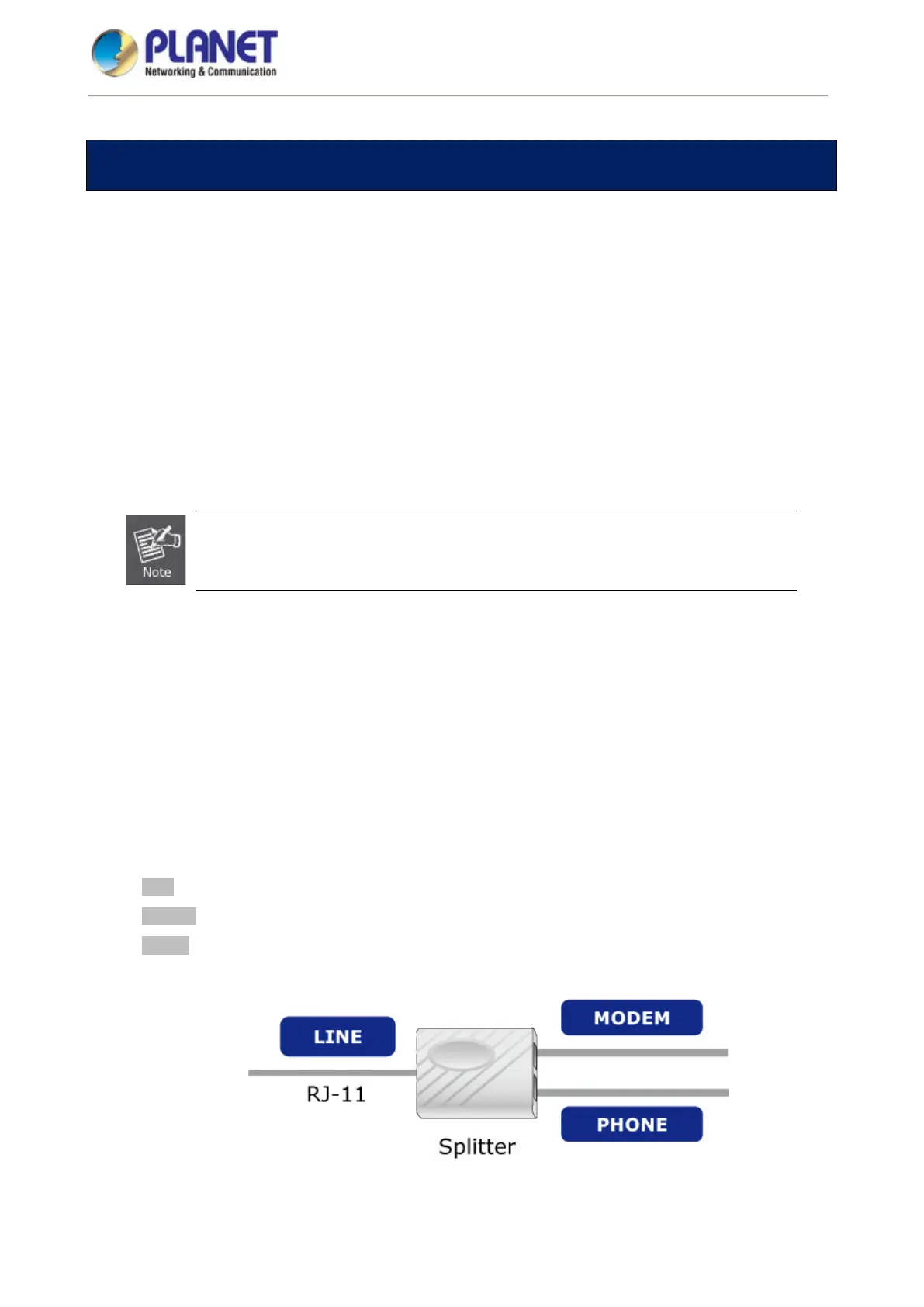
STEP 1. Connect the DSL port of the router and the Modem port of the splitter with a telephone cable;
connect the phone to the phone port of the splitter through a cable and connect the incoming line
to the Line port of the splitter.
The spliiter has three ports:
Line: Connect to a wall phone jack (RJ11 jack)
Modem: Connect to the Line interface of the router
Phone: Connect to a telephone set














 To Next Page