User Manual of VDR-301N
5.3.5 LAN
Choose Setup > LAN. The LAN page that is displayed contains LAN, DHCP, DHCP Static and LAN IPv6.
5.3.2.1 LAN
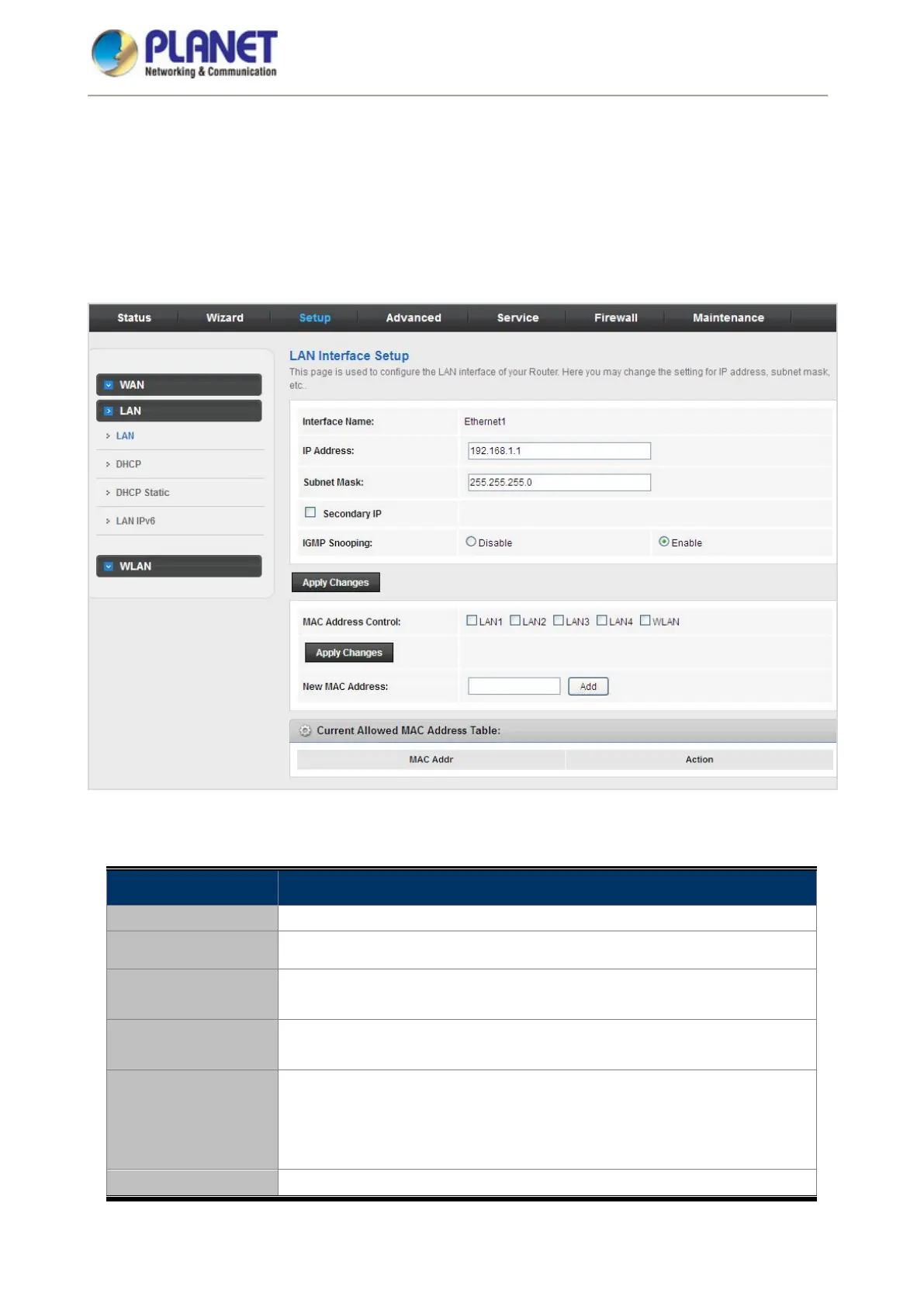
Click LAN in the left pane and the page shown in the following figure appears. On this page, you can change IP
address of the router. The default IP address is 192.168.1.1, which is the private IP address of the router.
Figure 5-25 LAN
The following table describes the parameters:
Field Description
IP Address The IP address of your LAN hosts is used to identify the device’s LAN port.
Subnet Mask Enter the subnet mask of LAN interface.
Secondary IP
Select it to enable/disable a secondary LAN IP address. The two LAN IP
addresses must be in the different network.
IGMP Snooping
Enable or Disable the IGMP snooping function for the multiple bridged LAN
ports.
MAC Address Control
It is the access control based on MAC address. Select LAN1, LAN2, LAN3,
LAN4, WLAN and the host whose MAC address listed in the Currently
Allowed MAC Address Table can access the device. Then click “Apply
Changes” to save the new settings.
New MAC Address
Enter MAC address and then click
to add a new MAC address.














 To Next Page