User Manual of VDR-301N
5.4.2.2 Virtual Server
Internet users would not be able to access a server on your LAN because of native NAT protection.The “virtual
server” feature solves these problems and allows internet users to connect to your servers.
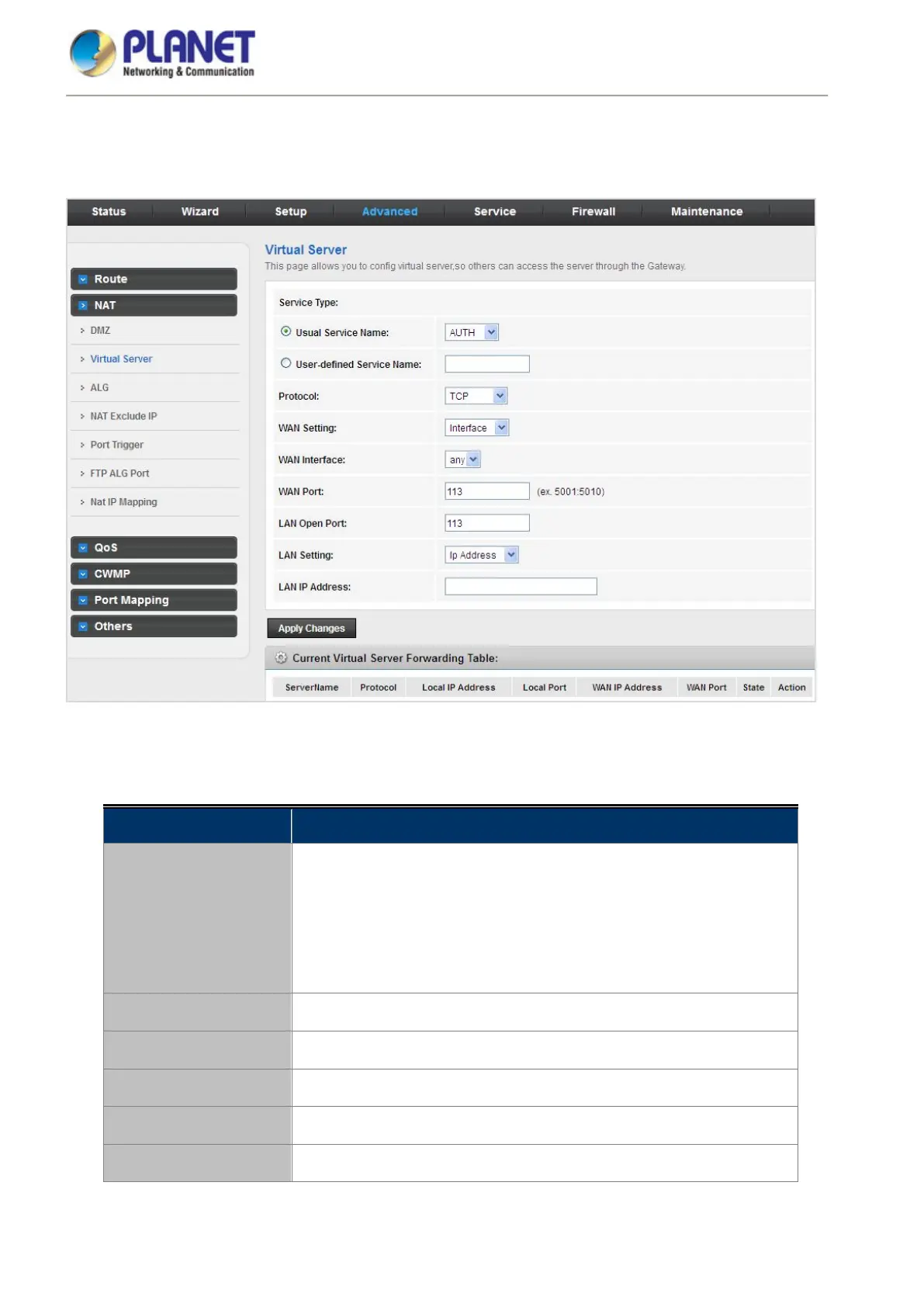
Figure 5-46 Virtual Server
The following table describes the parameters:
Field Description
Service Type
You can select the common service type, for example, AUTH, DNS or
FTP. You can also define a service name.
If you select Usual Service Name, the corresponding parameter
has the default settings.
If you select User-defined Service Name, you need to enter the
corresponding parameters.
Protocol
Choose the transport layer protocol that the service type uses. You can
choose TCP, UDP or TCP+UDP.
WAN Setting You can choose Interface or IP Address.
WAN Interface Choose the WAN interface that will apply virtual server.
WAN Port Choose the access port on the WAN.
LAN Open Port Enter the port number of the specified service type.



 To Next Page