Chapter D - ADJUSTMENT & CALIBRATION
Planmeca Proline EC X-ray unit D-37
CEPHALOSTAT ADJUSTMENT
Technical Manual
9.4 Checking the soft tissue filter
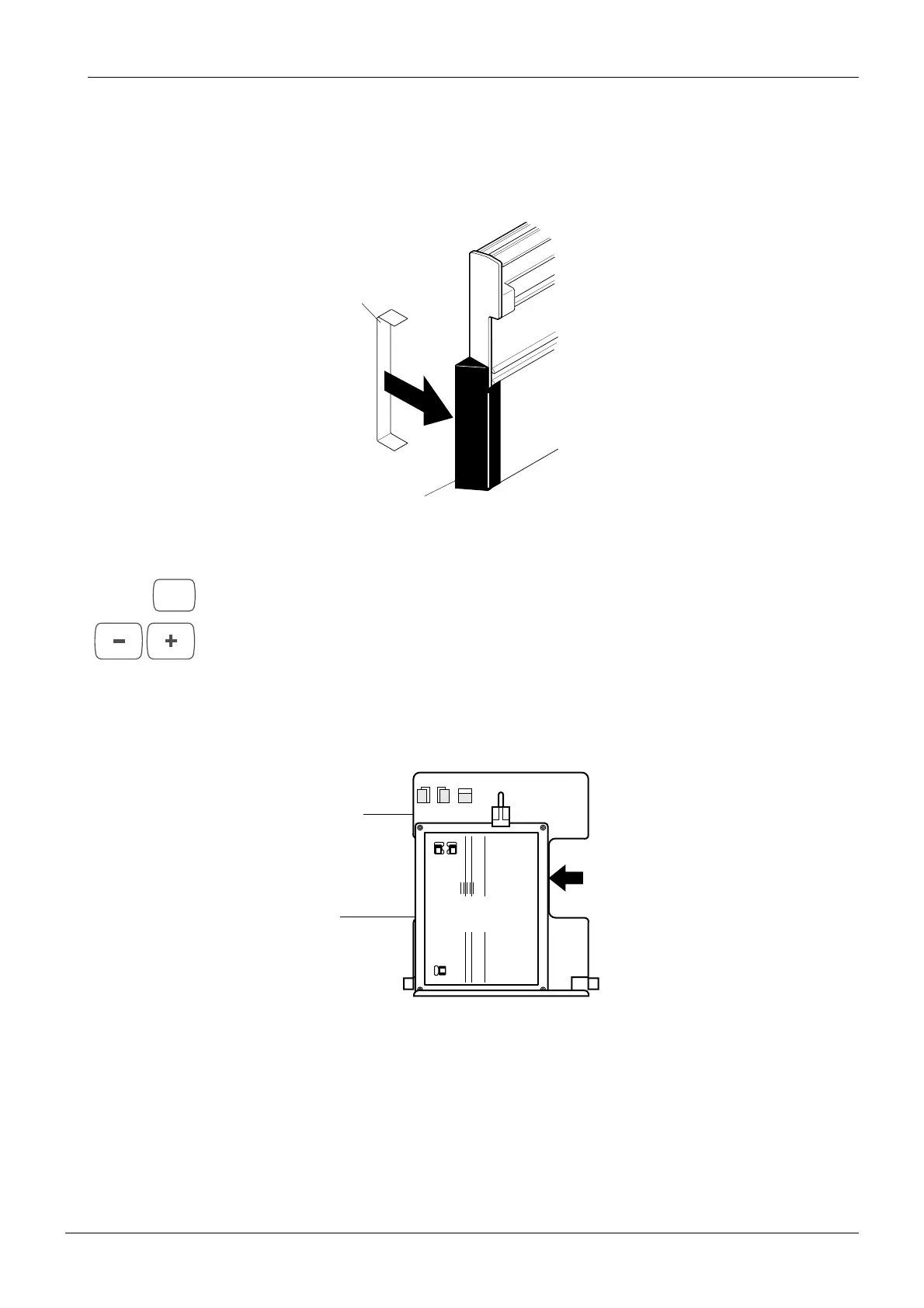
Clip the soft tissue filter positioning tool to the soft tissue filter which is at the end of the cas-
sette carriage (Fig. 40). This will enable you to see the soft tissue filter when you check its
position.
Figure 40
Enter the ceph mode. Press and hold the P key until you have heard two audible signals. The
latest used exposure mode number starts to flash on the main display.
Select the cephalometric exposure mode number 4 (CPH4) with the program selection keys
(collimator number 4).
Orientate the Cephalometric beam alignment tool so that it is vertical and then place it in the
cephalometric cassette holder. Position it so that it is on the left of the cassette holder (lateral
exposure position).
Figure 41
Soft tissue filter
Soft tissue filter
positioning tool
Cassette carriag
P
4 5
6
PLANMECA PM 2002 Proline Cephalostat 18x24 No. 652232
Soft tissue filter 0mm
Positioning light 0mm
Positioning light 25mm
Cassette
holder
Beam
alignment
tool














 To Next Page